
Summary of Atmega8 based Voltmeter Ampmeter v2
This article describes a compact, low-power Atmega8-based voltmeter and ammeter with a 5cm x 5cm PCB that avoids SMD components. It features high-resolution current display using low-value drop resistors and simplified calibration via two presets for voltage and amperage without voltage-out detection. The device uses a 12V input, an LM7805 regulator, and software built with WinAVR and Peter's LCD library.
Parts used in the Atmega8 based Voltmeter Ampmeter v2:
- Atmega8 microcontroller
- LM7805 voltage regulator
- LCD display
- 10 Ohm resistor
- Two preset resistors (voltage and amperage)
- WinAVR development environment
- Peter's LCD library
- Low power consumption
- Better Amperes display resolution while using low value drop resistor.
- Much smaller PCB size, only 5cm x 5cm. Still no SMD components.
- Easy calibration, only one voltage adjust and one ampere adjust preset, no voltage out detection.
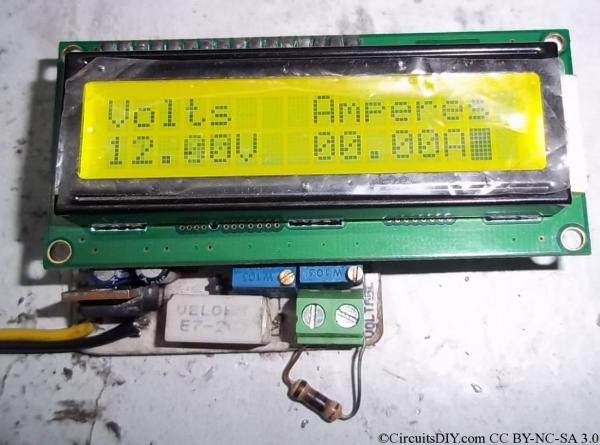
Voltage supplied by my 12Volt benchtop PSU(The resistor at output terminal is disconnected.
The 10Ohm resistance is connected and is burning :P. Voltage dropped to 8.75~8.80V and hence Amperes would be 0.875~0.88Amps and it is displayed here as 0.90Amps. It’s perfect as the meter is having 100mA resolution.
Callibration and usage:
- Connect a 5V DC supply to the voltage input. And short pin 1 and pin 3 of the LM7805 regulator.
- Now tune the rightmost preset to show 5.00V on the LCD.
- Now connect any real power supply of say 12volts. Connect a load at output, say a auto lamp, Measure current with multimeter, or calculate Amperes, and then tune the 2nd rightmost preset to show that reading of Amperes on LCD.
Software is written in WinAVR and Peter’s LCD library is used.The code below.
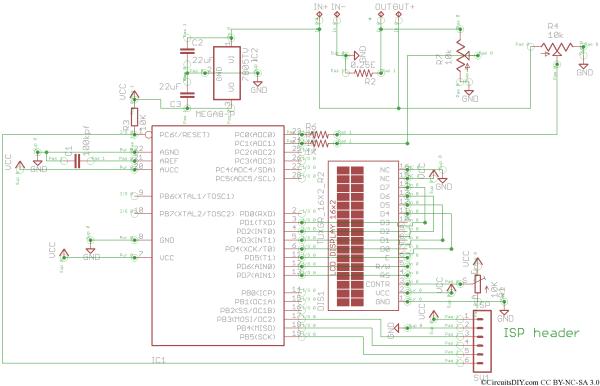
Rread More: Atmega8 based Voltmeter Ampmeter v2
- What is the PCB size of this project?
The PCB measures only 5cm x 5cm. - Does the design use SMD components?
No, the project does not use any SMD components. - How do you calibrate the voltage reading?
Connect a 5V DC supply to the voltage input, short pin 1 and pin 3 of the LM7805 regulator, and tune the rightmost preset to show 5.00V on the LCD. - How do you calibrate the amperage reading?
Connect a real power supply with a load, measure the current with a multimeter or calculate it, and then tune the second rightmost preset to match that reading on the LCD. - Can the meter display current values accurately with low value drop resistors?
Yes, it provides better amperes display resolution while using a low value drop resistor. - Is voltage out detection required for this calibration process?
No, the calibration requires only one voltage adjust and one ampere adjust preset with no voltage out detection. - What software was used to write the code?
The software is written in WinAVR. - Which LCD library is utilized in the code?
Peter's LCD library is used.
