
Summary of Dutchtronix AVR Oscilloscope Clock using Atmega328 microcontroller
The Dutchtronix AVR Oscilloscope Clock is an Atmega328p-based device that outputs clock and graphical displays for an analog X-Y oscilloscope. It includes onboard RTC with battery backup, DAC/OpAmp for direct video output, RS-232, optional USB footprint, external PPS input, and user controls via two buttons and menus. Professionally made PCB, on-board regulator and power jack, and many firmware features (multiple clock faces, terminal/vector graphics, function generator, alarms, calibration, GPS time setting, bootloader and firmware upgrades) make it a versatile, self-contained display and scope-utility project.
Parts used in theAVR Oscilloscope Clock:
- Atmel AVR Atmega328p microcontroller (32KB flash)
- On-board 5V power regulator
- Power plug (5.5mm OD) and power jack
- Battery for RTC backup
- 32.768 kHz crystal for RTC
- AD7302 Digital-to-Analog Converter with built-in OpAmp
- True RS-232 level converter
- BNC connectors (for X-Y scope input)
- DB9 connector (RS-232 serial)
- Optional USB interface footprint
- Header to select USB power
- Header for external clock signal (PPS)
- Headers for TTL serial access
- On-Off switch
- Two tactile pushbutton switches (user controls)
- On-board LED (Morse option)
- Professionally made dual-sided 3 x 3 inch PCB with soldermask and silkscreen
- Optional external 5V power connection
Hardware features:
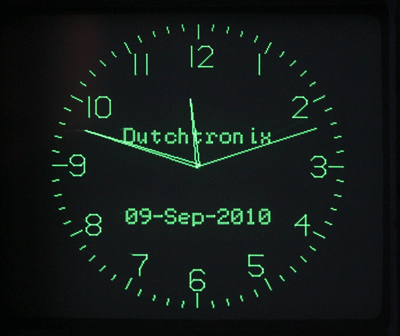
| Connects to your analog scope in X-Y mode using BNC cables or probes (1x, 10x) | |
| Uses the Atmel AVR Atmega328p with 32KB flashmemory | |
| On board 5V power regulator for use with user provided wall adapter (8-15V DC center positive) | |
| Power plug (5.5mm outside diameter) included | |
| On-board Real-Time Clock with 32.768kHz crystal and battery backup: this clock won’t lose time! | |
| Digital to Analog converter with built-in OpAmp (AD7302): no probes required. | |
| On-board true RS-232 level converter for the serial port | |
|
Professionally made dual sided 3″ x 3″ PCB (with solder masks and silkscreen) |
|
| Optional external 5V Power | |
| BNC connectors on PCB: use standard BNC cables | |
| DB9 connector on PCB: use a standard RS-232 cable. | |
| On-Off switch on PCB | |
| Two tactile switches on PCB | |
|
Intensity Control Output, both positive and negative going |
|
| Footprint on PCB for optional USB interface | |
| Header to select power from USB interface | |
| Header for External Clock Signal (GPS 1 Pulse Per Second, Rubidium Oscillator etc.) | |
| Headers provide easy access to TTL level Serial Port | |
| Extensive FAQ document available on this website |
Firmware V4.0 features:
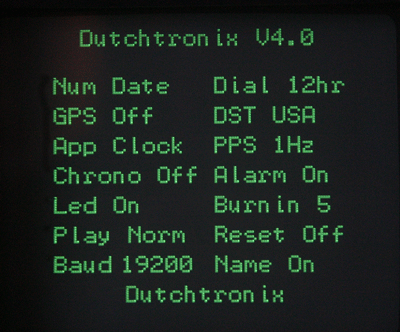
| Select different applications/modes from the on-screen menu: Clock, Terminal, Function Generator, Calibration Screen, Demo and Boot. | |
| User control with 2 push button switches, including auto-repeat operation | |
| 150-250 Hz refresh rate (dependent on the selected clock face mode) | |
| Set Time and Date using the on-board button switches. | |
| Set clock options and modes with On Screen Menu using the push button switches | |
| Roman Numerals Clock Display Option | |
| New Clock face: Digital Display Mode now supported (Menu-Dial:Dig) with moving dial dot | |
| Binary Clock Display option, together with Hexadecimal numeric Display (Bi-Hex clock) | |
| Fractional Seconds display option showing time in 1/100 of a second increments. | |
| The AVR Oscilloscope Clock supports a total of 37 different display combinations, many more when including the “Day of the Week” Display Option | |
| The Terminal application now supports Persistent Vector Graphics, allowing you to run a games like Asteroids on another computer (PC or AVR based) and use the AVR Clock board as the display device (communication using the Serial Connection). | |
| Help Screen, selected by a short S2 push | |
| Simple Alarm Clock built-in. Use Menu to turn the Alarm on/off (Menu-Alarm:On). Use the On Screen Change Mode option to set the Alarm Time. | |
| On board LED option to show the time in Morse Code (Menu-Led:Morse). | |
| Day of the Week display on the screen (Menu-Name:Day) | |
| Optionally add your own name to the Clock Display | |
| Automatic Daylight Saving Time correction for the years 2008-2014 for the USA and the EU | |
|
Automatic Screen Repositioning to prevent screen Burn-in; control Burn-In protection frequency from 1 to 9 minutes, or turn the feature off. |
|
|
Display Calibration mode |
|
| Multiple PPS (pulse per Second) options | |
| Software correctable Time Accuracy | |
| Play modes to have some fun with the clock. | |
| Clean Reset of the EEProm Configuration Data option | |
| Select from Multiple Baud Rates for the Serial Interface on the Menu, now including the 250,000 baud value | |
| Automatic Time and Date setting when connected to the NMEA Serial output from a GPS device; turning GPS mode on now remembers the current Serial Port speed setting and restores that value when turning GPS mode off | |
| The Function Generator has been sped up by 1 cycle, allowing for higher frequency waveforms. | |
| Use the IOCTL serial command to select unusual options. | |
| Firmware pre-programmed and upgradeable through the Serial Interface using the built-in boot-loader. | |
| On board very small boot-loader, less than 512 words, leaving 31KB code space available | |
| Boot-loader is STK500V1 compatible and uses avrdude to upload firmware (see WinAVR) |
For more detail: Dutchtronix AVR Oscilloscope Clock using Atmega328 microcontroller
- How does the AVR Oscilloscope Clock connect to an analog scope?
It connects in X-Y mode using BNC cables or probes (1x, 10x) to the BNC connectors on the PCB. - Can the clock output drive the scope without external probes?
Yes, the on-board AD7302 DAC with built-in OpAmp provides direct video output so no probes are required. - Does the board keep time when power is removed?
Yes, it has an on-board Real-Time Clock with a 32.768kHz crystal and battery backup so the clock won't lose time. - What power options are supported?
On-board 5V regulator for a user-provided 8–15V DC center positive adapter, a power plug (5.5mm) is included, and there is optional external 5V power and a USB power selection header. - Can firmware be upgraded?
Yes, firmware V4.0 is pre-programmed and upgradeable through the serial interface using the built-in STK500V1 compatible boot-loader and avrdude. - How is user input handled?
User control is via two tactile pushbutton switches with menu-driven on-screen options and auto-repeat operation. - Does it support GPS or external time sources?
Yes, there is a header for an external clock signal (GPS 1 PPS) and software supports automatic time/date setting from NMEA GPS serial output. - What display and clock modes are available?
Firmware supports Clock, Terminal, Function Generator, Calibration, Demo and Boot modes, including Roman, Binary-Hex, Digital with moving dot, fractional seconds, and up to 37 display combinations. - Is serial communication supported for graphics?
Yes, the Terminal application supports Persistent Vector Graphics allowing external computers to use the board as a display via the serial connection. - Are there burn-in protection and calibration features?
Yes, automatic screen repositioning with adjustable interval and a display calibration mode are included.
