
Summary of FabISP, a fab-able in-system programmer using ATtiny44
The FabISP is a compact, FabLab-friendly in-system programmer for AVR microcontrollers. It uses an ATtiny44 to enable USB communication via software, allowing users to program other boards through a simple USB connection and a 6-pin IDC cable. The design relies on standard passive components and open-source firmware, making it easy to manufacture and modify using available FabLab resources.
Parts used in the FabISP:
- ATtiny44 microcontroller
- Mini-B USB connector
- 12 MHz crystal
- 18 pF capacitors (for the crystal)
- USB connector
- 6-pin ISP header
- Solder jumpers SJ1 and SJ2
The FabISP is an in-system programmer for AVR microcontrollers, designed for production within a FabLab. That is, it allows you to program the microcontrollers on other boards you make, using nothing but a USB cable and 6-pin IDC to 6-pin IDC cable. It’s based on the USBtiny and V-USB firmwares, which allow the ATtiny44 to perform USB communication in software. Programming can be done through avrdude. The schematic (PDF) is super simple: USB connector, ATtiny44, and 6-pin ISP header, with assorted passive components. I started with the Eagle files for the USBtinyISP, although there’s almost nothing left of it. Most of the parts for the FabISP are in the FabLab inventory. Exceptions include the Mini-B USB connector (SparkFun, Digi-Key), 12 MHz crystal (Digi-Key), and 18 pF capacitors for the crystal (Digi-Key).
Eagle: fabisp.sch, fabisp.brd
Schematic: fabisp.pdf
PNGs: fabisp.png, fabispdim.png
Firmware: firmware.zip
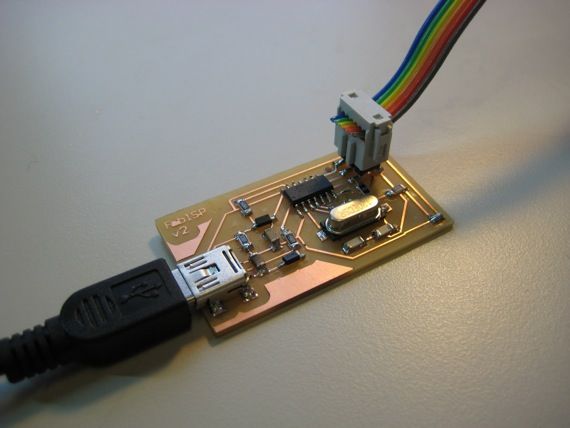
Hardware Interface
The board connects to the computer using a Mini USB cable. It connects to the target (the board being programmed) with an 6-pin cable on the 2×3 ISP header.

The FabISP board contains two solder jumpers: pairs of adjacent pads with no components mounted on them. These can be closed (connected with solder) to configure the board. They are:
- SJ1 (between the crystal and microcontroller)
- Close to program the ATtiny44 on the FabISP. (Connects reset on the 2×3 ISP header with reset on the ATtiny44.)
- SJ2 (lower right corner of the board)
- For more detail: FabISP, a fab-able in-system programmer using ATtiny44
- How does the FabISP connect to the computer?
The board connects to the computer using a Mini USB cable. - What type of cable connects the FabISP to the target board?
An 6-pin cable on the 2x3 ISP header connects the board to the target being programmed. - Can I program the FabISP itself?
Yes, you can close solder jumper SJ1 to program the ATtiny44 on the FabISP. - Does the FabISP require specialized tools beyond a FabLab?
No, it allows programming using nothing but a USB cable and a 6-pin IDC to 6-pin IDC cable. - What firmware enables the ATtiny44 to perform USB communication?
The device is based on USBtiny and V-USB firmwares which allow software-based USB communication. - Which software is used to perform programming?
Programming can be done through avrdude. - Where can I find the schematic for the project?
The schematic is available as a PDF file named fabisp.pdf. - Are most parts available in the FabLab inventory?
Most parts are in the FabLab inventory, with exceptions like the Mini-B USB connector and specific crystals.
