
Summary of Fingerprint based security system
This article details an AVR microcontroller-based fingerprint access control system using the SM-630 module. The project enables secure entry by verifying fingerprints via a relay, featuring six keys for managing user data (adding, deleting, and searching fingerprints). It includes complete resources such as circuit diagrams, PCB layouts, Proteus simulations, and C code for the Atmega 8 controller. The system displays status on an LCD and handles operations like low-power consumption and adaptive imaging for various finger conditions.
Parts used in the Fingerprint based security system:
- Atmega 8 Microcontroller
- Relays
- Switches
- SM630 Finger Print Module
- LM7805
- BC548
- 16x2 LCD Display
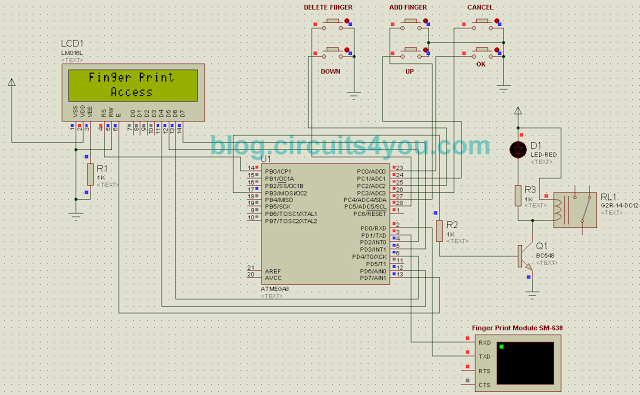
This AVR microcontroller based project demonstrates Finger print based access control / security system, in this project we have provided all required data, PCB, Code, Circuit Diagram, Proteus Simulation.
This project operates a relay based on valid finger detection. It is provided with 6-Keys for Addition, Deletion of Finger Print. It uses standard SM-630 Fingerprint Verification Module developed by Miaxis Biometrics Co., Ltd.
SM630 background highlight optical fingerprint verification module is the latest release of Miaxis Biometrics Co., Ltd. It consists of optical fingerprint sensor, high performance DSP processor and Flash. It boasts of functions such as fingerprint Login, fingerprint deletion, fingerprint verification, fingerprint upload, fingerprint download, etc. Compared to products of similar nature, SM630 enjoys the following unique features:
● Self-proprietary Intellectual Property Optical fingerprint collection device, module hardware and fingerprint algorithm are all self developed by Miaxis.
● High Adaptation to Fingerprints When reading fingerprint images, it has self-adaptive parameter adjustment mechanism, which improves imaging quality for both dry and wet fingers. It can be applied to wider public.
● Low Cost Module adopts Miaxis’ optical fingerprint collection device, which dramatically lowers the overall cost.
● Algorithm with Excellent Performance SM630 module algorithm is specially designed according to the image generation theory of the optical fingerprint collection device. It has excellent correction & tolerance to deformed and poor-quality fingerprint.
● Easy to Use and Expand User does not have to have professional know-how in fingerprint verification.
User can easily develop powerful fingerprint verification application systems based on the rich collection of controlling command provided by SM630 module. All the commands are simple, practical and easy for development.
● Low Power Consumption Operation current <80mA, specially good for battery power occasions.
Algorithm:
1. Power on state
2. Display “Place Finger”3. Poll for Keys and Finger Search
4. Display “Entry Successful” and Relay on for delay
1. “Time out”
2. “Process Failed”
5. Add Finger
1. Display “Add Finger” “Place Finger”
2. “Time out”
3. “Process Failed”
4. “Entery Successful” “ID=??”
6. Delete Finger
1. Display “Select ID”
2. Use UP/Down Keys
3. OK key to delete
4. “ID=?? Deleted”
1. Power on state
2. Display “Place Finger”3. Poll for Keys and Finger Search
4. Display “Entry Successful” and Relay on for delay
1. “Time out”
2. “Process Failed”
5. Add Finger
1. Display “Add Finger” “Place Finger”
2. “Time out”
3. “Process Failed”
4. “Entery Successful” “ID=??”
6. Delete Finger
1. Display “Select ID”
2. Use UP/Down Keys
3. OK key to delete
4. “ID=?? Deleted”
Step 1: Major Components Required
1. Atmega 8 Microcontroller
2. Relays, Switches
1. Atmega 8 Microcontroller
2. Relays, Switches
3. SM630 Finger Print Module
4. LM7805
5. BC548
6. 16×2 LCD Display
4. LM7805
5. BC548
6. 16×2 LCD Display
7. Buy Components from our Store www.circuits4you.com
Step 2: Circuit Design and PCB Manufacturing
Download Requires Files
1. Download Proteus Simulation Circuit Diagram
Download Requires Files
1. Download Proteus Simulation Circuit Diagram
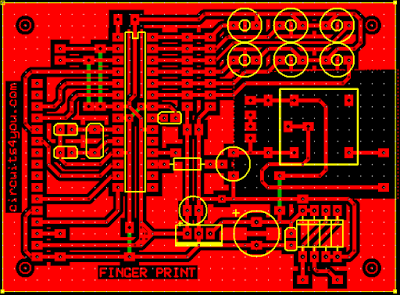
3. Assemble components using above files.
4. Download SM630 Manual
AVR Studio C Code
#include <avr/io.h>
#include <string.h>
#include <avr/eeprom.h>
#include <avr/interrupt.h>

unsigned char u8_data;

//LCD connections

//#define D0   PD6
//#define D1   PD2
//#define D2   PD4
//#define D3   PD3

#define E   PD7
#define RS   PB0

//Key interface
#define Key1 PC0  //ok
#define Key2 PC1  //up
#define Key3 PC2  //down
#define Key4 PC3  //cancel
#define Key5 PC4  //Add Finger
#define Key6 PC5  //Delete Finger


#define Relay PB3  //Relay

//Decleration
void display(char string[16]);
void displayrp(void);
void displaybyte(char D);
void dispinit(void);
void cleardisplay(void);
void line1(void);
void line2(void);
void epulse(void);
void delay_ms(unsigned int de);


void USART_Transmit(char data);
void senddata(char string[16]);
void USART_Init();
void USART_Receive();

void ProcessFifo();
void AddFinger();
void DeleteFinger();
void SearchFinger();
void DoCancel();

char mystr[6];
unsigned char ID,flg,flgd,flgs,Fifo[20],FifoCnt,IDcnt,IDT,flgmenu;

int main(void)
{
 DDRB = 0b00001001; //LCD port direction
 DDRD = 0b11011100; //LCD port direction
 DDRC = 0b00000000;  //Key Pad

 PORTC= 0b11111111; //Internal Pull up activated

 FifoCnt=0;
  delay_ms(500);  //Initiaize LCD
  dispinit();
 USART_Init();
  delay_ms(200);
 SREG=0x80;

 line1();
 display("  Finger Print  ");
 line2();
 display("     Access     ");

 flg=8;
 flgd=8;
 flgs=8;
 flgmenu=0;

  IDcnt = eeprom_read_byte((uint8_t*)4);
  if (IDcnt == 0xFF)
  {
   IDcnt=0;
   eeprom_write_byte((uint8_t*)4,IDcnt);
  }
  else
  {
   ID = eeprom_read_byte((uint8_t*)(8+IDcnt));
  }


 while(1)
 {
  ProcessFifo();
  if( (PINC & 0x04) == 0x00)    //Add finger
  {
   flgmenu=8;
   cleardisplay();
   line1();
   display("  Add finger    ");
   line2();
   display("  Place Finger  ");
   delay_ms(2000);
   AddFinger();
   flgmenu=0;
  }
  if( (PINC & 0x20) == 0x00)    //Delete finger
  {
   IDT = eeprom_read_byte((uint8_t*)4);
   if((IDT==0) || (IDT==0xFF))
   {
    cleardisplay();
    line1();
    display("    Finger      ");
    line2();
    display("  Not  Found    ");
    DoCancel();
   }
   else
   {
    cleardisplay();
    line1();
    display("  Delete finger "); //Delete Last Added Finger only
    line2();
    sprintf(mystr,"%02d",IDT);
    display("   ID : ");
    displaybyte(mystr[0]);
    displaybyte(mystr[1]);
    flgmenu=1;
   }
  }


  if(((PINC & 0x02) == 0x00) && (flgmenu==1))    //Up  //OK
  {
   DeleteFinger();
   flgmenu=0;
  }

  if((PINC & 0x10) == 0x00)    //Down //Cancel
  {
   DoCancel();
   flgmenu=0;
  }
  if(((PINC & 0x08) == 0x00) && (flgmenu==0))
  {
   IDT = eeprom_read_byte((uint8_t*)4);
   if((IDT==0) || (IDT==0xFF))
   {
    cleardisplay();
    line1();
    display("    Finger      ");
    line2();
    display("  Not  Found    ");
    DoCancel();
   }
   else
   {
    cleardisplay();
    line1();
    display("  Place finger  ");
    SearchFinger();
   }
  }
 }
}


void display(char string[16])
{
 int len,count;
  len = strlen(string);

   for (count=0;count<len;count++)
  {
    displaybyte(string[count]);
 }
}


void displaybyte(char D)
{
  char D1;
  D1=D;
  D1=D1 & 0xF0;
  D1=D1 >> 4;  //Send MSB

  PORTD = PORTD & (0b10100011);

  PORTD |= ((D1 & 0x01) << 6);
  PORTD |= ((D1 & 0x02) << 1);
  PORTD |= ((D1 & 0x04) << 2);
  PORTD |= (D1 & 0x08);

 epulse();

  D1=D;
  D1=D1 & 0x0F;  //Send LSB

  PORTD = PORTD & (0b10100011);

  PORTD |= ((D1 & 0x01) << 6);
  PORTD |= ((D1 & 0x02) << 1);
  PORTD |= ((D1 & 0x04) << 2);
  PORTD |= (D1 & 0x08);

 epulse();
}


void dispinit(void)
{
 int count;
 char init[]={0x43,0x03,0x03,0x02,0x28,0x01,0x0C,0x06,0x02,0x02};

 PORTB &= ~(1<<RS);           // RS=0
 for (count = 0; count <= 9; count++)
  {
 displaybyte(init[count]);
  }
 PORTB |= 1<<RS;    //RS=1
}


void cleardisplay(void)
{
 PORTB &= ~(1<<RS);           // RS=0
    displaybyte(0x01);
 PORTB |= 1<<RS;    //RS=1
}

void line1(void)
{
 PORTB &= ~(1<<RS);           // RS=0
    displaybyte(0x80);
 PORTB |= 1<<RS;    //RS=1
}

void line2(void)
{
 PORTB &= ~(1<<RS);           // RS=0
    displaybyte(0xC0);
 PORTB |= 1<<RS;    //RS=1
}

void epulse(void)
{
 PORTD |= 1<<E;
  delay_ms(1);
 PORTD &= ~(1<<E);
 delay_ms(1);
}

void delay_ms(unsigned int de)
{
unsigned int rr,rr1;
   for (rr=0;rr<de;rr++)
   {

  for(rr1=0;rr1<700;rr1++)   //395
  {
   asm("nop");
  }

   }
}

void senddata(char string[16])
{
  int len,count;
  len = strlen(string);

   for (count=0;count<len;count++)
  {
    USART_Transmit(string[count]);
 }
}


void USART_Init()
{
/* Set baud rate */
 UBRRH = 0x00;  //03
 UBRRL =0x17; //baud rate 57600 at 11.0592MHz
//Set double speed
  UCSRA |= (1<<U2X);
/* Enable receiver and transmitter */
 UCSRB = (1<<RXEN)|(1<<TXEN);
/* Set frame format: 8data, 1stop bit */
 UCSRC = (1<<URSEL)|(1<<USBS)|(3<<UCSZ0);
//Set interrupt on RX
  UCSRB |= (1<<RXCIE);
}

void USART_Receive()
{
/* Wait for data to be received */
while ( !(UCSRA & (1<<RXC)) )
;
/* Get and return received data from buffer */
u8_data=UDR;
}

/***********************************/
/*           USART ISR             */
/***********************************/
SIGNAL(USART_RXC_vect)
{
//4D 58 30 02 44 33 4E after delay

 u8_data=UDR;
 FifoCnt++;
 Fifo[10]=Fifo[9]; //Add more lines to increase buffer size
 Fifo[9]=Fifo[8];
 Fifo[8]=Fifo[7];
 Fifo[7]=Fifo[6];
 Fifo[6]=Fifo[5];
 Fifo[5]=Fifo[4];
 Fifo[4]=Fifo[3];
 Fifo[3]=Fifo[2];
 Fifo[2]=Fifo[1];
 Fifo[1]=Fifo[0];
 Fifo[0]=u8_data;
 return;
}


void USART_Transmit(char data )
{
 UDR = data;
 /* Wait for empty transmit buffer */
 while ( !( UCSRA & (1<<UDRE)) )
 ;
 /* Put data into buffer, sends the data */

}


/*******************************/
/*        Finger Process       */
/*******************************/
void AddFinger()
{
 flg=0;
 IDcnt=eeprom_read_byte((uint8_t*)4);
 if(IDcnt==0xFF)
 {
  IDcnt=0x00;
 }
 ID=IDcnt+1;
 USART_Transmit(0x4D);   //packet head
 USART_Transmit(0x58);
 USART_Transmit(0x10); //command packet
 USART_Transmit(0x03);   //length


 USART_Transmit(0x40); //Add Finger
 USART_Transmit(0x00);
 USART_Transmit(ID);
 USART_Transmit(0xF8+ID);  //check sum
}

void DeleteFinger()
{
 flgd=0;
 IDcnt=eeprom_read_byte((uint8_t*)4);
 ID=IDcnt;
 USART_Transmit(0x4D);   //packet head
 USART_Transmit(0x58);
 USART_Transmit(0x10); //command packet
 USART_Transmit(0x03);   //length


 USART_Transmit(0x42); //Delete Finger
 USART_Transmit(0x00);
 USART_Transmit(ID);
 USART_Transmit(0xFA+ID);  //check sum
}

void SearchFinger()
{
 flgs=0;
 IDcnt=eeprom_read_byte((uint8_t*)4);
 ID=IDcnt;
 USART_Transmit(0x4D);   //packet head
 USART_Transmit(0x58);
 USART_Transmit(0x10); //command packet
 USART_Transmit(0x05);   //length


 USART_Transmit(0x44); //Search Finger
 USART_Transmit(0x00);
 USART_Transmit(0x01);

 USART_Transmit(0x00);
 USART_Transmit(ID);
 USART_Transmit(ID-1);  //check sum
}

void ProcessFifo()
{


 if(FifoCnt>0)
 {

 //ADD FINGER==========================
   if((Fifo[FifoCnt-1]==0x30) && (flg==0))
   {
    flg=1;
   }
   if(flg==4)
   {
    if(Fifo[FifoCnt-1] == 0x33)
    {
     cleardisplay();
     line1();
     display("   Time Out   ");
     DoCancel();
    }
    if(Fifo[FifoCnt-1] == 0x34)
    {
     cleardisplay();
     line1();
     display("Process Failed");
     DoCancel();
    }
    if(Fifo[FifoCnt-1] == 0x31)
    {
     cleardisplay();
     line1();
     display(" Finger Added  ");
     line2();
     sprintf(mystr,"%02d",ID);
     display("   ID : ");
     displaybyte(mystr[0]);
     displaybyte(mystr[1]);
     eeprom_write_byte((uint8_t*)(8+IDcnt),ID);
     IDcnt++;
     eeprom_write_byte((uint8_t*)4,IDcnt);
     DoCancel();
    }
    flg=8;
   }

      if(flg==3)
      {  //2 bytes recived
       flg=0;
      }
      if((Fifo[FifoCnt-1]==0x40) && (flg==2))
      {
       flg=4; //Get Second byte
      }
      if((Fifo[FifoCnt-1]==0x02) && (flg==1))
      {
       flg=2;
      }
      if((Fifo[FifoCnt-1]==0x01) && (flg==1))
      {
       flg=3;
      }

 //====================================
 //DELETE FINGER=======================
   if((Fifo[FifoCnt-1]==0x30) && (flgd==0))
   {
    flgd=1;
   }
   if(flgd==4)
   {
    if(Fifo[FifoCnt-1] == 0x33)
    {
     cleardisplay();
     line1();
     display("   Time Out   ");
     DoCancel();
    }
    if(Fifo[FifoCnt-1] == 0x34)
    {
     cleardisplay();
     line1();
     display("Process Failed");
     DoCancel();
    }
    if(Fifo[FifoCnt-1] == 0x31)
    {
     cleardisplay();
     line1();
     display(" Entery Deleted  ");
     line2();
     sprintf(mystr,"%02d",ID);
     display("   ID : ");
     displaybyte(mystr[0]);
     displaybyte(mystr[1]);
     eeprom_write_byte((uint8_t*)(8+IDcnt),0xFF);
     IDcnt--;
     eeprom_write_byte((uint8_t*)4,IDcnt);
     DoCancel();
    }
    flgd=8;
   }

      if(flgd==3)
      {  //2 bytes recived
       flgd=0;
      }
      if((Fifo[FifoCnt-1]==0x42) && (flgd==2))
      {
       flgd=4; //Get Second byte
      }
      if((Fifo[FifoCnt-1]==0x02) && (flgd==1))
      {
       flgd=2;
      }
      if((Fifo[FifoCnt-1]==0x01) && (flgd==1))
      {
       flgd=3;
      }

  //==================================
  //SEARCH FINGER=====================
   if((Fifo[FifoCnt-1]==0x30) && (flgs==0))
   {
    flgs=1;
   }
   if(flgs==4)
   {
    if(Fifo[FifoCnt-1] == 0x31)
    {
     cleardisplay();
     line1();
     display("Finger Placed");
     flgs=0;
    }

    if(Fifo[FifoCnt-1] == 0x33)
    {
     cleardisplay();
     line1();
     display("   Time Out   ");
     flgs=8;
     DoCancel();
    }
    if(Fifo[FifoCnt-1] == 0x34)
    {
     cleardisplay();
     line1();
     display("Process Failed");
     flgs=8;
     DoCancel();
    }
    if(Fifo[FifoCnt-1] == 0x39)
    {
     cleardisplay();
     line1();
     display(" Entery Passed  ");
     line2();
     flgs=8;
     PORTB |= (1<<Relay);
     delay_ms(2000);
     DoCancel();
    }
    if(Fifo[FifoCnt-1] == 0x3A)
    {
     cleardisplay();
     line1();
     display(" Access Denide  ");
     line2();
     flgs=8;
     DoCancel();
    }
    if(Fifo[FifoCnt-1] == 0x35)
    {
     cleardisplay();
     line1();
     display(" Parameter Error");
     flgs=8;
     DoCancel();
    }


   }

      if(flgs==3)
      {  //2 bytes recived
       flgs=0;
      }
      if((Fifo[FifoCnt-1]==0x44) && (flgs==2))
      {
       flgs=4; //Get Second byte
      }
      if(((Fifo[FifoCnt-1]==0x04) || (Fifo[FifoCnt-1]==0x02)) &(flgs==1))
      {
       flgs=2;
      }
      if((Fifo[FifoCnt-1]==0x01) & (flgs==1))
      {
       flgs=3;
      }

  //=================================================
       FifoCnt--;
 }
}

void DoCancel()
{
 delay_ms(2000);
 cleardisplay();
 line1();
 display("  Finger Print  ");
 line2();
 display("     Access     ");
 PORTB &= ~(1<<Relay);
}
Step 5: Test the code and Hardware
1. Follow us on Google+
2. You Did it Yourself
3. Refer Tutorials from this site for more understanding of code and Circuits
For more Detail: Fingerprint based security system
- How does the system operate the relay?
The system operates a relay based on valid finger detection. - What module is used for fingerprint verification?
The project uses the standard SM-630 Fingerprint Verification Module developed by Miaxis Biometrics Co., Ltd. - Can users add or delete fingerprints?
Yes, the system provides 6-keys for the addition and deletion of fingerprints. - Does the SM630 module support dry and wet fingers?
Yes, it has a self-adaptive parameter adjustment mechanism that improves imaging quality for both dry and wet fingers. - What is the operation current of the module?
The operation current is less than 80mA, making it suitable for battery power occasions. - Which microcontroller is required for this project?
The major component required is the Atmega 8 Microcontroller. - What display is used to show status messages?
A 16x2 LCD Display is used to show messages like Place Finger, Entry Successful, and Time Out. - How is the code compiled and downloaded?
The article mentions downloading a Hex File and using AVR Studio C Code for programming the controller.
