
Summary of How to interface RFID with AVR microcontroller (ATmega16)
This article explains interfacing an RFID receiver with an ATmega16 microcontroller. It describes RFID tag operation, output formats (RS232 or Wiegand), and using a MAX232 level converter when the RFID module provides RS232-level serial output. The guide details wiring (cross TX/RX and common ground) and notes TTL-output modules can connect directly. It outlines using USART in polling mode on the ATmega16 to receive the 12-byte tag ID and briefly lists steps: initialize USART and read the 12-byte string.
Parts used in the RFID with ATmega16 project:
- RFID receiver module (providing 12-byte unique ID)
- ATmega16 microcontroller
- MAX232 level converter (for RS232 to TTL conversion)
- LCD (optional for displaying ID; implied by code description)
- Connecting wires (for TX/RX cross-connection and ground)
- Power supply/common ground
Knowingly or unknowingly the RFID technology is used by us in our day to day life. The most familiar example is seen in MNCs, schools and offices for daily attendance or automatic door opening system. The RFID contains two parts, namely, tag and receiver modem. When an RFID tag comes in the range of receiver, the tag gets activated and transmits its unique identification code to the receiver module.

The output of the RFID receiver is the unique ID in either serial (RS232) or wiegand format. Most of the receivers are equipped with additional hardware to send the extracted code in the above format, which can then be used by digital signal processors. This article shows the interfacing of ATmega16 with RFID.
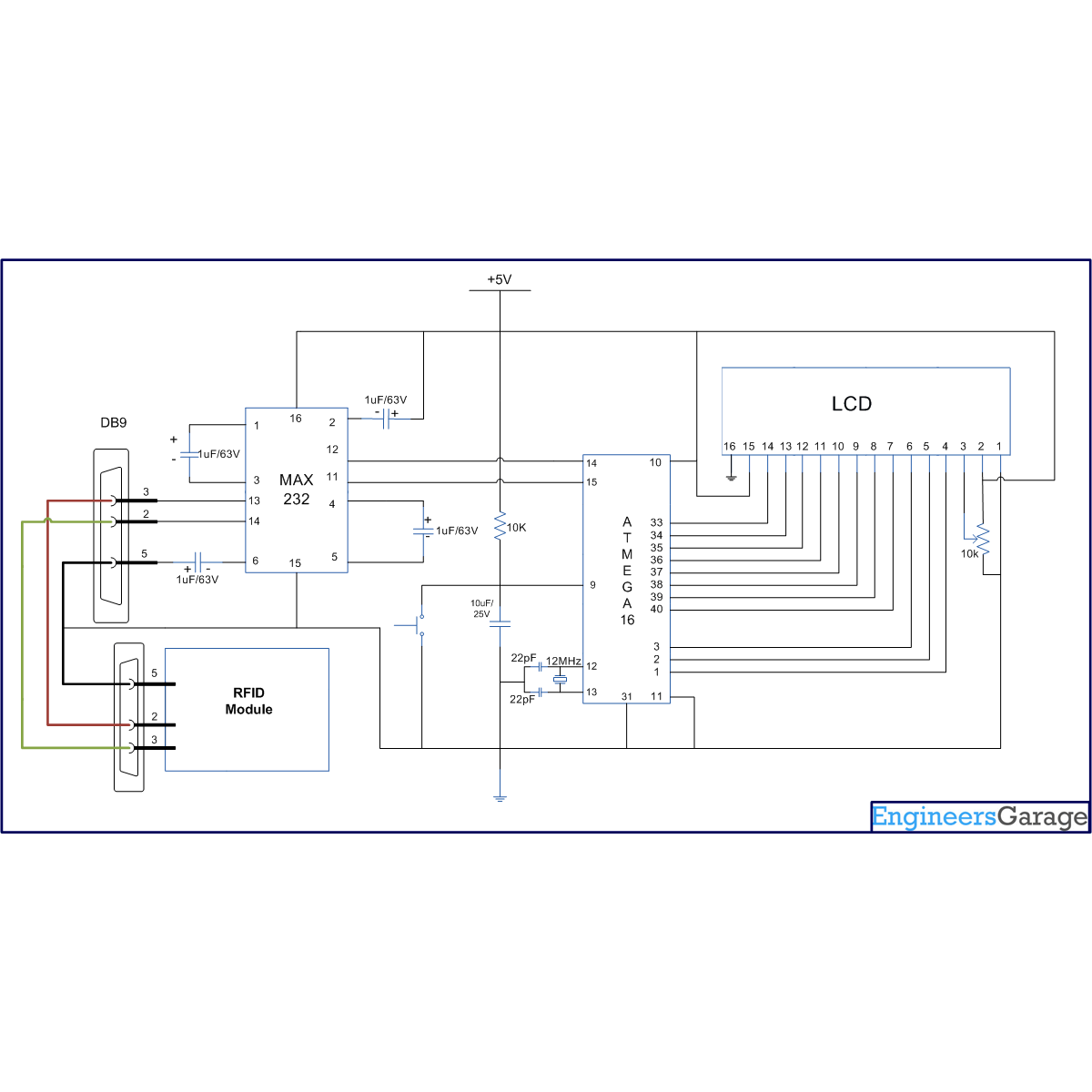
The RFID module used here gives a 12 byte unique ID of a particular tag in serial RS232 logic level format. Hence a level converter MAX232 is used in between RFID receiver module and microcontroller. The connections of RFID module and ATmega16 are shown in thecircuit diagram. The ground pin of MAX232 and serial output of RFID module is made common. A cross cable connection is set up between the RFID module and the MAX232 by connecting transmitter pin of one to the receiver pin of the other and vice versa as shown in the circuit diagram.
Note: In case the output of the RFID module is in TTL format, there is no need of MAX232. In such a case the output of the RFID module can be directly given to the microcontroller.
|
Pin 2 of max 232
|
Pin 3 of RFID modem
|
|
Pin 3 of max 232
|
Pin 2 of RFID modem
|
|
Pin 5 ground pin of max 232
|
Pin 5 ground of RFID modem
|
Code description
In order to understand the code for RFID (given below) which is interfaced with ATmega16, one must have a basic knowledge of serial communication and LCD. The serial data from RFID module can be taken by microcontroller either by polling or by using serial interrupt concepts. (To understand the difference between them, refer to tutorial on Interrupts) This article explores the interfacing of RFID module with AVR microcontroller (ATmega16) using the polling technique. The code described here keeps monitoring the serial input till it receives all the twelve bytes from the RFID module.
Receiving 12 byte serial interrupt data by polling method:
Steps to receive twelve byte serial data
i. Initialize USART in read mode.
ii. Get a 12 byte string (RFID card no.)
For more detail: How to interface RFID with AVR microcontroller (ATmega16)
- What are the two parts of an RFID system?
The RFID contains two parts: tag and receiver modem. - What format does the RFID module used here provide the unique ID in?
The RFID module used here gives a 12 byte unique ID in serial RS232 logic level format. - Is MAX232 always required between the RFID module and microcontroller?
No; MAX232 is required only when the RFID module outputs RS232-level signals. If the output is TTL format, MAX232 is not needed and the module can be connected directly to the microcontroller. - How should TX and RX be connected between the RFID module and MAX232?
A cross cable connection is used: transmitter pin of one connects to the receiver pin of the other and vice versa. - Which USART receive method is demonstrated in the article?
The article demonstrates receiving serial data by the polling technique. - How many bytes does the microcontroller wait for from the RFID module?
The microcontroller monitors the serial input until it receives all twelve bytes from the RFID module. - What are the basic steps to receive the twelve byte serial data?
i. Initialize USART in read mode. ii. Get a 12 byte string (RFID card no.). - What common connection must be made between MAX232 and the RFID modem?
The ground pin of MAX232 and the ground pin of the RFID modem must be made common.
