
Summary of Password manager
The author built a custom, low-cost password manager using a PIC16LF1454 microcontroller and an OLED display to simplify password storage without complex encryption. The device emulates a keyboard via USB, stores credentials in flash memory protected by a PIN, and uses external storage encryption with a pseudo-random number generator. It features a simple PC application for management and fits within a standard USB thumbdrive footprint.
Parts used in the Custom Password Manager:
- PIC16LF1454 microcontroller
- 128x32 I2C OLED display
- OS USB stack from signal11.us
- USB thumbdrive housing
- PC application software (Linux and Windows compatible)
I was frustrated by trying to remember my passwords for all my websites and got even more frustrated when i need to change a password again after some months. Dont even to mention the needed complexity of them nowadays. A bit insired by the mooltipass featured on hackaday, but too scared of the complexity and hugeness of it, I decided to roll my own.
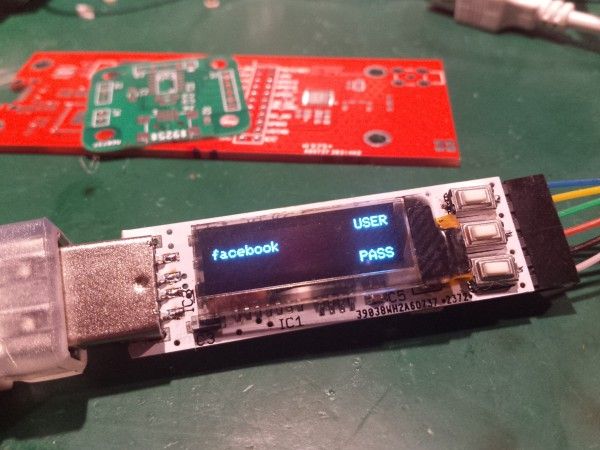
Also I’m not a terrorist nor a high placed public person, so I dont need that high encrypted and bulky design. Prolly the NSA would crack this thing in a matter of days (minutes?) but I think it will keep your pr0n logins safe from your little brother ;).
Current design/features:
– Uses the supercheap PIC16LF1454 (+- 1USD/piece) with no need for a XTAL (Clock is derived from USB)
– Uses a small but crystalclear OLED (128×32, I2C).
– Uses an OS USB stack ( http://www.signal11.us/oss/m-stack/ ).
– Emulates a keyboard (HID) for entering usernames or passwords.
– USB thumbdrive footprint.
– Device is protected by a pincode (securely stored in flash on the uC).
– Simple PC application for updating protected storage (currently compiles on linux and windows).
– 32Kbyte storage for usernames/passes (512 username/passes total).
– External storage is XORed with a pseudo RNG (seed of the RNG is not based on the pincode).
For more detail: Password manager
-
What microcontroller does the project use?
The device uses the supercheap PIC16LF1454 which costs around one dollar per piece. -
Does the design require an external crystal oscillator?
No, the clock is derived directly from the USB connection so no XTAL is needed. -
How does the device input data into computers?
It emulates a keyboard using the HID protocol to enter usernames or passwords. -
How many username and password entries can be stored?
The device has 32Kbyte of storage capable of holding a total of 512 username/password pairs. -
How is the external storage data secured?
External storage is XORed with a pseudo RNG where the seed is not based on the user pincode. -
Can the PC application run on Windows?
Yes, the simple PC application currently compiles and runs on both Linux and Windows systems. -
Where is the secure pincode stored?
The pincode is securely stored in the flash memory of the microcontroller.
