
Summary of Wearable Child Tracker
This article outlines a DIY child tracker project using the Mediatek Linkit ONE board. The device leverages built-in GSM and GPS capabilities to send real-time location data via SMS when triggered by a user's message. Encased in a digital camera pouch for safety and comfort, it serves as a portable solution to prevent children from getting lost in crowded areas. The entire build is designed to be completed quickly without external shields, requiring only a SIM card and a power source.
Parts used in the Wearable Child Tracker:
- Mediatek Linkit ONE
- 3.7v lithium battery
- GSM antenna
- GPS antenna
- SIM card (must not be pin locked)
- Enclosure (digital camera pouch)
Are you worried of your kids getting lost when you are out at a crowded place? That’s obvious, isn’t it? This project will reduce the risk of children getting lost at unknown and crowded places thus will also eleminate your nightmares. As you may have already guessed from the name, this project is basically a child tracker that can give you the exact GPS location through an SMS to your phone when required.
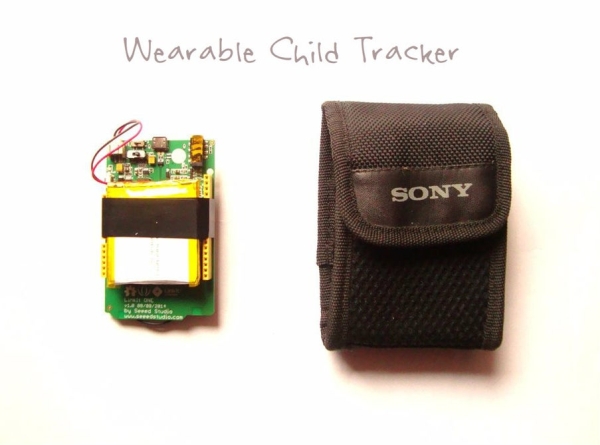
This project uses the Mediatek Linkit ONE as a base for communication between your phone and the tracker and to get the GPS location. As linkit one has in-built GSM and GPS features, you don’t need to connect any external shield or modules which makes it a perfect weekend project to be completed within an hour. You just need a SIM card with some balance or an SMS pack. The best part is that the device will work in any part of this world provided that there is a mobile network available at that place.
The project is enclosed in a digital camera pouch thus can be tied around the waist along with a belt, can be kept in your child’s bagpack or pocket. Since the project has GPS, you can not only use it as a child tracker but also as car tracking or bagpack anti-theft device.
Don’t forget to vote if you like this project. Follow for more great projects!
You can like my Facebook page- Frozen Solenoid for amazing new projects, videos and facts related to science and technology.
Step 1: How It Works?

The process is very simple. As you may already know, linkit one as in-built GPS and GSM features. So when you send a message to linkit one through your phone, it is received by the SIM card present on linkit one and transferred to the board thereafter.
The board then processes the signal, gets GPS data by directly connecting to a sattelite and then sends this data to the no. which is mentioned in it’s code. The data when entered on Google Maps gives you the exact GPS location of the device. As the device will be with your child, it will tell you the location of your child so that you can easily reach that place.
It shall be noted that you will only get the data till the device is on. Unavailability of power supply or the battery running low will not give you the GPS data.
Step 2: Parts and Tools

You will require the parts and tools mentioned below to make this project. Actually, you just need a SIM card and an enclosure if you already have a Linkit one or got it from the recent giveaway here at instructables.
- 1x Mediatek Linkit ONE
- 1x 3.7v lithium battery
- 1x GSM antenna
- 1x GPS antenna
- 1x SIM cart (must not be pin locked)
- 1x Enclosure for your project (I used a camera pouch)
Step 3: Connect the Antennas

The first step is to connect both the antennas in their respective sockets. This should be quite easy. In your linkit one package, look for a yellow colored square shaped antenna (GPS) and a rectangular black one (GSM/GPRS) which is comparatively bigger than the other black one.
Look for the antenna sockets at the back of your boards. Insert and connect your antenna to their respective sockets which are labelled on the board.
Step 4: Connect the Battery and Insert the SIM Card

Next step is to connect the battery and the SIM card. First connect your battery to the white color socket present on the bottom left corner of the board. On setting the big switch to BAT position, you should see the on-board LED light up.
Next, insert the SIM card inside the micro SD/SIM combo socket present below the board. Make sure that your SIM isn’t pin locked or it would not work.
Step 5: Stick Everything Together

And that’s it! You’re all done with the building part of this project. The last step is to tie everything up using some tape. You can also use zip ties.
Try to keep everything in place and make the size as small as possible by arranging the battery and the antennas. Use some tape to keep everything in place. You may need to apply some tape below the board as well to avoid any unnecessary connections with the metal base.
Step 6: Add a Cover or an Enclosure
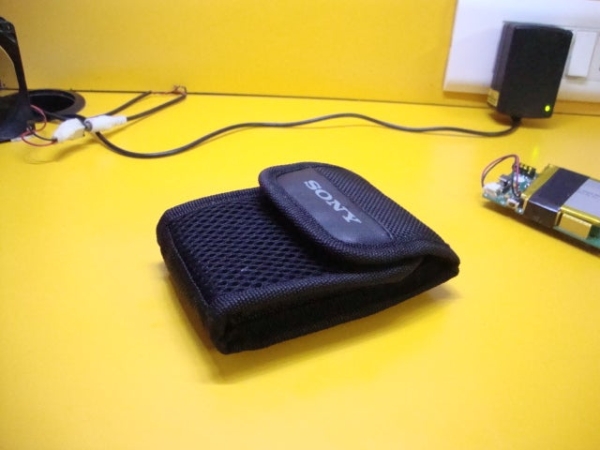
Here comes the most crucial part of this project. Here, you have to decide as to how to make the assembled project a wearable. You directly keep the board in your child’s pocket with all open connections with the risk of breaking them so you have to have a nice enclosure for it.
In my case, I used a camera pouch, which is soft thus would not irritate your child. The pouch can be held together with a belt, can be hung as a locket or can even be kept in your child’s bagpack or pocket. However, this was just a basic idea. You can use whatever you want which depends on how well you can imagine.
Source: Wearable Child Tracker
- How does the device determine the child's location?
The board processes signals received from your phone, connects directly to a satellite to get GPS data, and sends this information to a specified number. - Can this tracker work internationally?
Yes, the device works anywhere in the world provided there is a mobile network available at that place. - What type of enclosure is recommended for the project?
A digital camera pouch is suggested because it is soft enough not to irritate the child and can be tied around a waist or placed in a backpack. - Does the SIM card require a PIN code?
No, the SIM card must not be pin locked or the device will not function. - Will the tracker provide location data if the battery is low?
No, you will only receive data while the device is on; low power or unavailability of power supply will stop GPS data transmission. - Are external shields required for this project?
No, the Linkit One has built-in GSM and GPS features, so no external shield or modules are needed. - What other uses does this GPS device have besides tracking children?
It can also be used as a car tracker or an anti-theft device for backpacks. - How do you switch the power source on the board?
You must set the big switch to the BAT position after connecting the battery to the white socket.
