
Summary of Apple-style LED pulsing using a $1.30 MCU using ATTiny85 microcontroller
This article details a DIY project to replicate the soothing pulsating light of Apple laptops using an ATTiny85 microcontroller. By leveraging Fast PWM and hardware configuration, the author creates a low-cost alternative to commercial products with minimal coding required. The guide emphasizes reading the datasheet for successful implementation and lists necessary supplies including a breadboard, LED, ISP programmer, and computer tools like avrdude.
Parts used in the Apple-style LED pulsing project:
- Breadboard
- Breadboard wires
- 1 LED
- ATTiny85 microcontroller
- ISP programmer (such as USBtinyISP)
- Computer with avrdude and avr-gcc
- Oscilloscope (optional)
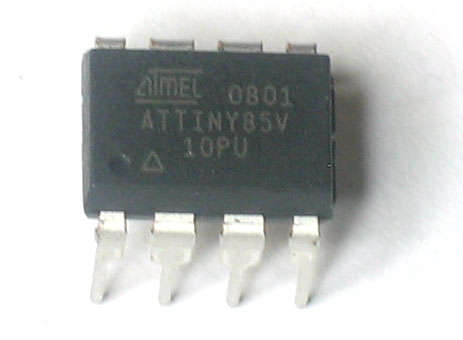 The Atmel ATTiny85 chip is an 8-pin MCU that is totally awesome. If you’ve been programming with the bigger boys (the ATMega series), these are a nice adventure – you’re rather limited in the number of output pins, but a creative design gives us a lot of flexibility in a very small package.
You’ve seen them – those “Apple computers.” Probably in the hands of some Hipster in Portland, while riding his fixie and wearing those thick framed glasses. That pulsating light when Apple laptops are asleep is so … sooooothing. You just want to go to sleep watching it. You know you do.
Today, we’re going to replicate that using our ATTiny85. It’s really easy, and most of it can be implemented in hardware instead of code (!!!).
Step 1 Supplies
- Breadboard
- Breadboard wires
- 1 LED
- ATTiny85 (the 45 or 25 will probably work, but I haven’t tested them)
- An ISP programmer (or other, if you know how to use it) – I use the USBtinyISP.
- A computer with avrdude and avr-gcc
- Optional: an oscilloscope
Step 2Understanding PWM
In this guide, we’re going to use Fast PWM, which is just one of the modes available on our little chippy friend. I’ve attached Atmel’s very educational document on PWM – I suggest you read it and familiarize yourself with the magic.
Step 3 The datasheet – your new best friend
The ATTiny 25/45/85 datasheet is the core of this project. Without it, we’d all be lost, poking our chips with sticks and screaming like chimpanzees. Well, most of us, anyway.
Download it and go to section 11 and just take 30 minutes and read the entire thing. Trust me, it’s worth it – it’s a lot better than randomly paging through it for hours trying to debug your code!
For more Detail: Apple-style LED pulsing using a $1.30 MCU using ATTiny85 microcontroller
- How can I replicate the Apple laptop sleep light?
You can replicate it using an ATTiny85 chip where most functionality is implemented in hardware instead of code. - Which PWM mode should I use for this project?
The guide specifies using Fast PWM, which is one of the modes available on the microcontroller. - What is the best way to understand the microcontroller settings?
The article suggests downloading the datasheet and reading section 11 entirely for about 30 minutes. - Can I use other chips besides the ATTiny85?
The author notes that the ATTiny45 or ATTiny25 might work but states they have not tested them. - Do I need to write complex code for this project?
No, the guide states that most of the implementation can be done in hardware rather than code. - What specific programmer is recommended?
The author uses a USBtinyISP but mentions any ISP programmer works if you know how to use it. - Is an oscilloscope required for this build?
An oscilloscope is listed as optional equipment for the project. - Why is the datasheet important for this project?
The datasheet is described as the core of the project because it prevents random debugging and confusion.
