
Summary of Arduino MP3 alarm clock
This article details the creation of an Arduino MP3 alarm clock featuring a 128x64 graphical LCD for displaying date and time, buttons for alarm configuration, and an MP3 module with a speaker to trigger alarms. The builder utilized software SPI for the LCD due to existing bus constraints and selected the accurate DS3231 RTC over the less precise DS1307, communicating via the I2C protocol using the standard Wire library on an Arduino Mega2560.
Parts used in the Arduino MP3 Alarm Clock:
- Arduino Mega2560
- 12864ZW graphical LCD (128×64 pixels)
- DS3231 Real Time Clock module
- MP3 module
- Small speaker
- Buttons
- Ebay break out boards
After finishing my hexapod I needed another project 
Over the last year I have bought numerous small break out boards on Ebay. So I came up with the idea to make an Arduino MP3 alarm clock. The idea is simple, an LCD that shows the date and time. A couple of buttons to set an alarm, and an MP3 module and small speaker to play an MP3 when the alarm goes of.
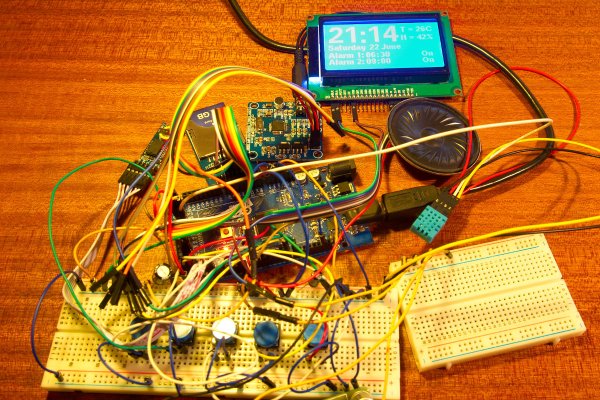
I decided to use my 6€ 12864ZW graphical LCD, with 128×64 pixels it has enough room to display all the things I want. I used the Arduino u8glib and software SPI to make it work with my Arduino Mega2560. I decided to use software SPI because I already had 2 other devices on the SPI bus. It should be possible to use the hardware SPI bus but that would need more coding. You can connect multiple devices to an SPI bus but you can only talk to one at a time.
Next thing I needed was an RTC, a real time clock. I have a DS1307 RTC but it’s not very accurate, it “loses” about 1-2 seconds a day. So that’s not very good. Luckily there some more accurate RTC’s, like the DS3231. It’s very similar to the DS1307 and you can even use the same code. I bought a couple of DS3231 modules on Ebay and they work very well. The DS3231 uses the I2C bus to communicate with a micro controller. So you need to connect 2 wires (SDA and SCL) to the Arduino and 5V and GND. I did not use a special library to get the data from the DS3231, just the Arduino Wire library.
For more detail: Arduino MP3 alarm clock
- What components are needed for the project?
An Arduino Mega2560, 12864ZW graphical LCD, DS3231 RTC, MP3 module, small speaker, and buttons. - Why was software SPI chosen for the LCD?
The author used software SPI because two other devices were already on the SPI bus. - Does the DS3231 RTC require a special library?
No, the author used the standard Arduino Wire library to get data from the DS3231. - How many wires connect the DS3231 to the Arduino?
You need to connect two wires, SDA and SCL, plus 5V and GND. - Can multiple devices be connected to an SPI bus?
Yes, you can connect multiple devices to an SPI bus but can only talk to one at a time. - Is the DS1307 RTC recommended for this project?
No, the author found the DS1307 loses about 1-2 seconds a day and is not very accurate. - What display resolution does the 12864ZW LCD have?
The LCD has a resolution of 128×64 pixels. - How does the alarm function work?
An MP3 module and small speaker play an MP3 when the alarm goes off.
