
Summary of AVR-GCC 4 bit and 8 bit LCD library using ATmega8 microcontroller
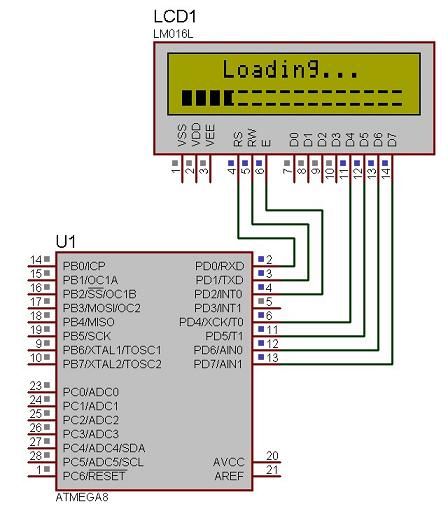
This article describes a unified AVR-GCC library for controlling standard alphanumeric LCDs via a 74HC164 controller. It merges previously separate 4-bit and 8-bit libraries, allowing mode selection by toggling a single macro definition. The library supports custom character initialization and includes an adapted progress bar function. It defines specific MCU pin mappings for RS, RW, E, and data lines, utilizing PORTD for both control and data operations on an ATmega8 microcontroller.
Parts used in the Unified LCD Library:
- Standard alphanumeric LCD display
- 74HC164 LCD controller
- ATmega8 microcontroller
- AVR-GCC compiler
- Custom LCD characters
- LCD progressBar function
Standard alphanumeric LCD display controlled by 74HC164 LCD controller can accept 8 bit data bytes or 4 bit nibbles. Earlier my 4 bit and 8 bit LCD libraries were split in separate files as they were used in different projects. Now they are merged in to one library where simple logic is implemented to select 4 bit or 8 bit library just by modifying only three lines of code.
In the library header file there is line added:
//Uncomment this if LCD 4 bit interface isused
//******************************************
#define LCD_4bit
//******************************************
what allows to select different LCD modes by commenting and uncommenting this line. Also don’t forget to select proper ports and pins where LCD is connected:
#define LCD_RS 0 //define MCU pin connected to LCD RS
#define LCD_RW 1 //define MCU pin connected to LCD R/W
#define LCD_E 2 //define MCU pin connected to LCD E
#define LCD_D0 0 //define MCU pin connected to LCD D0
#define LCD_D1 1 //define MCU pin connected to LCD D1
#define LCD_D2 2 //define MCU pin connected to LCD D1
#define LCD_D3 3 //define MCU pin connected to LCD D2
#define LCD_D4 4 //define MCU pin connected to LCD D3
#define LCD_D5 5 //define MCU pin connected to LCD D4
#define LCD_D6 6 //define MCU pin connected to LCD D5
#define LCD_D7 7 //define MCU pin connected to LCD D6
#define LDP PORTD //define MCU port connected to LCD data pins
#define LCP PORTD //define MCU port connected to LCD control pins
#define LDDR DDRD //define MCU direction register for port connected to LCD data pins
#define LCDR DDRD //define MCU direction register for port connected to LCD control pins
In newer library there is also couple new functionalities added:
-
Predefining 8 custom LCD characters during LCD initialisation;
-
LCDprogressBar() function have been adapted from AVRLib.
Complete function set:
void LCDsendChar(uint8_t); //forms data ready to send to 74HC164
void LCDsendCommand(uint8_t); //forms data ready to send to 74HC164
void LCDinit(void); //Initializes LCD
void LCDclr(void); //Clears LCD
void LCDhome(void); //LCD cursor home
void LCDstring(uint8_t*, uint8_t); //Outputs string to LCD
For more detail: AVR-GCC 4 bit and 8 bit LCD library using ATmega8 microcontroller
- How can I switch between 4-bit and 8-bit modes?
You select the mode by commenting or uncommenting the #define LCD_4bit line in the header file. - What changes are needed to configure the library?
Only three lines of code need modification to change the library logic between 4-bit and 8-bit modes. - Which microcontroller is used in this project?
The project utilizes the ATmega8 microcontroller with AVR-GCC. - Can I define custom characters during initialization?
Yes, the newer library allows predefining eight custom LCD characters during LCD initialization. - Is there a built-in function for progress bars?
Yes, the LCDprogressBar() function has been adapted from AVRLib. - What pins are defined for the LCD control signals?
The library defines macros for LCD_RS, LCD_RW, LCD_E, and data pins D0 through D7. - Which port is used for data and control connections?
The code uses PORTD for both the data pins (LDP) and control pins (LCP). - What functions are included in the complete set?
The set includes LCDsendChar, LCDsendCommand, LCDinit, LCDclr, LCDhome, and LCDstring.
