
This article demonstrates a simple AVR LCD menu routine using an ATmega8 microcontroller. The project avoids standard libraries, storing menu strings in Flash memory to save RAM. It utilizes four buttons for navigation and parameter adjustment, with three LEDs providing visual feedback. Button inputs are handled via Timer0 overflow interrupts, and the code is compiled with WinAVR.
Parts used in the AVR LCD Menu Routine:
- LCD
- LED diodes (three)
- Buttons (four)
- ATmega8 microcontroller
- Timer0 interrupt system
Lets have some practice and write simple AVR LCD menu routine. For this we need to write LCD control library. I decided not to use one from AVRLIB. LCD controlling isn’t difficult just a few lines of code unless you want to make it more universal.
I want to demonstrate how LCD menu control may look. Of course this isn’t the best practice as it uses pretty simple logic, but may do the job.
To make it interesting I am going to have 4 buttons: 2 for menu scrolling up and down and two for changing submenu parameters. As output I am going to use three LED diodes that will light according to parameters selected in menu. Button states are going to be read using timer0 overflow interrupts. Code is written for WinAVR compiler.
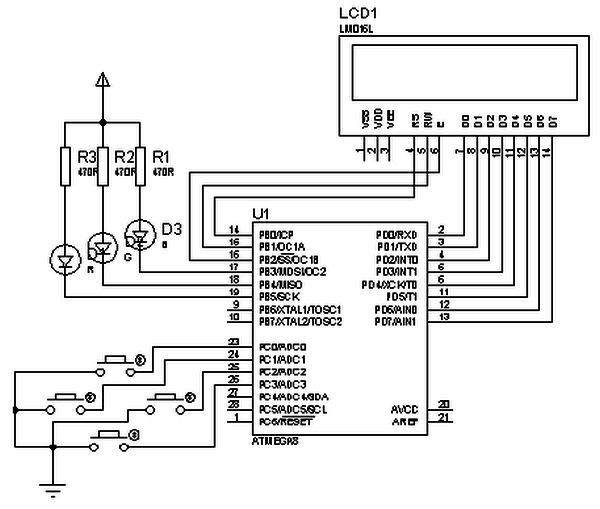
First of all construct a circuit:
Lets have some practice and write simple AVR LCD menu routine. For this we need to write LCD control library. I decided not to use one from AVRLIB. LCD controlling isn’t difficult just a few lines of code unless you want to make it more universal.
I want to demonstrate how LCD menu control may look. Of course this isn’t the best practice as it uses pretty simple logic, but may do the job.
To make it interesting I am going to have 4 buttons: 2 for menu scrolling up and down and two for changing submenu parameters. As output I am going to use three LED diodes that will light according to parameters selected in menu. Button states are going to be read using timer0 overflow interrupts. Code is written for WinAVR compiler.
First of all construct a circuit:
I have excluded power circuit, just left main parts: LCD, LED’s and buttons connected. This circuit works well with Proteus simulator as it is. Proteus circuit is attached to project archive.
My idea is to store menu strings in Flash memory without occupying MCU RAM. This way menu items are limited only by Flash memory, not by RAM.
As you can see in code menu structure is pretty simple and there is many ways to optimize. Feel free to do so. Firs of all decide how many Menu items we are going to have. According to my example there are 4 menu items:
//Menu Strings in flash
//menu 1
const uint8_t MN100[] PROGMEM=”<<One Led>>\0″;
//menu 2
const uint8_t MN200[] PROGMEM=”<<All ON/OFF>>\0″;
//menu 3
const uint8_t MN300[] PROGMEM=”<<Auto scroll>>\0″;
//menu 4
const uint8_t MN400[] PROGMEM=”<<Blink All>>\0″;
Then we have to describe submenus:
//SubMenu Strings in flash
For more detail: AVR LCD menu routine using ATmega8 microcontroller
- Which microcontroller is used in this project?
The project uses an ATmega8 microcontroller. - How many buttons are required for the menu interface?
Four buttons are used: two for scrolling up and down and two for changing submenu parameters. - Where are the menu strings stored to conserve resources?
Menu strings are stored in Flash memory instead of MCU RAM. - How are button states detected in the code?
Button states are read using Timer0 overflow interrupts. - What compiler was used to write the code?
The code was written for the WinAVR compiler. - How many LED diodes are used as output indicators?
Three LED diodes are used to light according to the selected menu parameters. - Does the project use a library from AVRLIB?
No, the author decided not to use a library from AVRLIB for LCD control. - Is the circuit compatible with Proteus simulator?
Yes, the circuit works well with the Proteus simulator.
