
Summary of Debugging AVR code in Linux with simavr using Microcontroller ATTiny85
Simavr is a Linux AVR simulator that runs ELF/HEX firmware (like for ATTiny85), produces VCD traces viewable in GTKWave, and helps debug issues (example: timer register misconfiguration). The article shows cloning simavr, installing dependencies on Ubuntu, building, running tests, simulating an ATTiny85 at 8 MHz, generating traces, and using GTKWave to inspect signals and fix a timer setup bug.
Parts used in the Debugging with simavr Project:
- simavr source code (git clone git://gitorious.org/simavr/simavr.git)
- run_avr simulator executable (built from simavr)
- avr-gcc/avr-libc toolchain (for building ELF/HEX)
- libelf-dev
- libglut3-dev
- gtkwave
- git
- build-essential (compilers and build tools)
- Optional OpenGL fix: libGL.so symlink in /usr/lib
- Example test/firmware files (e.g., tests/atmega88_example.axf, ctc_ledblink.o)
I recently started programming AVR chips, namely the ATTiny85. They can be programmed using C, compilers are readily available in Ubuntu, and you can do a LOT with them – just search for avr on this site! Anyway, I was having some trouble with my project today – the LED wouldn’t flash! I couldn’t figure out what was going on, as debugging these things is non-trivial. That is, until I discovered simavr.
 It’s a simulator for AVR in Linux that can take your ELF or HEXcode and run it as if it’s actually on-chip, but gives you hooks and the possibility of dumping trace files. I’ll go through a simple example.
Step 1Git it
There are a few dependencies on Ubuntu (which is what I use all the time):
sudo apt-get install avr-libc libelf-dev \
   libglut3-dev gtkwave git build-essential
I had to remove some crappy Mesa symlink for OpenGL in 10.10. Only do this if you have problems compiling related to -lGL,
sudo rm /usr/lib/libGL.so
cd /usr/lib
sudo ln -s libGL.so.1 libGL.so
cd
Finally, use git to download the source code:
git clone git://gitorious.org/simavr/simavr.git
Now, build it.
cd simavr
make
If you get any errors, leave me a comment. I’d be happy to help. You should have a new program called run_avr in the simavr subdirectory once that completes.
Step 2Try a test
There’s tons of tests that come with the software. They’re located in the (surprise!) tests subdirectory in the code. You can run one like this:
./run_avr ../tests/atmega88_example.axf
You should see something like this:
AVR_MMCU_TAG_VCD_TRACE 00c6:00 - UDR0
AVR_MMCU_TAG_VCD_TRACE 00c0:20 - UDRE0
Loaded 1760 .text
Loaded 114 .data
Loaded 4 .eeprom
Starting atmega88 - flashend 1fff ramend 04ff e2end 01ff
atmega88 init
avr_eeprom_ioctl: AVR_IOCTL_EEPROM_SET Loaded 4 at offset 0
Creating VCD trace file 'gtkwave_trace.vcd'
Read from eeprom 0xdeadbeef -- should be 0xdeadbeef..
Read from eeprom 0xcafef00d -- should be 0xcafef00d..
simavr: sleeping with interrupts off, quitting gracefully
Notice it made a VCD trace file? Let’s see what that looks like in GTKWave!
Step 3
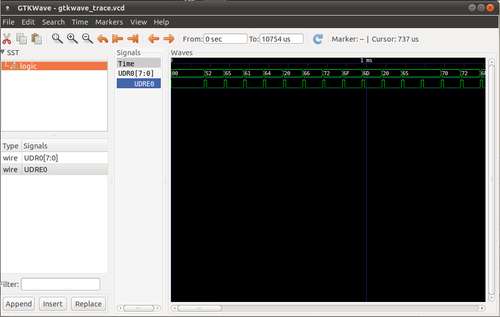 You can drag and drop the Signals on the left into the Signals list by the Waves dialog to make them show up. You can also right click the Signals and change their properties (like making them display in binary).
Step 4How it worked for me
You specify the chip you want to simulate on the command line, and you can give it the object file created by avr-gcc (ELF format) to make it run. I also specified the frequency here as 8Mhz.
run_avr -mcu attiny85 -freq 8000000 -t ~/repos/life/code/avr/tutorials/ctc_ledblink.o
This produced this wonderful output:
AVR_MMCU_TAG_VCD_TRACE 0053:00 - TCCR0B
AVR_MMCU_TAG_VCD_TRACE 004a:00 - TCCR0A
AVR_MMCU_TAG_VCD_TRACE 0038:01 - tick
AVR_MMCU_TAG_VCD_TRACE 0038:02 - reset_timer
AVR_MMCU_TAG_VCD_TRACE 0038:08 - OC0A
Loaded 136 .text
Starting attiny85 - flashend 1fff ramend 025f e2end 01ff
attiny85 init
Creating VCD trace file 'gtkwave_trace.vcd'
avr_timer_configure-0 TOP 31250.00Hz = 256 cycles
avr_timer_configure-0 TOP 488.28Hz = 16384 cycles
avr_timer_configure-0 TOP 488.28Hz = 16384 cycles
avr_timer_configure-0 A 2450.98Hz = 3264 cycles
avr_timer_configure-0 TOP 31250.00Hz = 256 cycles
avr_timer_configure-0 A 156862.75Hz = 51 cycles
simavr: sleeping with interrupts off, quitting gracefully
Now that I had the trace file, I looked at it with gtkwave like in step 3. I used my datasheet and compared the registers with what I expected, and I was setting my timer registers backwards! Whoops! Anyway, it would have taken me a much longer amount of time to solve it without simavr – this way it only took a few minutes to get it up and running and find my problem. I highly recommend you try it out! For more Detail: Debugging AVR code in Linux with simavr using Microcontroller ATTiny85
- How do I obtain simavr?
Clone the repository with git clone git://gitorious.org/simavr/simavr.git as described in the article. - What Ubuntu packages are needed to build simavr?
Install avr-libc, libelf-dev, libglut3-dev, gtkwave, git, and build-essential as listed in the article. - How do I build simavr once cloned?
Change into the simavr directory and run make to build run_avr. - How can I run a test example included with simavr?
Use ./run_avr ../tests/atmega88_example.axf from the simavr directory to run a test example. - How do I simulate an ATTiny85 ELF object at a specific frequency?
Run run_avr with options like -mcu attiny85 -freq 8000000 -t path/to/your.o as shown in the article. - What output does simavr produce that helps debugging?
Simavr creates a VCD trace file (gtkwave_trace.vcd) and prints register and timer trace messages to inspect behavior. - How do I view signal traces generated by simavr?
Open the VCD trace file in GTKWave and drag signals into the Waves view or change their display properties. - Can simavr help find register configuration bugs?
Yes. The article describes using simavr and GTKWave to discover a timer register was set backwards. - What should I do if linking to OpenGL causes compile errors?
The article suggests replacing or fixing the libGL.so symlink in /usr/lib if you encounter -lGL related compile problems.
