
Summary of GPS Clock Prototyping
The author prototyped a GPS-synced clock using a SparkFun 128x64 LCD and an Adafruit 66-channel GPS module, removing buttons to allow automatic time/date setting and aiming for a compact PCB roughly the size of the display. They interfaced with the complex 128x64 library (harder than a 16x2 LCD) and successfully got basic communication with the display and GPS working, with intent to reduce PCB size and cost.
Parts used in the GPS Clock Prototyping:
- SparkFun 128x64 LCD
- Adafruit 66-channel GPS module
A while back I picked up a SparkFun 128×64 LCD and an Adafruit 66-channel GPS module to have a go at making a GPS clock.The great thing about setting the time and date via GPS is that I won’t have to put any buttons on the clock. It’ll set itself, and appear to be completely autonomous.
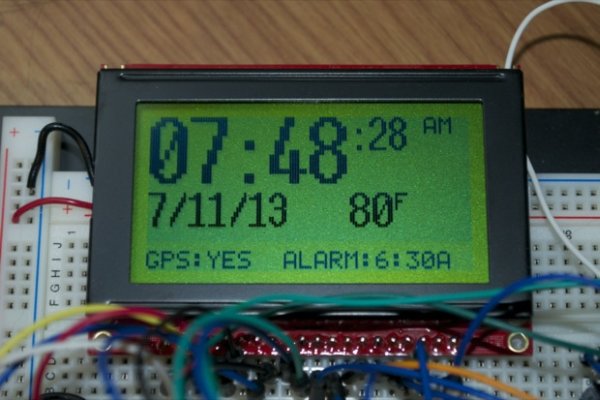
By removing the buttons needed for entering menus and setting the time and date, I can hopefully make the clock that much smaller. Ideally, I don’t want it to be any bigger than the display itself. In addition, shaving a half inch or so off the PCB should save a few bucks when it comes to getting the PCB made.
I finally had a go at trying both the LCD and the GPS module today.
I figured out how to talk to the 128×64 LCD display. It’s orders of magnitude harder to talk to than a standard 16×2 LCD. The library is way more complex. It took a few hours to wrap my head around the basics, but I got it.
For more detail: GPS Clock Prototyping
- What display was used for the GPS clock?
The project used a SparkFun 128x64 LCD display. - What GPS module was used to set time and date?
An Adafruit 66-channel GPS module was used to set the time and date. - Does the clock require buttons to set time and date?
No, the clock uses GPS to set time and date so buttons for that purpose are removed. - Why remove buttons from the clock design?
Removing buttons allows the clock to be more compact and potentially the same size as the display, and reduces PCB size and cost. - How difficult was it to interface with the 128x64 LCD?
Interfacing was significantly harder than a 16x2 LCD; the library is much more complex and took a few hours to understand the basics. - Will shrinking the PCB reduce cost?
Yes, reducing the PCB size by about a half inch should save money when getting the PCB manufactured.
