
Summary of How-To: Super simple serial terminal using ATMEGA128
This article details a DIY project to build a portable dumb terminal using an ATMEGA128 microcontroller, an LCD screen, and an AT keyboard. The device communicates via RS-232 to control headless Linux systems like Linux Mint, making it useful for server rescue or learning microcontroller programming. The setup utilizes a level shifter to convert 12V RS-232 signals to safe 5V levels for the microcontroller.
Parts used in the Super simple serial terminal:
- ATMEGA128 microcontroller
- MAX233 chip (level shifter)
- ET-AVR stamp module
- Stamp board
- 4×20 character LCD
- HD44780 chip
- Common AT keyboard
This hack shows how to make a dumb terminal out of a keyboard, LCD screen, and an 8-bit microcontroller. From time to time, a portable dumb terminal can be handy for when you have to rescue a headless server that’s acting up or if you are building a minicomputer out of a WRT, or if you just want to learn how to run a keyboard and LCD screen with a microcontroller. This super simple serial terminal will use RS-232 to control a headless linux system. Additionally, you might want to check into some of the command line interface programs that allow web browsing, AIM and IRC chatting and more directly from the terminal, but nothing beats being able to track your pizzas with this device.
The Linux system in question here will be Linux Mint. It’s a young distro based on Ubuntu that’s gaining a lot of attention lately, though the principles can be used for other Linux distros.
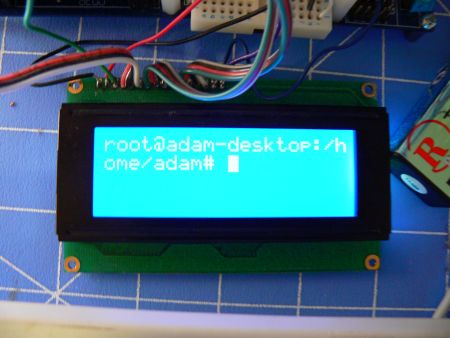
The Hardware:
For this How-To we’ll be using an ATMEGA128 running at 16MHz. Since this device will be communicating through RS-232, we’re going to need a level shifter. RS-232 uses 12 volt signals which will fry our 5V microcontroller. To fix this problem, we’re going to use a MAX233 chip.
I’m using the ET-AVR stamp module with the stamp board for this project. This dev board is cheap and has the essentials built in. I’ll be using the on board power supply and the MAX232 RS-232 level converter.
The LCD chosen for this project is a very common 4×20 character LCD. These LCDs are really easy to control with a microcontroller(PDF), and even without one(PDF). The HD44780 chip allows for several bit widths for parallel programming, as well as commands, and even custom characters. This LCD has nice software library, which makes it even easier to use.
A more attractive choice would have been to go with a graphical LCD, which are also supported by our library, however, we only had the character LCD on hand.
A common AT keyboard will be used for character input, again these aren’t hard to find, you probably have an extra one laying around somewhere .
If you don’t want to buy the ET-AVR, you can build the circuit for this hack yourself. (Click for larger pic).
For more detail: How-To: Super simple serial terminal using ATMEGA128
- What is the main purpose of this project?
To create a portable dumb terminal for rescuing headless servers or learning microcontroller programming. - Which operating system is recommended for this setup?
Linux Mint is the specific distro mentioned, though principles apply to other Linux distros. - Why is a level shifter required for this project?
RS-232 uses 12 volt signals that would fry the 5V microcontroller without conversion. - What chip is used to handle the RS-232 level shifting?
A MAX233 chip is used to fix the voltage difference between the serial port and the microcontroller. - Can I use a graphical LCD instead of the character LCD?
Yes, graphical LCDs are supported by the library, but a character LCD was used because it was on hand. - What type of keyboard is utilized for character input?
A common AT keyboard is used for inputting characters. - Is it possible to build the circuit without buying the ET-AVR module?
Yes, you can build the circuit yourself if you do not want to buy the ET-AVR. - What communication protocol does this terminal use?
The terminal uses RS-232 to control the headless linux system.
