
Summary of MicroPython PCF8591 DACtest
This article details a DIY project to implement Digital-to-Analog Conversion (DAC) using an ESP8266 microcontroller and a PCF8591 module. The author guides readers through preparing the hardware, flashing MicroPython firmware onto a Wemos D1R2, and wiring the components via I2C. It includes instructions for configuring the module's address and provides Python scripts to generate sawtooth waveforms, which can be verified using either an oscilloscope or a digital multimeter.
Parts used in the MicroPython PCF8591 DACtest:
- Wemos D1R2 (or D1mini) ESP8266
- PCF8591 module
- DMM or oscilloscope
- Laptop or PC with Thonny IDE (or uPyCraft)
- USB cable
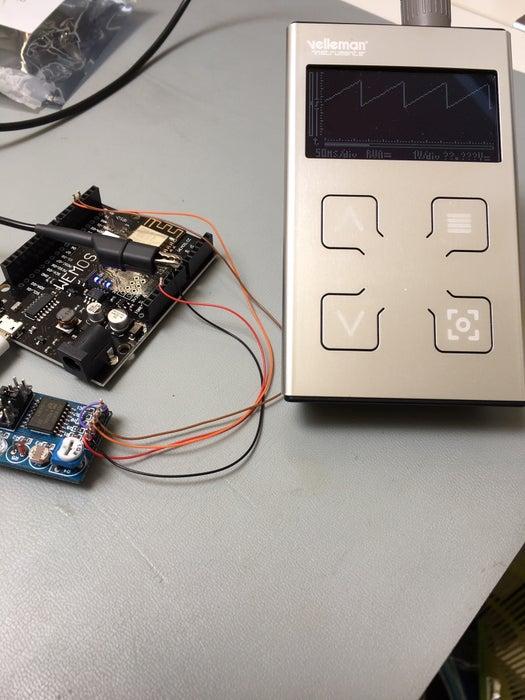
I bought this book to improve my Micropython-skills: MicroPython for ESP8266 Development Workshop by Agus Kurniawan. This book is a very good start, the I2C project uses a PCF8591 module. But no DAC programming example so I had to figure that out by myself 🙂 .
Supplies:
What do we need:
– Wemos D1R2 (or D1mini) ESP8266 flashed with the latest MicroPython found here
-PCF8591 module: found here
-DMM or oscilloscope (better: this project generates a sawtooth waveform)
– Laptop or PC with Thonny IDE (or uPyCraft ) -USB cable to connect the D1R2 to the computer
Step 1: Preparing the PCF8591 Module , Flash WemosD1R2 With MicroPython
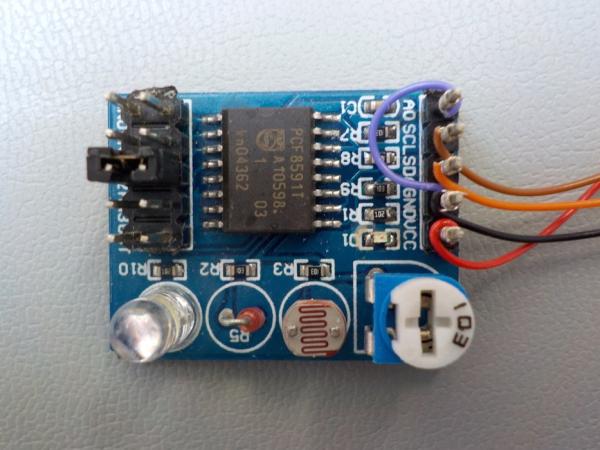
Before testing I inspected the module and found the A0 adress connection unwired and present on the input connector. My script uses adress 72(decimal) so this pin must be connected to GND.
See Datasheet for all info. The picture shows the purple wire connecting GND and A0.
The Wemos D1R2 must be flashed with MicroPython. Ahmed Nouira did a fantastic job and explained everything here. Working with Micropython can be done via the REPL and a terminal emulator but it’s easier with an IDE: I use Thonny IDE on Linux .
All info on Thonny IDE is found here. The RNT blog explains also how to use uPyCraft, another IDE for Windows users ( I tried but my old Linuxlaptop didn’t buy uPyCraft …).
Step 2: Connecting the D1R2 to the PCF8591
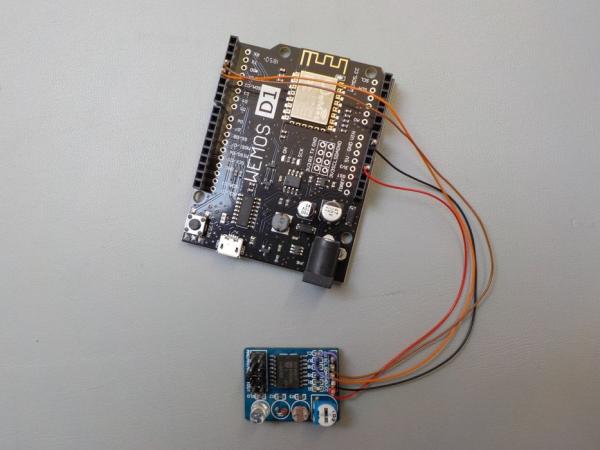
I removed all jumpers from the PCF8591 module, they connect the pot, LDR, thermistor to the inputs and the analog output to a LED. If the DAC output is loaded with a 10k resistor it will make the output drop so why putting a LED there?
Here’s the Wiring list:
WemosD1R2 PCF8591
3V3 Vcc
GND GND
SCL(D1) SCL
SDA(D2) SDA
make sure the jumper wire is connected A0 to GND if you try my (silly) script 🙂
Step 3: Load Script and Testing
If you’re using Thonny IDE you can download DAC.py and DAC1.py, and load them into the D1R2
for testing. If You’re using the REPL enter line by line, it’s a very easy and short script.
DAC.py is a simple sawtooth generator ( verify by scope) while DAC1.py has a 1s delay built-in so you can use a DMM.
Have Fun !
Source: MicroPython PCF8591 DACtest
- What is the purpose of connecting pin A0 to GND?
The script uses address 72 decimal, requiring the A0 pin to be connected to GND. - How should jumpers on the PCF8591 module be handled?
All jumpers must be removed to prevent loading the DAC output with resistors or LEDs. - Which IDEs are recommended for working with MicroPython?
Thonny IDE for Linux users and uPyCraft for Windows users are suggested options. - What is the function of the DAC.py script?
DAC.py acts as a simple sawtooth generator that requires verification by an oscilloscope. - When should I use the DAC1.py script instead?
Use DAC1.py if you need to measure the output with a DMM because it has a built-in 1-second delay. - Can this project work without an oscilloscope?
Yes, you can verify the output using a DMM if you utilize the DAC1.py script. - Where can I find information about the Thonny IDE?
Information on Thonny IDE is available via the provided link in the article text. - Why did the author remove the jumpers from the module?
Jumpers connect components like LEDs or pots that would cause the output voltage to drop.
