
Summary of On/Off Controller – Interfacing Touch LCD LC7981 using ATMega Microcontroller
Concept: implement an on/off temperature controller using an AVR (ATmega) with a touch LCD LC7981. The controller switches an output fully on or off based on measured temperature versus setpoints, with hysteresis to prevent rapid chattering. User enters on/off thresholds (0–99 corresponding to 0–5V) and sampling interval (1–1000 ms) via serial or keypad; system displays current reading and state on the LCD. Use 10-bit ADC values (no floats), document hardware, RC test network, measurements, flowcharts, ports, and include source code and user manual.
Parts used in the Touch LCD LC7981 using ATMega project:
- ATmega microcontroller (AVR Evaboard)
- Touch LCD LC7981
- 10-bit ADC input source (temperature sensor or voltage divider)
- Serial interface (UART) or external keypad for user input
- Resistors (for sensor/divider and RC network)
- Capacitor (for RC network and capacitor that charges/discharges in principle)
- RC network (1st order RC used for output testing)
- Power supply (5V)
- Output transistor or driver (to switch load on/off)
- Connecting wires and prototyping board
Concept of Touch LCD LC7981 using ATMega
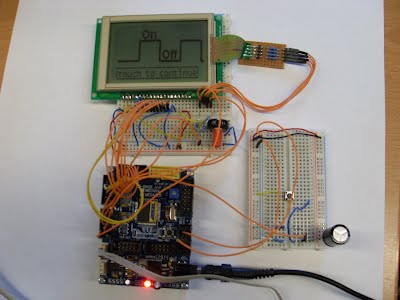
Specification
Program requirements:
– Program an on/off controller with your AVR Evaboard
– On the start of the program let the user enter the on/off values and the time of checking using the serial port or an external connected keypad
– The on/off values must be entered in degrees Celsius (0 = 0V-99 = 5V) and the time of checking in ms(1-1000)
– Make it possible to correct typing mistakes
– Display the on/off state and the recent measured value on your LCD display
– Use the 10-bit AD result to calculate with, do not cut it to an 8-bit value
– Use inline documentation and the good style programming rules
– Do not use float/double or other fractured number variables
Simulation/Measurements:
– Connect an 1st order RC network of your choice to your controller output pin and check, if your controller is working
– Draw/record a diagram with a program of your choice for a measurement where your system temperature goes up and is cycling between on and off state, then is disturbed and after this goes back to the normal cycling states
Documentation:
– Make a small users manual for using your on/off controller
– Document your basic program operation by using one or more Nassi – Shneiderman or flow chart diagram(s)
– Document also, what ports/pins you are using in your program
– Include your measurements, the diagram and the used RC network description. Explain the parts of the measured diagram
– Include the source code in your documentation in a readable monospace font
Principle of this on/off controller
- How is the on/off controller output determined?
The output is on when measured temperature is below the set-point and off when above, with hysteresis applied to prevent chattering. - How are set values entered into the controller?
Setpoints and checking time are entered at program start via the serial port or an external keypad. - What units are used for on/off values and sampling time?
On/off values are in degrees Celsius mapped 0=0V to 99=5V; checking time is in milliseconds from 1 to 1000. - Can typing mistakes be corrected when entering values?
Yes, the program must make it possible to correct typing mistakes during entry. - How should ADC data be used in calculations?
Use the full 10-bit AD result for calculations; do not truncate to 8 bits. - Are floating point variables allowed in the program?
No, the specification forbids float, double, or other fractional number variables. - What must be displayed on the LCD?
The LCD must display the on/off state and the most recent measured value. - How is the controller tested or simulated?
Connect a first order RC network to the controller output and record measurements showing cycling and disturbance recovery. - What documentation is required with the project?
Include a user manual, flowchart(s), port/pin usage, RC network description, measurement diagrams, and readable source code. - What is the charging/discharging principle used for demonstration?
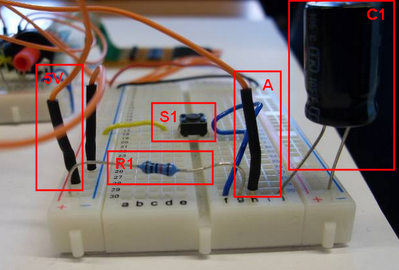
A capacitor charges toward a chosen maximum while output is on and discharges toward a chosen minimum when output is off, creating the on/off cycling.
