
Summary of Programmer UsbAsp using AVR microcontroller
The author built a custom USBasp AVR programmer to replace a previous model and experiment with a software USB stack. While programming speed is comparable to other models, initialization takes slightly longer via avrdude. The design includes modifications such as a custom pinout, dual connectors (with an initial wiring error), two reset buttons, a ground loop for measurements, removed status LEDs, and added fuse/switch power controls for the target.
Parts used in the USBasp Programmer:
- AVR microcontroller
- USB connector
- 6-pin single row header (programming connector)
- Second connector for programming the programmer
- Two reset buttons
- Ground loop
- Fuse (100mA)
- Switch with LED
This morning (2009-12-31) I built my 4th AVR programmer. USBasp. I built this one because I wasn’t completely happy with my 3rd programmer and because I want to play with a software USB stack. I do know that it works (I just reprogrammed 2 old projects just to try it out. Programming seems to be a little bit faster than with my Tuxgraphicsprogrammer, but they are both shorter than 10s, speed is not really an issue.
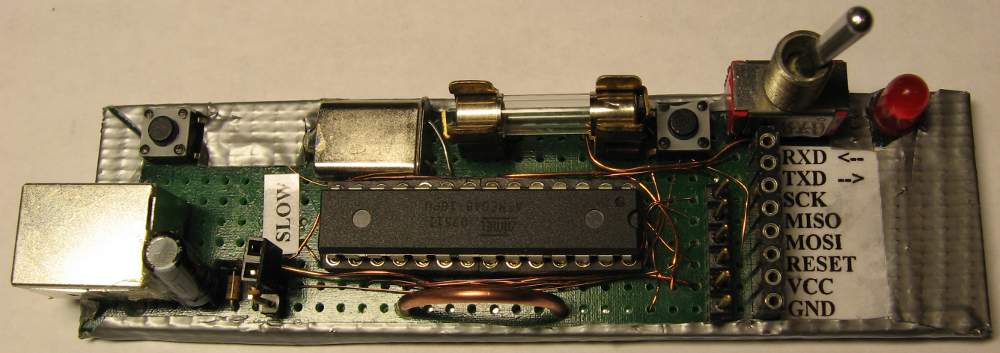
Avrdude needs a few seconds more to initialize this programmer (Each time before programming). Another little quirk of this programmer is that if I change the USB port it is connected to, to a port which I never used for this programmer, then windoze wants to reinstall the usbasp driver. To suit my own stubborn needs I made a few little changes to the original schematic:
- I used my own pinout for the programming connector. (6pin single row header.)
- Added a 2nd connector to program the programmer. (I made a fault with this by crossing the MISO and MOSI lines between the 2 connectors, the connectors just should be 1:1.)
- Added 2 reset buttons. (1 for the programmer(which I later discovered is useless) and 1 for the connected project.)If there is something wrong with the programmer it does not help to reset the programmer because the fault always seems to be on te PC part of the cable. This means you have to unplug and replug the cable. Fortunately this does not happen very often.
- Added a big ground loop for easy attachment of measurement equipment.
- Removed green and red leds. Don’t even know what they are for, the red one is probably on in the 3 seconds the programmer is programming a microcontroller.
- Added a fuse (100mA) and a switch (instead of jumper) with led for powering the target.
For more detail: Programmer UsbAsp using AVR microcontroller
- Why did the author build this specific USBasp programmer?
The author built it because they were not completely happy with their third programmer and wanted to play with a software USB stack. - How does the programming speed compare to the Tuxgraphics programmer?
Programming seems a little bit faster than with the Tuxgraphics programmer, though both are shorter than 10 seconds so speed is not really an issue. - What happens when changing the USB port on Windows?
If connected to a new port never used before, Windows wants to reinstall the usbasp driver. - Is the reset button for the programmer useful?
No, the reset button for the programmer was discovered to be useless because faults usually occur on the PC part of the cable. - What mistake was made with the second connector?
The author crossed the MISO and MOSI lines between the two connectors instead of connecting them 1:1. - What components were removed from the original schematic?
The green and red LEDs were removed because the author did not know what they were for. - What was added to control power for the target?
A fuse rated at 100mA and a switch with an LED were added instead of a jumper to power the target. - What is the purpose of the big ground loop?
The big ground loop was added for easy attachment of measurement equipment.
