
Summary of RIVERDI IOT DISPLAYS FOR NEXT LEVEL IOT PROJECTS
This Riverdi IoT display is a Python-programmable, ESP32-powered device designed for high-quality, low-power projects. It features three 5-inch versions with 800×480 resolution and SPI interfaces. The system uses the Bridgetek BT81x graphics controller for HMI tasks and supports Zerynth firmware for cloud connectivity via simple code. Expansion is facilitated through two Grove connectors and two MicroBUS sockets compatible with SeedStudio Twigs and MikroElektronika Click Boards, allowing integration of various sensors and modules.
Parts used in the Riverdi IoT Display:
- ESP32 microcontroller
- Bridgetek BT81x (EVE3) graphics controller
- Zerynth license
- Grove connectors
- MicroBUS sockets
- SeedStudio Twigs
- MikroElektronika Click Boards
- Temperature and humidity sensors
- Text to speech converters
- UV sensors
- Voltage regulators
- RF transceivers
- Buttons and switches
- Motor control modules
Designed and produced with everything an IoT engineer might need, the python-programmable ESP32– powered IoT display by Riverdi is an expandable, cloud-ready GUI with a sleek design, low power consumption and top of the line graphical capabilities for high-quality IoT projects.
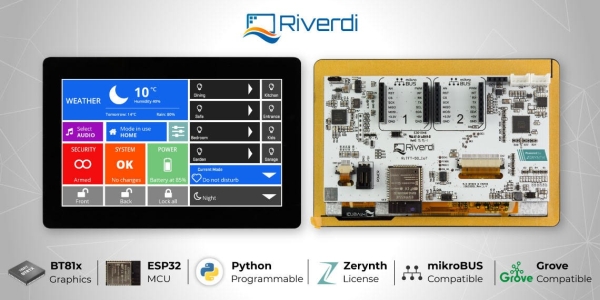
The Riverdi IoT displays comes in 3 different versions – 5″ resistive touch panel, 5″ capacitive touch panel, and 5″ Ux touch panel (with a decorative black or white cover glass) – each of which has great features like 800×480 resolution, SPI interface and 510 cd/m2 brightness. Each display can be programmed without any limitation in Python or C/Python with the Integrated Zerynth license onboard. With about 15 lines of codes, you should be able to connect a sensor to the cloud, thanks to the simplicity of Python and the efficiency of Zerynth toolchain. The Zerynth toolchain offers hardware encryption, multi-threaded applications, firmware over the air updates, advanced power management, Blockchain libraries, among many others.
The system architecture is simplified for human-machine interfaces (HMI) by the Bridgetek graphics controller, BT81x (a part of the family of advanced graphics controllers) or EVE3 on the Riverdi IoT display which is responsible for the audio, display and touch functionalities including an object-oriented architectural approach that goes from creating display to rendering graphics.
Every IoT display has two Grove connectors and two MicroBUS sockets that offer a simple and easy way to expand the display through many SeedStudio Twigs and MikroElektronical Click Boards. On each click board and Twig, you can choose any functionality that you want to be added to your display: temperature and humidity sensors, text to speech converters, UV sensors, voltage regulators, RF transceivers, buttons, switches, and motor control. In no time, you’d have your customized IoT project in your hands.
Read more: RIVERDI IOT DISPLAYS FOR NEXT LEVEL IOT PROJECTS
- How can I program the Riverdi IoT display?
You can program it without limitations using Python or C/Python with the onboard Integrated Zerynth license. - What are the available versions of the Riverdi IoT display?
The display comes in three versions: 5″ resistive touch panel, 5″ capacitive touch panel, and 5″ Ux touch panel. - Does the display support cloud connectivity?
Yes, you can connect a sensor to the cloud with about 15 lines of code thanks to the efficiency of the Zerynth toolchain. - What graphics controller is used in this system?
The system uses the Bridgetek graphics controller, specifically the BT81x or EVE3, for audio, display, and touch functionalities. - Can I expand the functionality of the display?
Yes, the system has two Grove connectors and two MicroBUS sockets that allow expansion via SeedStudio Twigs and Click Boards. - What types of sensors can be added to the project?
You can add temperature and humidity sensors, UV sensors, voltage regulators, RF transceivers, buttons, switches, and motor control modules. - Does the Zerynth toolchain offer hardware encryption?
Yes, the Zerynth toolchain offers hardware encryption along with multi-threaded applications and firmware over the air updates. - What is the screen resolution of the Riverdi IoT display?
Each display version features an 800×480 resolution.
