
Summary of Synchronizing Fireflies using Microcontroller ATtiny13
This article details a hardware project demonstrating firefly synchronization using 25 microcontroller units. Each unit consists of an ATtiny13 chip, an LED, and an LDR arranged to detect neighbors' flashes. The system simulates natural self-organization where fireflies adjust their blinking frequency based on light detection until they synchronize globally.
Parts used in the Synchronizing Fireflies Project:
- 25 x 1K Ohm resistor
- 25 x 100 Ohm resistor
- 25 x LDR (Light Dependent Resistor), e.g. M9960
- 25 x LED, 1.7V, 20mA
- 25 x ATtiny13 microcontroller
- 25 x sockets
- Prototyping board
- Wire
- Soldering iron
- Solder wire
- Breadboard
- AVR programmer
- 5V Power supply or 4 AA rechargeables
- WinAVR software
Have you ever asked yourself how do hundreds and thousands of fireflies are able to synchronize themselves? How does it work, that they are able to blink all together without having a kind of boss firefly?
This instructable gives a solution and shows how this synchronization can be achieved.
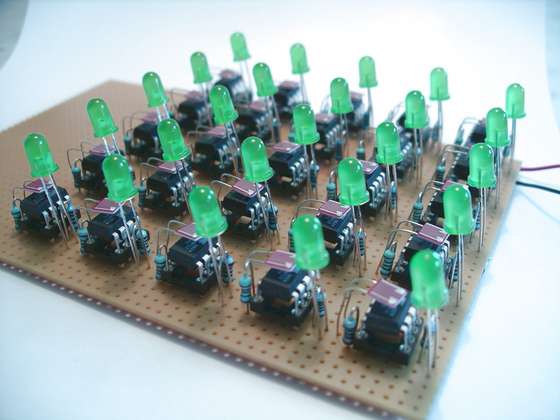
I have always been fascinated by self organization of insects. A couple of years ago I wrote a Java-Applet that simulates a square of thousands of fireflies. It worked well and was fun to watch. This time I have done it in hardware.
Credits for inspirations goes to Keso and his Jar of fireflies http://www.instructables.com/id/E7U5HYMSVIEWP86SAL/.
Any comments or corrections are welcome.
Update 2008-09-12: There is a new version of the fireflies online at Synchronizing Firefly Howto. It has a custom PCB for every firefly. And you can buy a kit at the Tinker Store.
Here is the video:
Step 1 How it works
And what is it good for? It is used to attract other specimen. With all the blinking in sync it is much easier to find a partner.
One of the easiest algorithm to explain this behaviour goes like this: You have a value that holds the power to flash. As time passes this power will slightly raise. If the power reaches a certain level, the firefly flashes and the power is consumed. The rate at which the power raises is nearly the same for all fireflies. So they have the same frequency but not the same point in time to flash.
While slowly charging with power the firefly is able to detect a flash of another firefly nearby. It adds then a higher value to its power value. Some kind of power boost, if you wish. That means the next flash will occur earlier than the one before. And next one even earlier, until these two are flashing exactly at the same point in time and with the same speed.
You can find more on this algorithm e.g. here:
Firefly Synchronization Ad Hoc Networks
The Hardware
I decided to use my previous instructable (Programmable LED) as starting point. It consists of a microcontroller, an LED and an Light Dependent Resistor (LDR). That should be enough to simulate a simple firefly. It is able to flash, to see and to count.
I just had to modify the program and the orientation of the LED and the LDR. LED and LDR must been placed in a way that one firefly circuit is able to interfere with another. So one LDR must be able to “see” the LED of another firefly. And it should not only see one neighbour but more. That can be done by letting the LED and the LDR pointing up from the ground and use some white paper to reflect the flashes.
Step 2 Materials and Tools
- 25 x 1K Ohm resistor
- 25 x 100 Ohm resistor
- 25 x LDR (Light Dependent Resistor), e.g. M9960
- 25 x LED, 1.7V, 20mA (reg, green, blue, what ever you like)
- 25 x ATtiny13, 1KB flash RAM, 64 Bytes RAM, 64 Bytes EEPROM
- 25 x sockets
- prototyping board
- wire
The cost for one firefly should be about 1.50 Euro if you get some rabate when ordering in larger numbers.
The sockets are only neccessary, if your programs are buggy. If you feel confident with your development skills, you can spare them. 😉
You can surely replace the ATtiny chip with any other microcontroller as PIC, PICAXE or BasicStamp to name a few. Just take the smallest and cheapest you can get. I go with Atmel as I had the programmer already and my first project with a ATtiny13 worked just fine.
Tools
- Soldering iron
- Solder wire
- Breadboard
- AVR programmer
- 5V Power supply or
- 4 AA rechargeables
Software
- WinAVR
Step 3 The Circuit
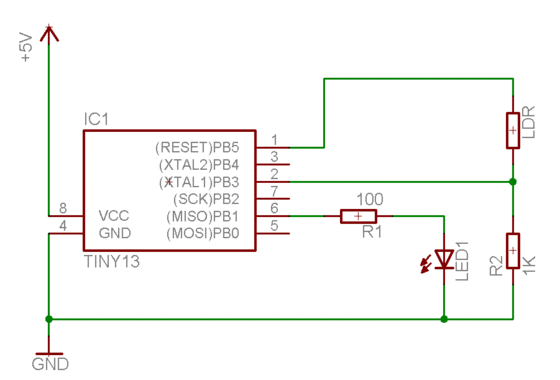
The circuit is not very complicated as you see. The LED is connected to an I/O port, the LDR to an ADC port (to enable seeing light differences, not only black and white).
For more details on the circuit see here: Programmable LED.
With my last instructable I got some comments about using the LED as light sensor. Yes, using the LED as a sensor. I gave it a try and it basically worked, I could detect light and shadow.
But I was not able to do use it in a more analog way as I was using the LDR before. At least I was not able.
For more Detail: Synchronizing Fireflies using Microcontroller ATtiny13
- How do fireflies synchronize without a boss?
Fireflies start with random blinking but slowly synchronize with nearest neighbors by detecting flashes and boosting their internal power value to flash earlier. - What is the purpose of synchronizing firefly blinks?
Synchronization makes it easier for fireflies to find a partner when all are blinking in the same cycle. - Can I use components other than the ATtiny13?
Yes, you can replace the ATtiny chip with any other small and cheap microcontroller like PIC, PICAXE, or BasicStamp. - Do I need sockets for the microcontrollers?
Sockets are only necessary if your programs are buggy; confident developers can spare them. - How should the LED and LDR be oriented?
The LED and LDR must point up from the ground and use white paper to reflect flashes so one circuit can interfere with others. - Is it possible to use an LED as a light sensor instead of an LDR?
Using an LED as a sensor works for detecting light and shadow but does not allow for the analog detection capabilities provided by an LDR. - What is the estimated cost per firefly?
The cost for one firefly is about 1.50 Euro if ordering larger numbers to get a rebate. - Which software is required for this project?
The project requires WinAVR software.
