
Summary of 4×4 Matrix Key-board Interfacing with ATmega32
This beginner project interfaces a 16-key (4x4) matrix keypad with an ATmega32 microcontroller using only one 8-pin port, optimizing pin usage. The system displays "WELCOME" on the first line of an LCD and shows the pressed key's character on the second line. A Proteus simulation demonstrates the functionality, with an optional LED for additional control.
Parts used in the Keypad Interfacing Project:
- ATmega32 microcontroller
- 4x4 matrix keypad
- LCD display
- LED
- ISIS Proteus Simulation software
Here is a project for beginners to interface a 16-key (4×4) keypad with ATmega32 using 8-pins i.e. one port of the microcontroller. This is useful particularly where we need more keys but don’t want to spend more uC pins for interfacing.
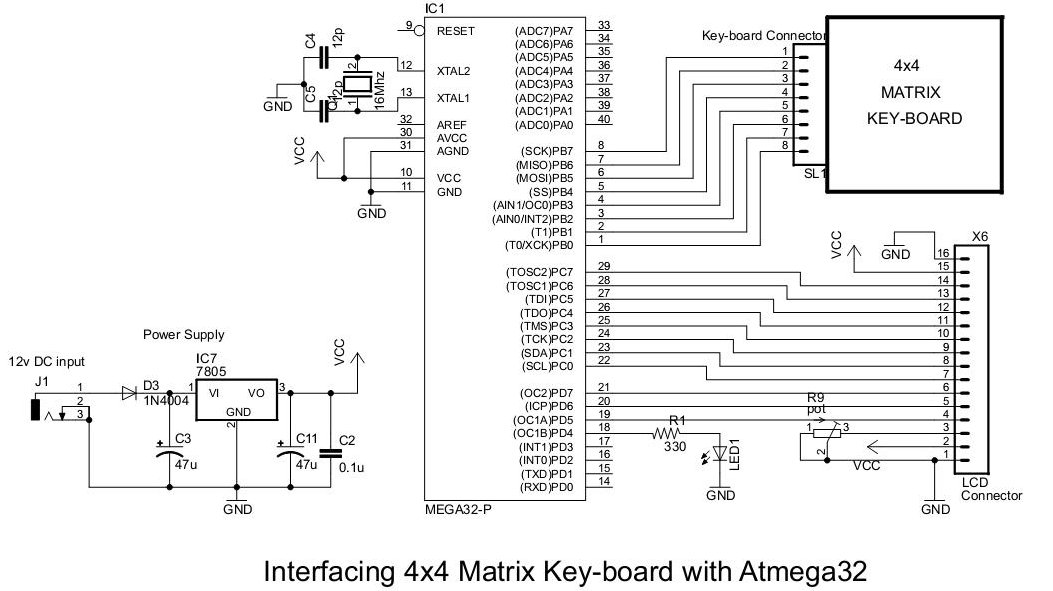
The 4×4 keypad is a standard one available in the market. I’ve used here one from my earlier project. The LED shown in the schematic is just extra, which can be used anyway you like.
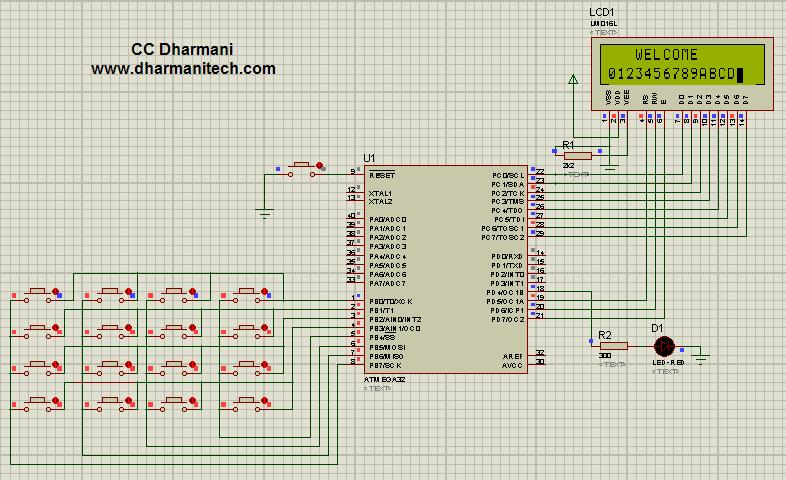
Here, the mega32 reads the code of key pressed and sends relevant character to display on LCD 2nd line. The first line displays ‘WELCOME’ all the time.
The figure below shows ISIS Proteus Simulation of this code:
Read more : 4×4 Matrix Key-board Interfacing with ATmega32
- How many pins does this project use?
The project uses one 8-pin port of the microcontroller. - What is displayed on the first line of the LCD?
The word WELCOME is displayed all the time. - Where is the pressed key character shown?
The relevant character appears on the second line of the LCD. - Can the LED be used differently?
Yes, the LED can be used in any way you like. - What type of keypad is used in the article?
A standard 16-key (4x4) matrix keypad is used. - Does the microcontroller send data to the display?
Yes, it sends the code of the key pressed to the display. - Is this project suitable for beginners?
Yes, it is described as a project for beginners. - What tool was used for simulation?
ISIS Proteus Simulation was used to demonstrate the code.
