
Summary of AT89C51 8051 GRAPHIC LCD ANIMATION
This project utilizes an AT89C51 microcontroller to animate images on a Graphic LCD. Upon applying voltage, the display sequentially shows a map of Turkey, followed by the Turkish flag, a portrait of Mustafa Kemal Atatürk, and finally art-related content. The circuit divides the LCD into two sections (left and right) and uses P2 as the data output port while connecting CS1 and CS2 to P1_0 and P1_1 respectively.
Parts used in the 8051 Graphic LCD Animation:
- AT89C51 Microcontroller
- Graphic LCD
- P2 Port (Data Output)
- P1_0 Pin (CS1 Connection)
- P1_1 Pin (CS2 Connection)
- Keil Source Code
- Proteus ISIS Simulation Schematic
GLCD Animation circuit voltage is applied to the currently displayed map of Turkey comes first. Subsequently, the Turkish flag and a picture of Mustafa Kemal Atatürk, the next step is to come. Art world… Electronics Projects, AT89C51 8051 Graphic LCD Animation “8051 example, avr project, keil example, microcontroller projects, “
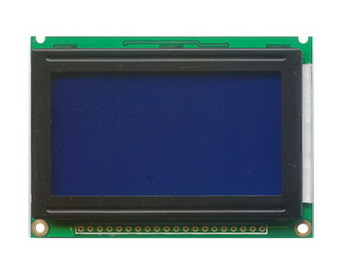
GLCD Animation circuit voltage is applied to the currently displayed map of Turkey comes first. Subsequently, the Turkish flag and a picture of Mustafa Kemal Atatürk, the next step is to come. Art world will begin to come after arrival.
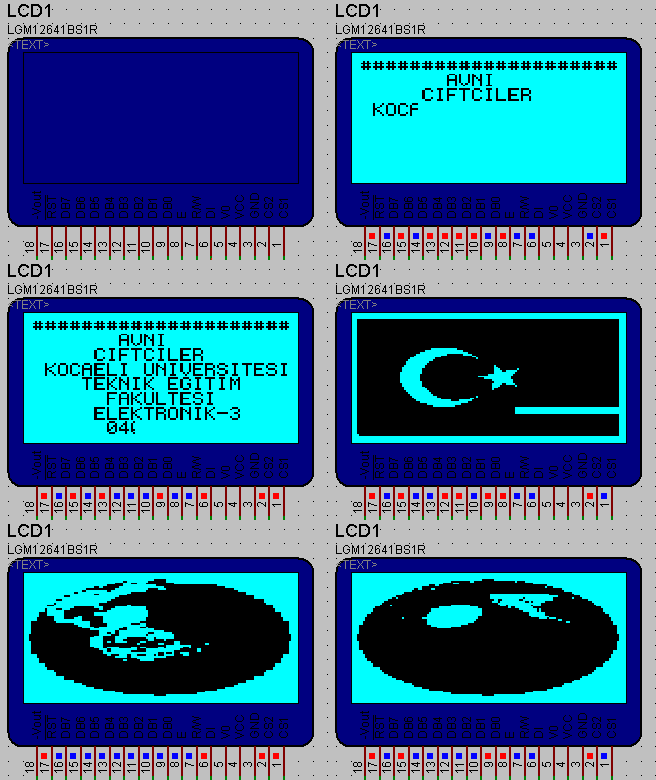
Circuit operation: Graphic LCD as the most important feature point-based study. So, as in LCDs text and text can be printed as well as shape can be drawn. Half-P2 as data output port ayarlanmıştır.p1_0 end graphic LCD’s CS1, CS2 end P1_1 port is connected to the graphic LCD. Graphic Lcd structure is divided into 2 sections, including the right and left.
LCD ANIMATION SCHEMATIC
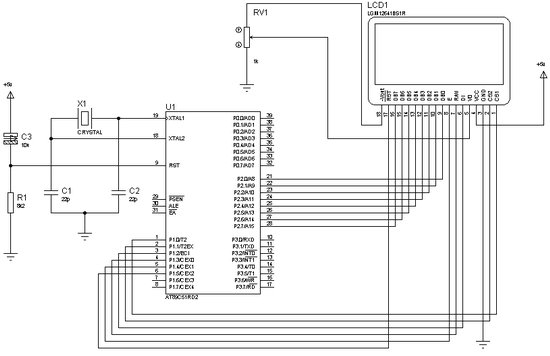
Source: AT89C51 8051 GRAPHIC LCD ANIMATION 8051 Graphic LCD Animation proteus isis simulation schematic keil source code: 8051-graphic-lcd-animation.rar author:Avni ÇiFTÇiLER
- What is displayed first when voltage is applied?
The map of Turkey is displayed first. - Can shapes be drawn on this LCD?
Yes, shapes can be drawn in addition to printing text. - Which port is used for data output?
P2 is set as the data output port. - How is the Graphic LCD structured?
The structure is divided into two sections, including the right and left. - Which pins connect to CS1 and CS2?
P1_0 connects to CS1 and P1_1 connects to CS2. - What image appears after the Turkish flag?
A picture of Mustafa Kemal Atatürk appears next. - What follows the portrait of Atatürk?
Art world content begins to appear after his portrait. - Where can the source code be found?
The source code is available in the file named 8051-graphic-lcd-animation.rar.
