
Summary of Digital Book Cricket with ATtiny 85
This project implements a digital "Book Cricket" game using an ATtiny85 microcontroller and Arduino IDE. Designed for simplicity, it features a 16x2 LCD display managed by a HEF4094 shift register to minimize pin usage. The system generates random numbers via ADC noise, accepts user input through two push buttons (Reset and Hit), and regulates power with a 7805 voltage regulator.
Parts used in the Digital Book Cricket Game:
- Breadboard
- 16*2 LCD
- 7805 regulator
- Push Button
- 47K ohm resistor
- 100 ohm resistor
- 470 ohm resistor
- HEF4094BP shift register
- Attiny 85V microcontroller
The project described here is a digital implementation of “book cricket game” which students normally use to play in their childhood time. The heart of the project is 8 bit MCU from AVR family called ATtiny85. ATtiny85 are small and cheap microcontrollers which are convenient for running simple programs with low footprint. The software used for programming the MCU is Ardunio which is a popular open source IDE.

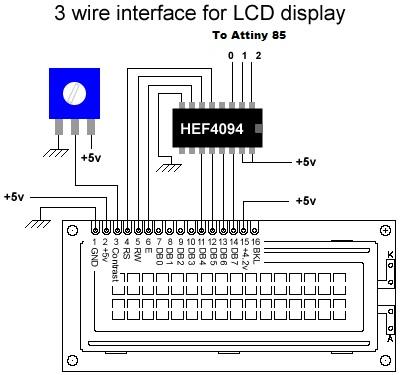
The overall design is kept to a least for simplicity and ease to use. The main components used in the circuitry are 16X2 LCD which is used to display the characters in 2 lines with maximum of 16 characters in one line, a serial in parallel out shift register HEF4094, ATtiny85, 2 push buttons and 7805 voltage regulator which regulates the voltage supply to maximum of 5 volts. Shift register HEF4094 is used because normally when LCD is used it requires 7 connections to the pins on the display. But if shift register is used the number of connections to the MCU can be reduced to only 3 wires.


WORKING
Before starting with the game some random numbers are required. These random numbers can be generated by keeping the ADC channel of the ATtiny85 floating, which means no connection the pin. So that noise is generated and by using the mod 10 value of the noise, integers from 0-9 are generated. (Also check this circuit for random number generation using 7 segment)
For displaying the data on the LCD, arduino 3 wire LCD libraries are used because it provides an easy way to write the characters on LCD.
2 push switches are used to handle the input from the user. One is RESET switch which is used to reset the MCU and the other is HIT switch through which all the calibration and playing is done.
Components
1x Breadboard
1x 16*2 LCD
1x 7805 regulator
2x Push Button
1x 47K ohm
1x 100 ohm
1x 470 ohm
1x HEF4094BP
1x Attiny 85V
For more detail: Digital Book Cricket with ATtiny 85
- What is the heart of this project?
The heart of the project is the 8 bit MCU from AVR family called ATtiny85. - How are random numbers generated in the game?
Random numbers are generated by keeping the ADC channel of the ATtiny85 floating to capture noise, then using the mod 10 value of that noise. - Why is the HEF4094 shift register used?
The shift register reduces the number of connections to the MCU from 7 wires to only 3 wires when using the LCD. - Which software is used for programming the MCU?
The software used for programming the MCU is Arduino, which is a popular open source IDE. - What is the function of the 7805 voltage regulator?
The 7805 voltage regulator is used to regulate the voltage supply to a maximum of 5 volts. - What roles do the two push buttons serve?
One button is a RESET switch to reset the MCU, and the other is a HIT switch used for calibration and playing. - How many characters can be displayed on one line of the LCD?
The 16X2 LCD displays characters in 2 lines with a maximum of 16 characters in one line. - Which library is used for displaying data on the LCD?
Ardunio 3 wire LCD libraries are used because they provide an easy way to write characters on the LCD.
