
Summary of DS1820 Temperature Controller using atmega8515 microcontroller
This project displays temperature (0.06°C resolution) from a DS1820 sensor on a 16x2 LCD, supports positive temperatures only, and provides three buttons to increment, decrement, and store an alarm temperature in EEPROM on an ATmega8515. The alarm output toggles a port pin when current temperature is below the alarm. The system debounces buttons and reads the DS1820 via a 1-Wire interface, converting scratchpad data to a displayable temperature.
Parts used in the DS1820 Temperature Controller:
- ATmega8515 microcontroller
- DS1820 (DS18S20) temperature sensor
- 16x2 LCD display
- Pushbutton switch: UP
- Pushbutton switch: DOWN
- Pushbutton switch: ENTER
- Resistors (for pull-ups/limits as required by buttons and sensor)
- Crystal oscillator 8 MHz
- Wiring and PCB or breadboard
- Power supply (suitable for ATmega8515 and peripherals)
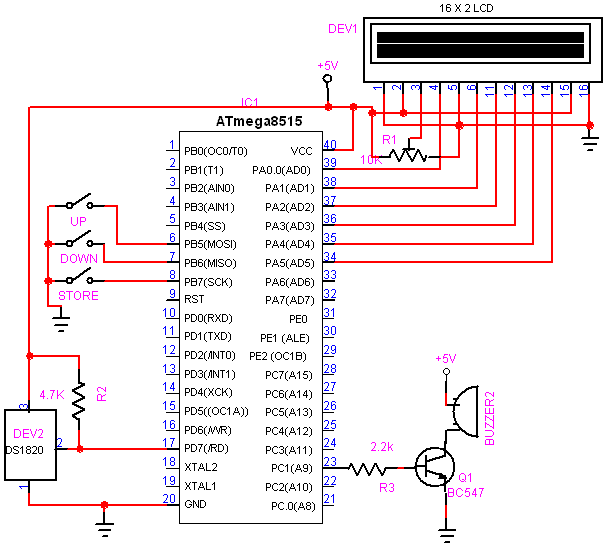
This project displays the temperature on an LCD display with an resolution of 0.06degrees. DS1820 is used for sensing the temperature. It can measure temperature range from -55deg to +125deg. But i take care of only the possitive temperature.
There are 3 switches to change the alarm temperature, the user can increment the Alarm temperature by pressing the UP button and they can decrease the Alarm temperature by pressing the Down button. The Enter button is used to store the Alarm temperature on the microcontroller EEPROM. So that the value retains even after power failure.
Circuit Diagram
Program
‘—————————————————————————————–
‘copyright : (c) 2008-2009, AVRprojects.info
‘purpose : DS1820 / DS18S20 Temperature Indicator
‘—————————————————————————————–
$regfile = “m8515.dat” ‘ specify the used micro
$crystal = 8000000 ‘ used crystal frequency
Declare Sub Read1820
Config 1wire = Portd.7
Config Lcd = 16 * 2
Config Lcdpin = Pin , Db4 = Porta.2 , Db5 = Porta.3 , Db6 = Porta.4 , Db7 = Porta.5 , E = Porta.1 , Rs = Porta.0
Upbtn Alias Pinb.5
Downbtn Alias Pinb.6
Enterbtn Alias Pinb.7
Alarm Alias Pinc.3
Config Upbtn = Input
Config Downbtn = Input
Config Enterbtn = Input
Config Portc = Output
‘Temp variables
Dim Bd1 As Byte
Dim Bd2 As Byte
Dim Bd7 As Byte
Dim Bd8 As Byte
Dim Alrmtemp As Byte
Dim I As Byte , Tmp As Byte
Dim T As Integer , T1 As Integer
Dim Bd(9) As Byte ‘Scratchpad 0-8 72 bits incl CRC, explanations for DS1820
‘Sc(1) ‘Temperature LSB
‘Sc(2) ‘Temperature MSB
‘Sc(3) ‘TH/user byte 1 also SRAM
‘Sc(4) ‘TL/user byte 2 also SRAM
‘Sc(5) ‘config also SRAM x R1 R0 1 1 1 1 1 – the r1 r0 are config for resolution – write FF to byte for 12 bit – others dont care
‘Sc(6) ‘res
‘Sc(7) ‘res
‘Sc(8) ‘res
‘Sc(9) ‘8 CRC
‘DALLAS DS1820 ROM and scratchpad commands”””””””””””””1wwrite….
‘&H 33 read rom – single sensor
‘&H CC skip rom
‘&H BE read scratchpad
‘&H 44 convert T
‘ Main loop
Cls
Cursor Off
‘Read the alarm temperature from EEPROM
Readeeprom Alrmtemp , 10
If Alrmtemp = &HFF Then Alrmtemp = 30
Do
1wwrite &HCC : 1wwrite &H44 ‘ start measure
Waitms 400 ‘ wait for end of conversion
Read1820
Debounce Upbtn , 0 , Uppr , Sub
Debounce Downbtn , 0 , Dwnpr , Sub
Debounce Enterbtn , 0 , Alarmpr , Sub
Waitms 300
Debounce Upbtn , 0 , Uppr , Sub
Debounce Downbtn , 0 , Dwnpr , Sub
Debounce Enterbtn , 0 , Alarmpr , Sub
Waitms 300
Debounce Upbtn , 0 , Uppr , Sub
Debounce Downbtn , 0 , Dwnpr , Sub
Debounce Enterbtn , 0 , Alarmpr , Sub
Waitms 300
Loop
End ‘end program
Uppr:
If Alrmtemp < 98 Then
Alrmtemp = Alrmtemp + 1
Cls
Lcd “Temp:” ; T1 ; “.” ; T
Lowerline
Lcd “Alarm Temp:” ; Alrmtemp
End If
Return
Dwnpr:
If Alrmtemp > 1 Then
Alrmtemp = Alrmtemp – 1
Cls
Lcd “Temp:” ; T1 ; “.” ; T
Lowerline
Lcd “Alarm Temp:” ; Alrmtemp
End If
Return
Alarmpr:
Writeeeprom Alrmtemp , 10
Cls
Lcd “Data Stored…”
Waitms 500
Return
‘Read the DS1820 by skipping the ROM checking, since we are using only 1 sensor
Sub Read1820 ‘ reads sensor ans calculate ‘ T for 0.1 C
1wreset ‘ reset the bus
1wwrite &HCC ‘ read internal RAM
1wwrite &HBE ‘ read 9 data bytest
Bd(1) = 1wread(9)
Bd1 = Bd(1)
Bd2 = Bd(2)
Bd7 = Bd(7)
Bd8 = Bd(8)
‘ read bytes in array
1wreset ‘ reset the bus
Tmp = Bd1 And 1
If Tmp = 1 Then Decr Bd1 ‘ 0.1C precision
T = Bd1
T = T * 50
T = T – 25
T1 = Bd8 – Bd7
T1 = T1 * 100
T1 = T1 / Bd8
T = T + T1
T1 = T / 100 ‘store tens
T = T Mod 100 ‘store decimal number
Cls
Lcd “Temp:” ; T1 ; “.” ; T
Lowerline
Lcd “Alarm Temp:” ; Alrmtemp
If Alrmtemp > T1 Then
Portc = &B00000100
Else
Portc = &B00000000
End If
End Sub
End
For more Detail: DS1820 Temperature Controller using atmega8515 microcontroller
- What sensor is used to sense temperature?
The DS1820 (DS18S20) sensor is used for sensing temperature. - What microcontroller is used in the project?
The ATmega8515 microcontroller is used. - How is the alarm temperature changed?
The UP button increments the alarm temperature and the DOWN button decrements it. - How is the alarm temperature stored so it retains after power failure?
Pressing the ENTER button stores the alarm temperature in the microcontroller EEPROM. - What resolution and temperature range does the display support?
The project reports a resolution of 0.06 degrees and uses the DS1820 which can measure from -55°C to +125°C, though the project handles only positive temperatures. - How is the DS1820 read by the microcontroller?
The DS1820 is read over a 1-Wire interface using ROM skip and scratchpad read commands (skip ROM, convert T, read scratchpad). - What indicates the alarm state in hardware?
Port C bit (Pinc.3) is set when the alarm condition is met; otherwise it is cleared. - How are button presses handled in software?
Button presses are debounced using repeated Debounce calls and handled by UPPR, DWNPR, and ALARMPR routines.
