
Summary of Kickstarter Project ‘Wingz Smartkeyboard’ Creates Hybrid Touchscreen-Keyboard Device
The Wingz Smartkeyboard is a split ergonomic keyboard with a built-in touchscreen running a modified Android OS, enabling multitasking by running apps (Twitter, Facebook, texting) independently or while connected to a PC via Bluetooth or USB. It can act as a touchpad, miniature monitor, and local storage device, and connects to the Internet via Wi‑Fi or an optional SIM. Features include dual cameras, USB port, memory card slot, headphone jack, speakers, IR port, and AC charger, plus an app store for Android apps. Inventor David Prokop previously worked in Microsoft R&D.
Parts used in the Wingz Smartkeyboard:
- Split ergonomic keyboard chassis
- Embedded multi-touch touchscreen display
- Modified Android operating system (software)
- Bluetooth module
- USB port
- Wi-Fi module
- SIM card slot
- Dual cameras
- Memory card slot
- Headphone jack
- Speakers
- IR port
- AC power charger
Seattle, Wa (PRWEB) April 28, 2012
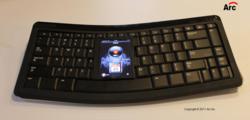
The Wingz Smartkeyboard has a touchscreen embedded in the middle of it. (Photo credit: Arc Inc.)
By including a small touchscreen in the middle of a split, ergonomically designed keyboard, the Wingz Smartkeyboard aims to increase productivity by allowing computer users to multitask better by adding one more screen to the mix. The Wingz Smartkeyboard runs a modified version of the Android operating system and can perform a variety of functions including tweeting, texting, Internet browsing and working as a tiny monitor.
For instance, if someone has the Wingz Smartkeyboard wirelessly connected to their personal computer — whether it be a tablet, laptop or desktop — they can simultaneously run any Android application on the keyboard such as Twitter, Facebook or TextPlus text messaging. Other instances that this hybrid keyboard could come in handy is during those on-the-go moments, when you don’t need your entire tablet to be used as a monitor, such as taking notes during a meeting or in class during a lecture, when you’d like to take notes without having to stare at an over-sized monitor. The touchscreen in the Smartkeyboard can be used as a mouse touch pad or miniature monitor, and can store data (such as a word document) that can later be sent to another device wirelessly.
The Wingz Smartkeyboard connects via Bluetooth or USB port on any HID-enabled device. That means most popular tablets, including the Apple iPad or Windows Tablets will be able to use the device and so will most popular desktop computers and laptops. The keyboard can also connect to the Internet using Wi-Fi, which gives it most of its high-end capabilities.
The Kickstarter page for the project also suggest that the keyboard will have a SIM slot to be able to connect to you cell phone network (as in, it’s unlocked) as long as you put the SIM card in the device. To boot, the keyboard includes two cameras, a USB port, memory card slot, headphone jack, speakers, on/off switch, IR port and a/c power charger, the duel cameras can be used for Skype or taking photos. A Wingz App Store will allow downloading of all Android Smartphone Applications, last count 100,000 applications available.
David Prokop, the man behind the machine, worked for 13 years at Microsoft in the Research and Development team according to the Kickstarter video. During his time at Microsoft, he helped teams work on several Mobile computer devices and ergonomic keyboards. His belief is that by combining a split, ergonomic keyboard with the power of a touchscreen device, computer users will be more productive while multi-tasking on their devices. For the full scoop,
check out Prokop’s Kickstarter video below.
http://www.kickstarter.com/projects/1679318871/wingz-smartkeyboard-android-with-multi-touch-displ
Related Embedded System Press Releases
- Can the Wingz Smartkeyboard run Android apps?
Yes, it runs a modified Android OS and can download apps from a Wingz App Store offering Android applications. - How does the Wingz Smartkeyboard connect to a computer?
It connects via Bluetooth or USB to any HID-enabled device. - Can the touchscreen be used as a monitor or touchpad?
Yes, the touchscreen can function as a miniature monitor or as a mouse touch pad. - Does the Smartkeyboard have internet connectivity?
Yes, it can connect to the Internet via Wi-Fi and may use a SIM card for cellular networks. - What peripheral ports and slots are included?
It includes a USB port, memory card slot, headphone jack, IR port, and an AC power charger. - Are there cameras on the Wingz Smartkeyboard?
Yes, the device includes dual cameras for Skype or taking photos. - Can the Smartkeyboard store documents locally?
Yes, it can store data such as word documents that can be sent wirelessly to other devices. - Is the Wingz Smartkeyboard compatible with tablets like the iPad?
Yes, it is compatible with most popular tablets including the Apple iPad and Windows tablets if they are HID-enabled.
