
Summary of Make a Pocket-Size Theremin With ESP32
This article details how to build a digital pocket-sized Theremin using an ESP32 microcontroller. By combining a Light Dependent Resistor (LDR) and a buzzer, the project creates unique sounds through Pulse Width Modulation controlled by hand movements over the sensor. The guide covers component selection, soldering a voltage divider, wiring instructions, and provides C++ code to translate light intensity into audible frequencies.
Parts used in the Pocket-Size Theremin:
- ESP32
- Light Dependent Resistor (LDR)
- Buzzer
- 10kΩ resistor
- Jumper Wires
- Breadboard
Theremin are those unique instruments use to make those alien show theme songs or sound effect. You may have also heard it in Star Trek, Big Bang Theory, or even a haunted house. They produced a unique sound from the electromagnetic effects between wires.
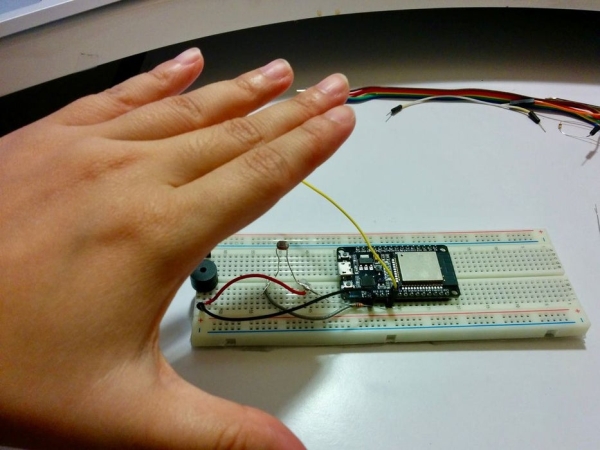
Here we will duplicate a similar sound digitally using a buzzer controlled by Pulse Width Modulations and an Light Dependent Resistor (LDR) for the input of reading values as the hand moves over it.
Step 1: BoM
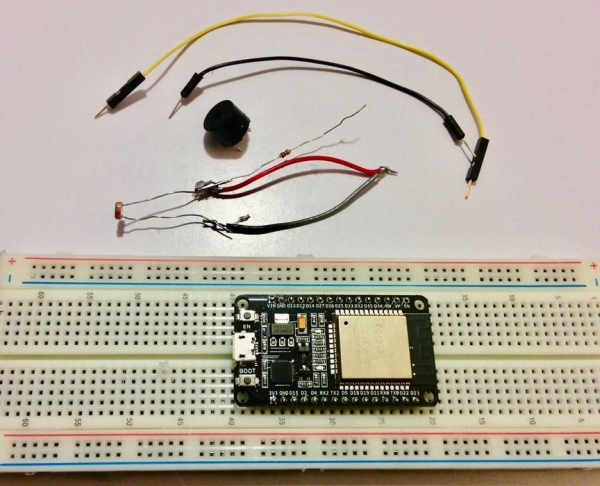
* ESP32
* Light Dependent Resistor (LDR)
* Buzzer
* Jumper Wires
* Breadboard
Step 2: Soldering
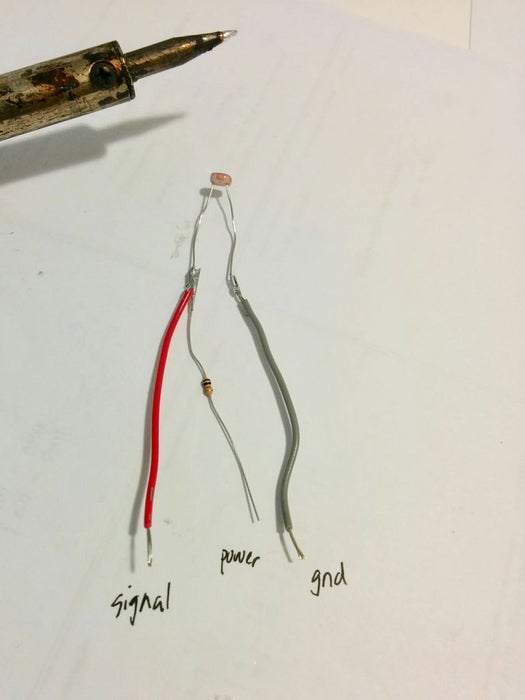
We will solder a voltage divider onto the LDR to make the wiring simpler.
* Take a 10kΩ resistor and solder it to one of the pins of the LDR.
* Then take two different coloured wires and solder it to each pin of the LDR.
That’s it! Now you have a voltage divider!
Step 3: Wiring
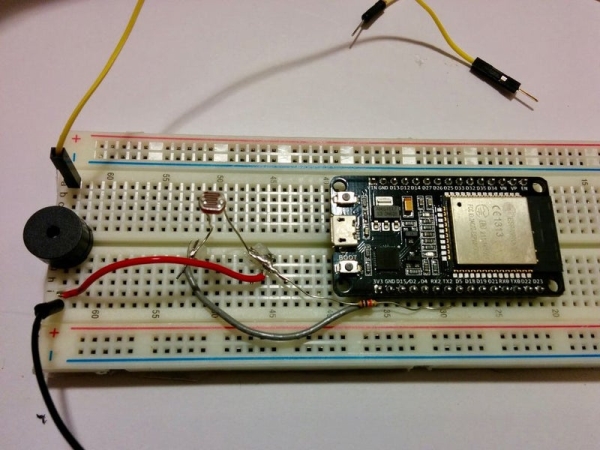
Follow the following table when wiring the LDR and Buzzer to the ESP32:
| I/O | Pin # | ESP32 Pin # |
|---|---|---|
| Buzzer* | 1 | D4 |
| Buzzer* | 2 | GND |
| LDR | Resistor | D5 |
| LDR | Grey | 3.3V |
| LDR | Red | GND |
* Order is arbitrary
Step 4: Code
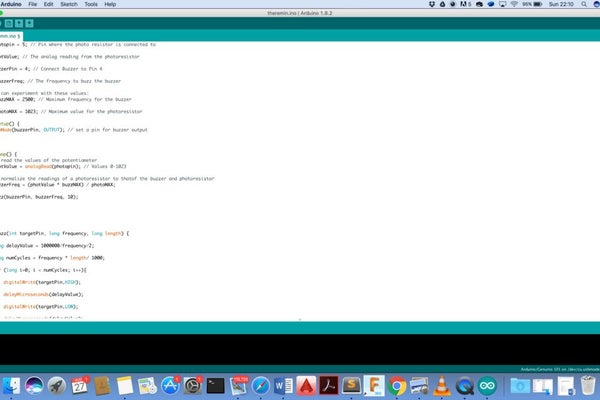
int photopin = 5; // Pin where the photo resistor is connected to
int photValue; // The analog reading from the photoresistor
int buzzerPin = 4; // Connect Buzzer to Pin 4
long buzzerFreq; // The frequency to buzz the buzzer
// You can experiment with these values:
long buzzMAX = 2500; // Maximum frequency for the buzzer
long photoMAX = 1023; // Maximum value for the photoresistor
void setup() {
    pinMode(buzzerPin, OUTPUT); // set a pin for buzzer output
}
void loop() {
    // read the values of the potentiometer
    photValue = analogRead(photopin); // Values 0-1023
    // normalize the readings of a photoresistor to thatof the buzzer and photoresistor
    buzzerFreq = (photValue * buzzMAX) / photoMAX;
buzz(buzzerPin, buzzerFreq, 10);
}
void buzz(int targetPin, long frequency, long length) {
long delayValue = 1000000/frequency/2;
long numCycles = frequency * length/ 1000;
for (long i=0; i < numCycles; i++){
digitalWrite(targetPin,HIGH);
delayMicroseconds(delayValue);
digitalWrite(targetPin,LOW);
delayMicroseconds(delayValue);
}
}
Step 5: Enjoy!
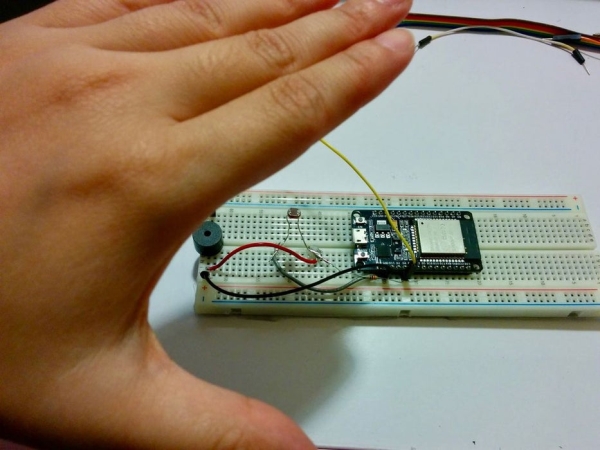
It’s easy to use but takes a lifetime to master and to play good music. Move your hands over the LDR to change the tone.
Enjoy your pocket sized theremin!
Source: Make a Pocket-Size Theremin With ESP32
- How does this project create a Theremin sound?
The project duplicates the sound digitally using a buzzer controlled by Pulse Width Modulations and an LDR that reads values as a hand moves over it. - What is the purpose of the 10kΩ resistor in Step 2?
The 10kΩ resistor is soldered to one pin of the LDR to create a voltage divider for simpler wiring. - Which ESP32 pins are used for the buzzer and LDR?
The buzzer connects to Pin D4 and GND, while the LDR connects to Pin D5 and 3.3V. - Can you adjust the maximum frequency in the code?
Yes, you can experiment with the buzzMAX value, which is set to 2500 in the provided example. - What range of values does the photoresistor return?
The analogRead function returns values ranging from 0 to 1023 based on light intensity. - Is the wiring order for the buzzer pins fixed?
No, the text states that the order for connecting the buzzer pins is arbitrary. - How do you control the tone of the instrument?
You move your hands over the LDR to change the tone generated by the buzzer. - What is the difficulty level for playing music on this device?
It is easy to use but takes a lifetime to master and play good music.
