
Summary of Security Entrance System
This article describes a standalone security entrance system using magnetic cards and an EEPROM database. It features multiple user accounts, including administrators who can manage access. The system includes a 20x4 LCD display for feedback, an RS232 port for PC logging, and an LED to simulate door unlocking. A critical security feature is the automatic lockdown mode triggered by three consecutive failed swipe attempts, which restricts access to administrators only until reset.
Parts used in the Security Entrance System:
- Magnetic cards
- EEPROM memory
- 20x4 LCD display
- Keypad
- Access LED
- Alarm LED
- RS232 port
- PC (for activity logging)
Overview:
Our security system is a stand alone device that allows access to registered users identified by their magnetic cards.(For this project, “access” is represented by a lit LED, showing how the system could be used to control an external locking mechanism.)The system includes features such as:
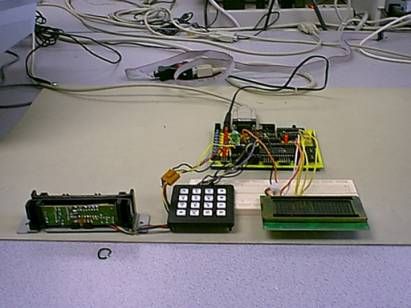
- Multiple accounts, including Administrator accounts (which can create, modify, or delete the other accounts). The account information is stored in non-volatile EEPROM memory, so that it is maintained even if the system is reset.
- A “lock down” of the system when someone tries to gain access by repeatedly swiping incorrect cards.
- A 20×4 LCD display to give the user feedback on the current state (such as “Access allowed.” or “try swiping the card the other way.”) and to prompt administrators for commands. All messages printed to the LCD are simultaneously transmitted to an RS232 port, so that all activity can be logged by a PC.
Design:
There are three basic modes of operation:
Normal Mode:
When a card is swiped, the system compares the number on the card to the list of numbers in the EEPROM database compare the number in its database. If a match is found, an the EEPROM lookup reveals that the account has not been disabled, the system prints a friendly message and lights the “access” LED for 4 seconds, representing the time that the door would be unlocked.
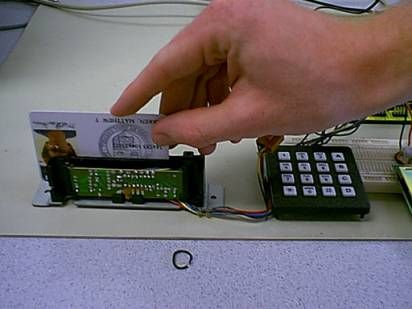
If the account number belongs to a system administrator number, then the administrator is prompted to enter a new mode via the keypad.
If more than three invalid attempts are made in a row, (i.e. presumably by a person who is not authorized for entrance) then an LED representing an alarm is activated, and the system goes into a lockdown mode.
Lockdown Mode:
While the system is in Lockdown mode, only administrators will be recognized. In addition to the ability to lock down after several failed attempts, this feature provides a convenient way for administrators to temporarily disable all non-administrator access, without having to modify each account individually,
For more detail: Security Entrance System
- How does the system verify a user?
The system compares the number on the swiped card against the list of numbers stored in the EEPROM database. - What happens if more than three invalid attempts are made?
An alarm LED activates, and the system enters a lockdown mode where only administrators are recognized. - Can account information be lost if the system resets?
No, account information is stored in non-volatile EEPROM memory so it is maintained even after a reset. - What function does the RS232 port serve?
All messages printed to the LCD are transmitted to the RS232 port so that all activity can be logged by a PC. - How long does the access LED stay lit for a valid user?
The access LED lights up for 4 seconds to represent the time a door would remain unlocked. - Who can modify or delete other accounts?
Only Administrator accounts have the ability to create, modify, or delete other accounts. - What is the purpose of Lockdown Mode?
Lockdown Mode allows administrators to temporarily disable all non-administrator access without modifying each account individually. - Does the system support multiple user accounts?
Yes, the system supports multiple accounts, including specific Administrator accounts with elevated privileges.
