
Summary of Stripboard Arduino using ATMega168 microcontroller
This article demonstrates building a cost-effective Arduino clone, called the "Stripduino," using a Stripboard and an ATMega168 microcontroller. The project costs under £6 and involves soldering components like voltage regulators, crystals, and capacitors onto a custom-cut board. It allows for further customization by adding pins or sockets if space permits.
Parts used in the Stripduino:
- Atmel ATMega168
- Stripboard
- 7805 Voltage regulator
- LEDs
- Resistors (220 Ohm and 10k Ohm)
- Capacitors (10 uF, 22 pF, and .1 mfd)
- 16 MHz clock crystal
- Small momentary button
- Wire for jumpers
In this, my first Instructable I’m going to show you how to make a stripped down Arduino for a fraction of the price, using Stripboard/Veroboard.
Material List:
1x Atmel ATMega168 = �2.65
1x Stipboard = 72p
1x 7805 Voltage regulator = 26p
2x LEDs = 16p
2x 220 Ohm resistors = 8p
1x 10k Ohm resistor = 4p
2x 10 uF capacitors = 12p
1x 16 MHz clock crystal = 45p
2x 22 pF capacitors = 10p
2x .1 mfd capacitors = 10p
1x small momentary button = 18p
# small amount of wire for jumpers
Total = �5.94
(All prices based on single component prices from bitsbox)
Step 1 Cutting the tracks
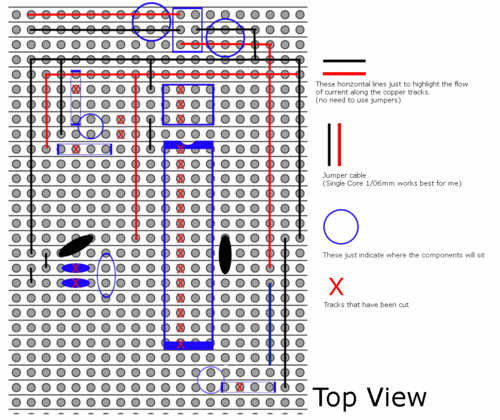
Once you have collected all your components, its time to cut the tracks in your stripboard, this can be done with a ‘spot face cutter’ or an appropriately sized drill bit (by hand).
Below is a guide on what tracks to cut, and how to place the components for soldering.
Step 2 Go Custom!
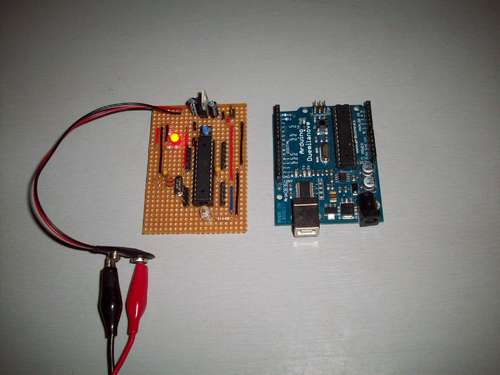
Now you have all the raw components soldered in place, test it out with one of the arduino codes such as “blink” that will make use of the built in LED on pin 13.
Now feel free to add male pins, sockets, ICSP, extra regulated +5v and ground pins. if it fits on your breadbord, it will fit on your Stripduino!
Would love to hear any feedback on this project, and hear how you would go about changing the designs.
For more Detail: Stripboard Arduino using ATMega168 microcontroller
- What is the main goal of this project?
To create a stripped-down Arduino for a fraction of the price using Stripboard. - How can you cut the tracks in the stripboard?
You can use a spot face cutter or an appropriately sized drill bit by hand. - Which code should be used to test the initial build?
A standard Arduino code such as blink that utilizes the built-in LED on pin 13. - Can I add extra features to the Stripduino?
Yes, you can add male pins, sockets, ICSP, and extra regulated pins if they fit. - What determines if extra components will fit on the board?
If a component fits on your breadboard, it will likely fit on your Stripduino. - Where did the pricing information come from?
The prices are based on single component prices from bitsbox.
