
Summary of Ultrasonic Rangefinder HC-SR04 Interfacing with ATmega8
This article explains interfacing an Ultrasonic Range Finder Module with an AVR ATmega8 microcontroller using an xBoard MINI v2.1 or 28-pin development board. It highlights the module's accuracy compared to IR sensors and provides a HEX file for quick testing. The setup requires connecting the sensor to PORTC pins and powering it via the board's 5V output, leveraging the MINI version's built-in LCD.
Parts used in the Ultrasonic Range Finder Project:
- Ultrasonic Range Finder Module
- AVR ATmega8 microcontroller
- xBoard MINI v2.1 development board
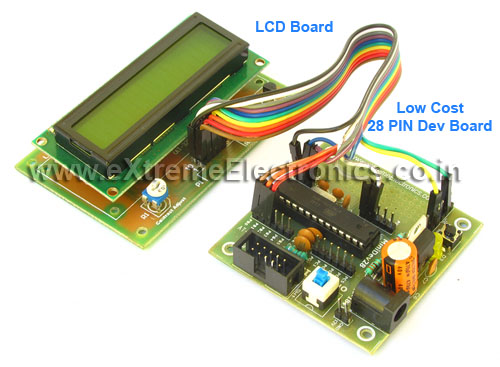
- 28 PIN Development board
- Built-in LCD Module
- PORTC pins
- 5 volt output pins
In this article I will describe how to interface a Ultrasonic Range Finder Module with a AVR ATmega8 microcontroller. I will provide a HEX file which you can burn into your ATmega8 directly to quickly test this whole setup.
 Ultrasonic range finder modules helps find the exact distance to an object. This can have vast application in robotics.
These are more expensive than IR based obstacle detectors but the advantage is that they give accurate distance to the obstacle and also their performance is not affected by the colour of obstacle.
Connection for xBoard MINI v2.1
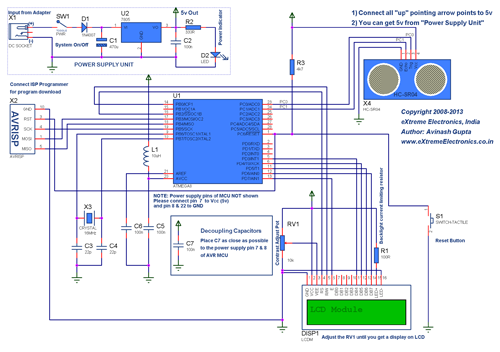
You can also use the xBoard MINI v2.1 development board to run this demo. The connection is same as the 28 PIN Development board with a difference that you don’t need the LCD board because xBoard MINI v2.1 has built in LCD Module. So you just need to connect the sensor module on PORTC pins and supply the module from 5 volt output pins. See the image below.
Supplying External Boards
External boards such as the LCD Board and Ultrasonic Range Finder Module requires 5v supply. You can easily supply them from the extra power output from the development board. The image below shows their position.
For more detail: Ultrasonic Rangefinder HC-SR04 Interfacing with ATmega8
- What is the main advantage of ultrasonic range finders over IR based obstacle detectors?
They provide accurate distance measurement and their performance is not affected by the color of the obstacle. - How can I quickly test the whole setup described in the article?
You can burn the provided HEX file directly into your ATmega8 microcontroller. - Which pins are used to connect the sensor module on the xBoard MINI v2.1?
The sensor module needs to be connected on PORTC pins. - How should the external boards like the Ultrasonic Range Finder Module be powered?
They require a 5v supply which can be easily taken from the extra power output from the development board. - Can I use the 28 PIN Development board for this demo instead of the xBoard MINI v2.1?
Yes, the connection is the same as the 28 PIN Development board. - Why do you not need an external LCD board when using the xBoard MINI v2.1?
The xBoard MINI v2.1 has a built-in LCD Module. - What is a vast application for these ultrasonic range finder modules?
They have vast applications in robotics.
