
Summary of DIY Nikon DSLR IR Remote with MSP430
Three years ago, the author built a DIY IR remote for their Nikon D3000 DSLR to avoid high local prices and long shipping times from China. The project utilizes an MSP430 microcontroller programmed via a Launchpad but does not require the Launchpad hardware during operation. The prototype features specific component choices, including 3V power instead of 4.5V, quality buttons to minimize debugging, and an optional RESET button.
Parts used in the DIY Nikon DSLR IR Remote:
- MSP430G2231 Microcontroller
- Launchpad (used only for programming)
- IR Remote Schematic components
- High-quality Buttons
- 3V Battery
- RESET Button (Optional)
Three years back in time, I bought Nikon D3000 DSLR. I started shooting, but the moment I needed remote, came one day (more over night), during on night photography session. I checked all local suppliers, but the prices were high. I ordered one from China. The problem with orders from China is that they take time. I started waiting and one day I made my IR remote, using the MSP430.
It doesn’t use the Launchpad hardware, I use it only for programming the MSP430G2231. This is the schematic of the remote:
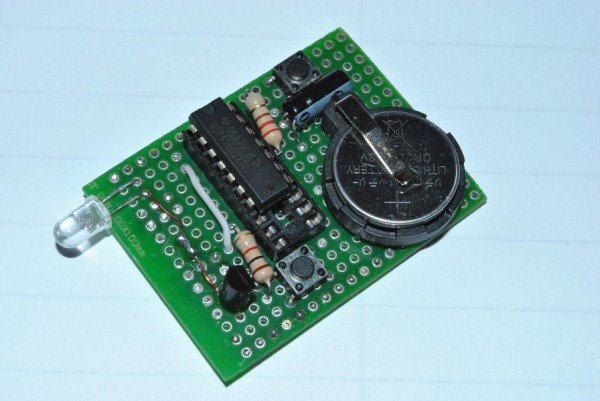
This is a photo of the prototype
One tip use good quality buttons, I had to debug this low cost button for more than 1/2 hour. The battery I used is 3V, not 4.5 V, like in the schematic. You can remove the RESET button, I placed it for other purposes.
For more detail: DIY Nikon DSLR IR Remote with MSP430
-
Why did the author build this IR remote?
The author built it because local suppliers had high prices and orders from China took too long. -
Does the final remote use the Launchpad hardware?
No, the Launchpad is used only for programming the MSP430G2231. -
What battery voltage is recommended for this project?
A 3V battery should be used instead of the 4.5V shown in the schematic. -
Which microcontroller model is used in the remote?
The project uses the MSP430G2231 microcontroller. -
What advice is given regarding the buttons?
You should use good quality buttons to avoid spending excessive time debugging low-cost ones. -
Is the RESET button necessary for the remote function?
No, you can remove the RESET button as it was placed for other purposes.
