
Summary of Digital Melody Player using ATmega8 with Proteus Simulation
This article describes a compact digital melody player built using an ATmega8 microcontroller and simulated in Proteus. The system generates musical tones via a speaker connected to the PB0 pin, utilizing BASCOM-AVR firmware to define note frequencies and durations. It plays predefined melodies like "Final Countdown" in a continuous loop, serving as an educational tool for embedded systems, timing, and audio generation.
Parts used in the Digital Melody Player:
- ATmega8 AVR microcontroller
- Speaker (LS1)
- Power supply connections
- Proteus simulation environment
- BASCOM-AVR compiler
Introduction
This microcontroller project is a compact digital melody player built around the ATmega8 and simulated in Proteus. It generates musical tones through a speaker by using the AVR’s sound output timing and a sequence of predefined note values. In simple terms, the circuit acts like a tiny embedded music box that plays recognizable melodies automatically.
It is a nice example of embedded systems, DIY electronics, and practical electronics because the hardware is minimal while the output is easy to test in a Proteus simulation. Projects like this are useful for learning how timing, note generation, and firmware-based sound playback work on AVR microcontrollers. It is also a good starting point for buzzer alarms, tune generators, and small audio-based interface systems.
How the Project Works (Overview)
The project uses an ATmega8 microcontroller running at 8 MHz. A speaker is connected to PB0, which is configured as an output pin in the BASCOM-AVR code.
Inside the firmware, the controller continuously plays a sequence of melodies using BASCOM’s Sound instruction. Each sound command defines two important values:
- Pulses → how long the note is played
- Periods → the pitch or frequency of the note
The code contains note timing references and frequency tables for multiple octaves, allowing the microcontroller to reproduce different melodies. Between notes, Waitms and Wait instructions create pauses so the tune sounds musical instead of continuous noise.
The program runs inside a Do ... Loop, so the melody list repeats endlessly in simulation.
Workflow Explanation
Workflow
- Power the ATmega8
- Initialize PB0 as output
- Connect PB0 to speaker
- Load melody sequence from firmware
- Generate tones using
Soundcommands - Insert pauses using delay commands
- Repeat all tunes continuously
Circuit-Level Explanation
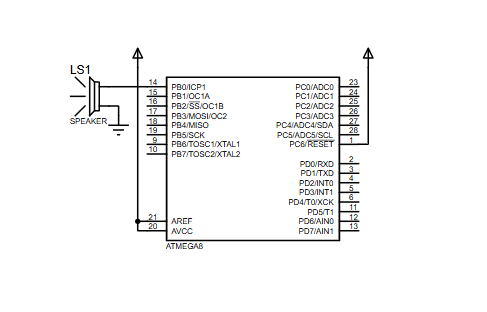
From the provided schematic, the hardware is very simple:
- ATmega8 is the main controller
- Speaker (LS1) is connected to PB0
- The controller output pin drives the speaker with timed pulse signals
- Power pins and standard MCU connections are present for simulation operation
This makes the circuit diagram clean and beginner-friendly, which is ideal for Proteus simulation and AVR audio experiments.
Key Features
- Plays multiple predefined melodies using an ATmega8
- Uses a very simple hardware setup with only a speaker output
- Based on BASCOM-AVR firmware
- Generates musical notes using timed pulse and period values
- Includes pauses and note durations for better melody playback
- Runs in a continuous loop for repeated playback
- Good educational example for microcontroller project and embedded systems learning
- Easy to simulate in Proteus with minimal components
Components Used
Based on the schematic and source code, the project uses:
- ATmega8 AVR microcontroller
- Speaker / sounder (LS1)
- Power supply connections
- Proteus simulation environment
- BASCOM-AVR compiler
Applications
This type of digital melody player can be used in many simple real-life and educational cases:
- Doorbell melody systems
- Alarm tone generators
- Embedded sound notifications
- Musical greeting or toy electronics
- Learning platform for AVR sound generation
- Classroom demonstration for timing-based waveform output
- DIY audio signaling circuits
- Basic buzzer-based user feedback systems
Explanation of Code
The code is written for the ATmega8 using BASCOM-AVR. It does not use complex peripherals like ADC, UART, or LCD. Instead, the firmware focuses on sound generation through a digital output pin.
Main code responsibilities
1. Microcontroller setup
The source file selects the ATmega8 device definition and sets the system clock:
$regfile = "m8def.dat"$crystal = 8000000
This tells the compiler which MCU is used and what frequency calculations should be based on.
2. Output pin configuration
The firmware sets PortB.0 as an output and aliases it as Speaker. This makes the code more readable when generating sounds.
3. Tone generation
The Sound Speaker , Pulses , Periods instruction is the core of the project. It creates square-wave-like audio on the speaker pin. Different Periods values produce different note frequencies, while Pulses values control note length.
4. Melody sequencing
The program contains hardcoded sequences for several recognizable tunes such as:
- Europe – Final Countdown
- Corona – Rhythm of the Night
- Jean Michel Jarre – Oxygene 10
- Titanic Theme
5. Timing and pauses
The firmware uses Waitms and Wait commands to insert musical spacing between notes and between songs.
6. Continuous playback
Everything is wrapped in a Do ... Loop, so the player keeps running forever once the simulation starts.
Source Code
'                _______________          |*_/*|________
'               |  ___________  |        ||_/-_|______  |
'               | |           | |        | |           | |
'               | |   0   0   | |        | |   0   0   | |
'               | |     -     | |        | |     -     | |
'               | |   ___/    | |        | |   ___/    | |
'               | |___     ___| |        | |___________| |
'               |_____|_/|_____|         |_______________|
'                 _|__|/ |_|_.............._|________|_
'                / **********             / **********
'              /  ************          /  ************
'              - - - - - - - - - -      - - - - - - - - - - -
'      _______________________________________________________________
'     | |C||D| | |F||G||A| | |C||D| | |F||G||A| | |C||D| | |F||G||A| |
'     | |1||1| | |1||1||1| | |2||2| | |2||2||2| | |3||3| | |3||3||3| | |
'     | |#||#| | |#||#||#| | |#||#| | |#||#||#| | |#||#| | |#||#||#| | |
'     |  |  |  |  |  |  |  |  |  |  |  |  |  |  |  |  |  |  |  |  |  | |
'     |C1|D1|E1|F1|G1|A1|H1|C2|D2|E2|F2|G2|A2|H2|C3|D3|E3|F3|G3|A3|H3| |
'     |__|__|__|__|__|__|__|__|__|__|__|__|__|__|__|__|__|__|__|__|__| |
' __________________________________________|Proteus Simulation
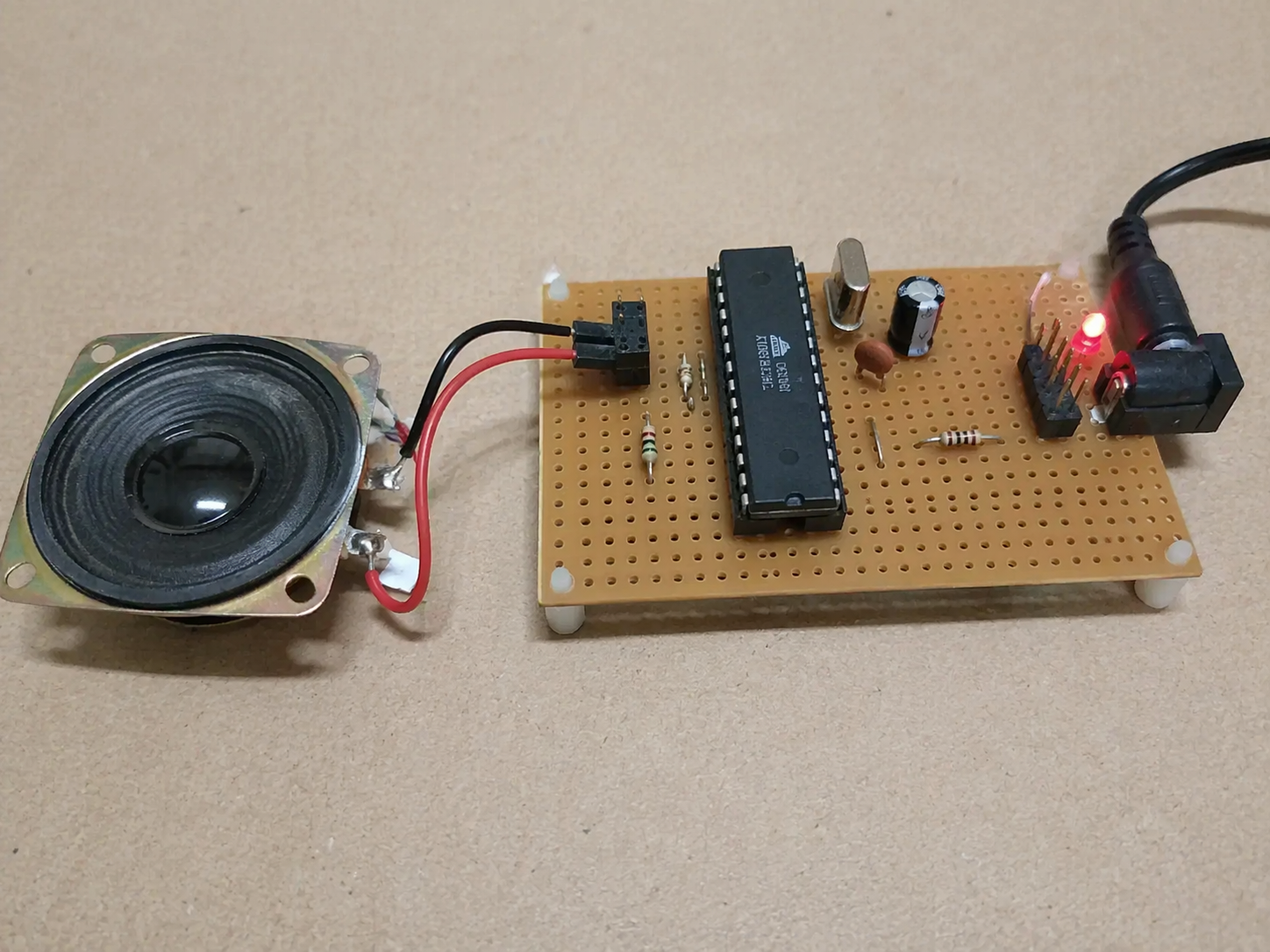
In the Proteus simulation, the ATmega8 drives the speaker connected to PB0. Once the program starts running, the microcontroller outputs timed sound pulses that create melody notes. Since the firmware is written in a repeating loop, the speaker keeps playing one tune after another continuously.
From the schematic, this is a lightweight simulation focused on sound generation rather than a full user interface. That makes it ideal for verifying firmware timing, note playback, and basic AVR sound output behavior.
Conclusion
This Digital Melody Player using ATmega8 with Proteus Simulation is a nice small-scale microcontroller project for learning how embedded sound generation works. With only a speaker and an AVR controller, it demonstrates note timing, melody sequencing, and firmware-driven audio output in a very practical way.
It is a great example for students, hobbyists, and anyone exploring embedded systems, DIY electronics, and Proteus simulation projects. If you want, send the HEX text too and I’ll extend this into the final publish-ready version with the HEX section embedded properly.
Complete File
- How does the project generate musical tones?
The controller uses timed pulse signals on the PB0 output pin with specific period values to create different note frequencies. - What determines the pitch of the notes played?
The pitch or frequency is determined by the Periods value defined in the Sound instruction within the firmware. - Can this circuit be simulated in Proteus?
Yes, the project is designed to be simulated in Proteus with minimal components including the ATmega8 and a speaker. - What programming language is used for the firmware?
The code is written using BASCOM-AVR to configure the microcontroller and generate sound commands. - Does the melody play only once or repeatedly?
The program runs inside a Do ... Loop structure, causing the melody list to repeat endlessly during simulation. - Which specific melodies are included in the code?
The hardcoded sequences include tunes such as Final Countdown, Rhythm of the Night, Oxygene 10, and the Titanic Theme. - How are pauses created between notes?
The firmware uses Waitms and Wait instructions to insert musical spacing between notes and songs. - Is complex hardware required for this project?
No, the hardware setup is very simple, requiring only a speaker connected to the PB0 output pin.
