
Summary of ATmega128 LCD Driver using ATmega128 with Proteus Simulation
This project demonstrates driving a 2-digit 7-segment LCD directly using an ATmega128 microcontroller without external driver ICs. It utilizes AVR241 principles, Proteus simulation, and AC waveform multiplexing via Timer0 interrupts at ~60Hz to ensure visibility. The firmware converts ASCII characters to segment patterns, toggling PORTD and PORTE for efficient, flicker-free display control suitable for low-cost embedded systems.
Parts used in the ATmega128 LCD Driver:
- ATmega128 Microcontroller
- 2-Digit 7-Segment LCD (Multiplexed)
- Proteus VSM Simulator
- AVR GCC / WinAVR Compiler
- Basic wiring components
Introduction
This microcontroller project demonstrates how to directly drive a 2-digit 7-segment LCD using the powerful ATmega128 microcontroller without any dedicated LCD driver IC. Based on the well-known AVR241 application note, this project shows how general I/O pins can be used to control LCD segments efficiently.
Using Proteus simulation, this setup helps visualize real-time LCD behavior, making it ideal for learning embedded systems, DIY electronics, and low-cost display interfacing techniques.
It’s especially useful for developers who want to understand direct LCD driving, reduce hardware cost, and explore firmware-based display control.
How the Project Works (Overview)
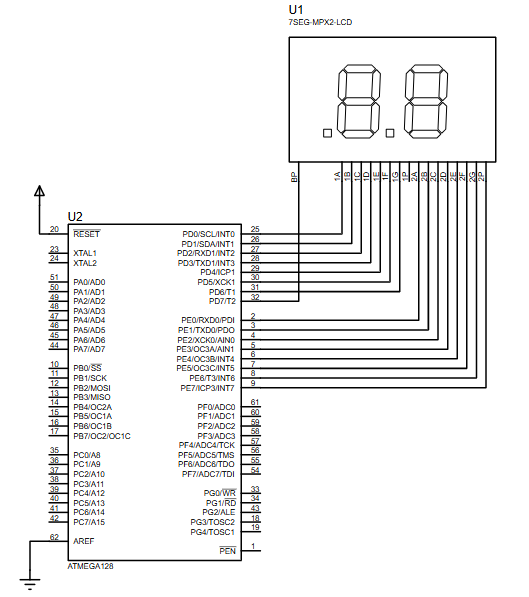
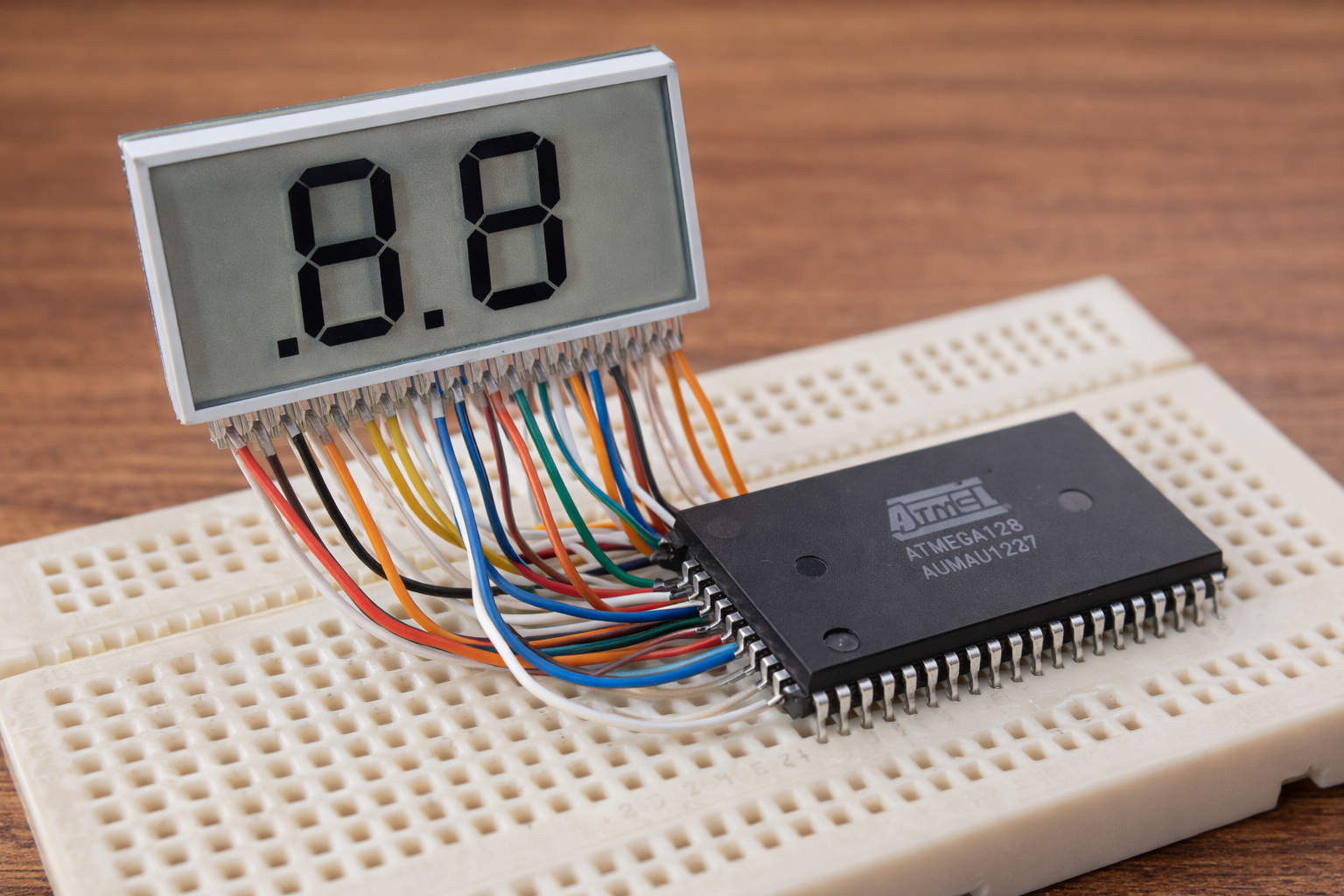
The system uses the ATmega128 to control a 2×7 segment LCD through its GPIO pins.
- The microcontroller generates alternating signals required for LCD operation.
- A timer interrupt (Timer0) runs at ~60Hz to refresh the display.
- The function
LCD_print()converts ASCII characters into segment patterns. - The
LCD_update()function continuously toggles segment lines to maintain LCD visibility.
Instead of static DC signals (which damage LCDs), the system uses AC waveform multiplexing, ensuring proper LCD operation.
Workflow Explanation
Workflow:
- Input Characters (Firmware)
→ Characters like ‘A’, ‘B’ are sent usingLCD_print() - ASCII to Segment Conversion
→ Converted into binary patterns for segments - Global LCD Buffer Update
→ Stored inLCD.digit1andLCD.digit2 - Timer Interrupt Trigger (~60Hz)
→ CallsLCD_update() - Segment Driving via Ports (PORTD & PORTE)
→ Alternating waveform drives LCD segments safely
Key Features
- Direct LCD driving using general-purpose I/O
- No external LCD driver IC required (cost-efficient)
- Timer-based multiplexed display refresh
- Supports digits 0–9 and A–F (Hex display)
- Built-in validation for incorrect inputs
- Supports decimal point (on digit 2)
- Efficient interrupt-driven display control
- Fully compatible with Proteus simulation
Components Used
- ATmega128 Microcontroller
- 2-Digit 7-Segment LCD (Multiplexed)
- Proteus VSM Simulator
- AVR GCC / WinAVR Compiler
- Basic wiring (no external IC required)
Applications
- Low-cost embedded display systems
- Digital counters / timers
- Measurement devices (voltage, temperature, etc.)
- Industrial control panels
- Battery-powered embedded devices
- Learning platform for embedded systems & LCD interfacing
Explanation of Code
The firmware is modular and cleanly structured:
LCD Driver Module
LCD_print()
→ Converts ASCII characters into segment patterns
→ Stores data in global LCD structureLCD_update()
→ Handles multiplexing
→ Alternates signal polarity to protect LCD
Timer Module
- Timer0 configured in CTC mode
- Generates ~60Hz interrupt
- ISR (
TIMER0_COMP_vect) refreshes LCD continuously
GPIO Control
- PORTD & PORTE used for segment driving
- Data toggled to create AC waveform
This architecture ensures stable display without flickering.
Source Code
int main(void)
{
    TCCR0 = (1 << CS00) | (1 << CS01) | (1 << CS02) | (1 << WGM01);
    // Clear TIMER0 on compare match, CK/1024
    OCR0 = 17;
    MCUCR = (1 << SE);   // TCNT0 Compare Match IRQ app. 60 Hz using 1MHz clock
    TIMSK = (1 << OCIE0);
    DDRE = 0xFF;
    DDRD = 0xFF;
    LCD_print(1, 'A');         // Will print "A" to digit 1, function returns 1
    LCD_print(2, 'B');         // Will print "B" to digit 1, function returns 1
    sei();
    for(;;);
}Proteus Simulation
In the Proteus simulation, the ATmega128 successfully drives the LCD:
- Displays characters like “A” and “B”
- Smooth refresh with no flicker
- Proper multiplexing ensures realistic LCD behavior
- Demonstrates real embedded hardware logic virtually
Conclusion
This project is a great example of how embedded systems can achieve efficient hardware control using just software and GPIO pins. By combining timer interrupts, bit manipulation, and Proteus simulation, it provides a solid foundation for learning LCD interfacing without dedicated drivers.
If you’re exploring DIY electronics or want to deepen your understanding of microcontroller-based display systems, this is a highly practical and insightful project.
Complete File
ATmega128 LCD Driver using ATmega128 with Proteus Simulation
- How does the system refresh the display?
The system uses a Timer0 interrupt running at approximately 60Hz to call the LCD_update function continuously. - Can this project be simulated in Proteus?
Yes, the setup is fully compatible with Proteus VSM simulation to visualize real-time LCD behavior. - Does the design require an external LCD driver IC?
No, the project drives the LCD directly using general-purpose I/O pins to reduce hardware costs. - What signals are used to protect the LCD from damage?
The system uses alternating AC waveforms instead of static DC signals to prevent LCD damage. - Which ports are used for segment driving?
PORTD and PORTE are utilized to toggle data and create the necessary AC waveform for segments. - What character set does the display support?
The driver supports digits 0–9 and letters A–F for hexadecimal display on both digits. - Is the decimal point supported?
Yes, the system supports the decimal point specifically on the second digit. - How are ASCII characters converted for the display?
The LCD_print function converts input ASCII characters into binary segment patterns stored in the global buffer. - What timer mode is configured for the operation?
Timer0 is configured in CTC mode to generate the required compare match interrupts. - What is the primary benefit of this direct driving method?
It allows for cost-efficient display interfacing by eliminating the need for dedicated driver chips.
