
Summary of Configure a low-cost, 9V battery-voltage monitor
This article presents a low-cost 9V battery voltage monitor circuit that uses less than 34 cents in parts. The design employs transistor Q1 as a 10-mA current sink to control LED1, which indicates good voltage and dims as the battery approaches the 7.2V threshold. Users can adjust the threshold by modifying components D3, LED1, and R1, or save space using surface-mount equivalents.
Parts used in the 9V Battery-Voltage Monitor:
- Transistor Q1
- LED1 (Kingbright WP7104IT)
- Diode D3
- Resistor R1
- 9V Battery
- Printed-circuit-board (PCB)
This Design Idea describes a 9V battery-voltage monitor whose total parts cost less than 34 cents (Figure 1). You configure transistor Q1 as a 10-mA current sink. LED1, a Kingbright WP7104IT, is on when the battery voltage is good. When the battery voltage nears the threshold voltage, the LED gradually dims.
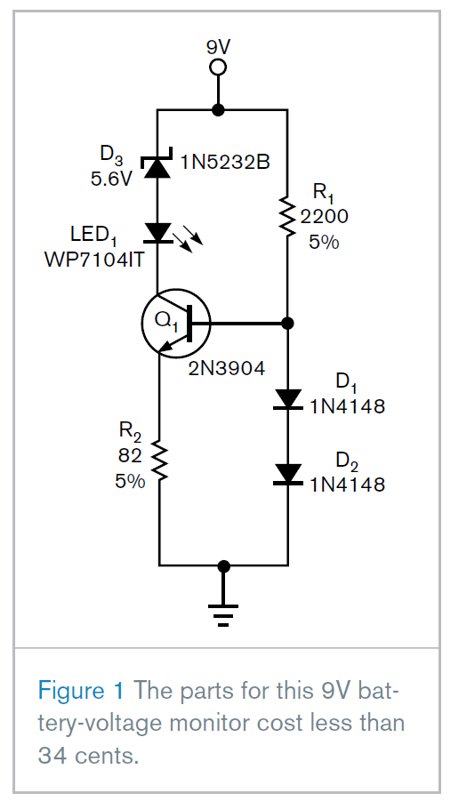
It goes out once it reaches the threshold voltage. The threshold voltage for this design is 7.2V, which the values of D3, LED1, and R1 determine. If your application requires a different threshold voltage, you can change these three components’ values. You can reduce the PCB (printed-circuit-board) space this circuit requires by using equivalent surface-mount components.
For more detail: Configure a low-cost, 9V battery-voltage monitor
- How much does this project cost?
The total parts cost is less than 34 cents. - What is the function of transistor Q1?
Transistor Q1 is configured as a 10-mA current sink. - When does LED1 turn off?
LED1 goes out once the battery voltage reaches the threshold voltage. - What determines the threshold voltage in this design?
The values of D3, LED1, and R1 determine the threshold voltage. - What is the specific threshold voltage for this circuit?
The threshold voltage for this design is 7.2V. - Can I change the threshold voltage?
Yes, you can change the threshold voltage by adjusting the values of D3, LED1, and R1. - How can I reduce the PCB space required?
You can reduce the PCB space by using equivalent surface-mount components. - What happens to the LED as the battery voltage nears the threshold?
The LED gradually dims when the battery voltage nears the threshold voltage.
