
Summary of Simple 3D gerber viewer
This 5-month project is an offline Windows application designed to visualize Gerber files for PCB fabrication review and milling data validation. Built with OpenGL, it supports drag-and-drop or command-line usage but requires a modern graphics card. The tool is open-source and aims to help users verify panelization scripts before production.
Parts used in the Offline Gerber Viewer:
- Windows operating system (32-bit or 64-bit)
- OpenGL library
- Gerber files
- PCB panelization scripts
- Modern video card
Over the course of the last 5 months I developped an application to visualize Gerber data. The goal was primarily to review Gerber files before sending them to a PCB fabrication house. It is very similar to the Mayhew Labs online Gerber viewer, except it’s offline (and has a few different features).
My tool is program for Windows (32bits or 64bits) that use OpenGL for visualization (you will need a decent/recent video card). You can simply drag and drop Gerber files on it, or use the command line to configure it more deeply. I set up a page explaining most of that and giving download links :
http://piratery.net/grbv/
I wrote the tool primarily for my own usage. In particular I wanted to visualize milling data to validate my PCB panelization scripts (which are still work in progress). However it may be useful to other people so I took some time to package it. Everything is open source, steal whatever you want for your own projects.
Please feel free to report bugs and request new features, I’m eager to improve that tool if that can help the community. Note that there is a high chance that the tool cannot display anything on your hardware, but it should report an error and I’d be very grateful if you would report it to me.
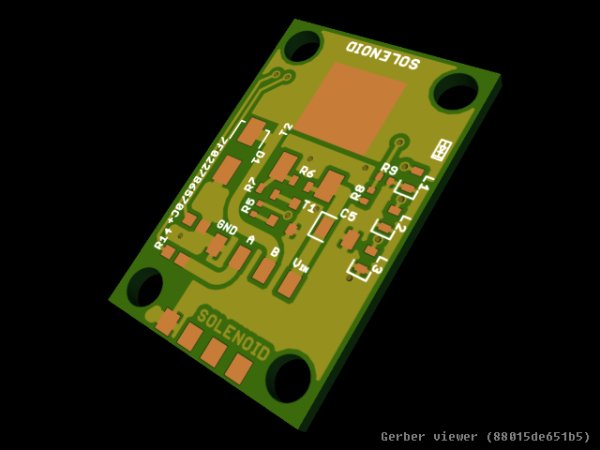
As a teaser here is an example screenshot of one of my boards. More are available on the webpage linked above.
For more detail: Simple 3D gerber viewer
- What is the primary goal of this application?
The goal was primarily to review Gerber files before sending them to a PCB fabrication house. - Can this tool be used offline?
Yes, the tool is similar to online viewers but operates offline. - How can I load Gerber files into the program?
You can simply drag and drop Gerber files on it or use the command line. - Does the software require specific hardware?
Yes, you will need a decent or recent video card because it uses OpenGL. - Is the source code available for other projects?
Everything is open source, so you can steal whatever you want for your own projects. - Why did the author develop this tool?
It was written primarily for personal usage to visualize milling data and validate PCB panelization scripts. - What should I do if the tool cannot display anything on my hardware?
If it reports an error, you should report it to the developer as they are eager to improve the tool.
