
Summary of Temperature and relative humidity logger
This article details a PC-based temperature and relative humidity logger utilizing the chipKIT Uno32 board and DHT11 sensor. The system requires no extra wires, as the sensor connects directly to four I/O pins on the board. The Uno32 reads data at preset intervals via USB-UART and sends it to a PC running a Processing application for real-time display and ASCII logging. This setup offers an easy solution for ambient room monitoring in server rooms.
Parts used in the Temperature and Relative Humidity Logger:
- chipKIT Uno32 board
- DHT11 sensor
- USB cable
- PC with Processing programming platform
This project is about building a PC-based temperature and relative humidity logger using the chipKIT Uno32 board and the DHT11 sensor. The project setup requires no additional wires (other than the USB cable) and components; the DHT11 sensor is directly plugged into four I/O pins of the Uno32 board and the project is ready to go. This could be a handy and an easiest way to setup an ambient room monitoring system for a server room.
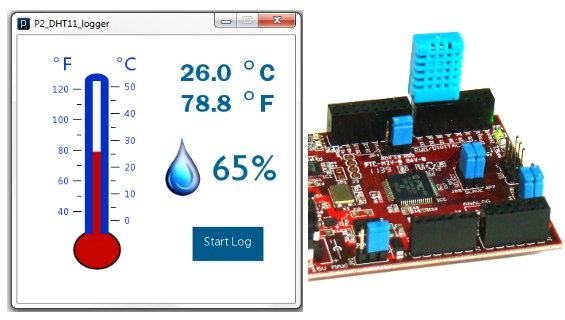
The Uno32 reads the temperature and relative humidity from the DHT11 sensor at preset interval and sends the data to PC through the USB-UART interface. A PC application is developed using the open-source Processing programming platform to log data onto an ASCII file. The PC application also displays the real-time temperature and relative humidity on computer screen.
Theory
DHT11 is an inexpensive sensor that provides calibrated digital outputs for ambient temperature and relative humidity. It comes in a single row 4-pin package and operates from 3 to 5.5V power supply. It can measure temperature from 0-50 °C with an accuracy of ±2°C and relative humidity ranging from 20-95% with an accuracy of ±5%. It has got its own proprietary 1-wire protocol, and therefore, the communication between the sensor and a microcontroller is not possible through a direct interface with any of its peripherals. The protocol must be implemented in the firmware of the MCU through bit-banging of an I/O pin. Please read
Measurement of temperature and relative humidity using DHT11 sensor and PIC microcontroller for more details on the DHT11 communication protocol. The following picture describes the four pins of the DHT11 sensor.
DHT11 is an inexpensive sensor that provides calibrated digital outputs for ambient temperature and relative humidity. It comes in a single row 4-pin package and operates from 3 to 5.5V power supply. It can measure temperature from 0-50 °C with an accuracy of ±2°C and relative humidity ranging from 20-95% with an accuracy of ±5%. It has got its own proprietary 1-wire protocol, and therefore, the communication between the sensor and a microcontroller is not possible through a direct interface with any of its peripherals. The protocol must be implemented in the firmware of the MCU through bit-banging of an I/O pin. Please read
Measurement of temperature and relative humidity using DHT11 sensor and PIC microcontroller for more details on the DHT11 communication protocol. The following picture describes the four pins of the DHT11 sensor.
In this project, four pins of the DHT11 sensor is directly inserted into four I/O pins (7, 6, 5, and 4) of the Uno32 board. The power supply (1), data (2), and ground (4) pins of DHT11 go to I/O pins 7, 6, and 5 of the Uno32, respectively. The Uno32 pins 7 and 4 are configured as output pins and are set to High (3.3V) and Low (Gnd), respectively, through software to power the DHT11 sensor. Note that an I/O pin of Uno32 can source up to 18mA current that is sufficient to power the DHT11 sensor, which only requires less than 5mA during data conversion and transfer. Pin 3 of DHT11 is unused. Temperature and humidity bytes are read through I/O pin 6 of the Uno32.
For more detail: Temperature and relative humidity logger
- How is the DHT11 sensor connected to the Uno32?
The DHT11 sensor is directly plugged into four I/O pins (7, 6, 5, and 4) of the Uno32 board without additional wires. - Can this project be used for server room monitoring?
Yes, the project serves as a handy and easy way to set up an ambient room monitoring system for a server room. - What software is used to log data on the PC?
A PC application developed using the open-source Processing programming platform logs data onto an ASCII file. - Does the DHT11 require a separate power supply?
No, the Uno32 powers the DHT11 sensor through its I/O pins, which provide sufficient current of up to 18mA. - What is the communication method between the sensor and microcontroller?
Communication uses a proprietary 1-wire protocol implemented via bit-banging of an I/O pin in the firmware. - How does the system transmit data to the computer?
The Uno32 sends temperature and humidity data to the PC through the USB-UART interface. - What are the measurement ranges of the DHT11 sensor?
The sensor measures temperature from 0-50 °C and relative humidity ranging from 20-95%. - Which specific I/O pins are used for data reading?
Temperature and humidity bytes are read through I/O pin 6 of the Uno32.
