
Summary of How to interface AVR microcontroller with PC using USART (RS232 protocol)
This article details an AVR microcontroller project enabling bidirectional serial communication via 8-bit USART. It demonstrates receiving data from a PC's HyperTerminal, displaying it on an LCD, and echoing the data back to the computer. The implementation uses C code for ATmega16 initialization of both the LCD and USART modules, managing baud rates and control signals through specific port configurations.
Parts used in the AVR Microcontroller USART Project:
- ATmega16
- LCD
- MAX232
This article covers data transmission using 8 bit USART. The readers should have a basic understanding of serial communication and how to receive the serial data output. More details on these topics are available on Serial communication using AVR Microcontroller USART.
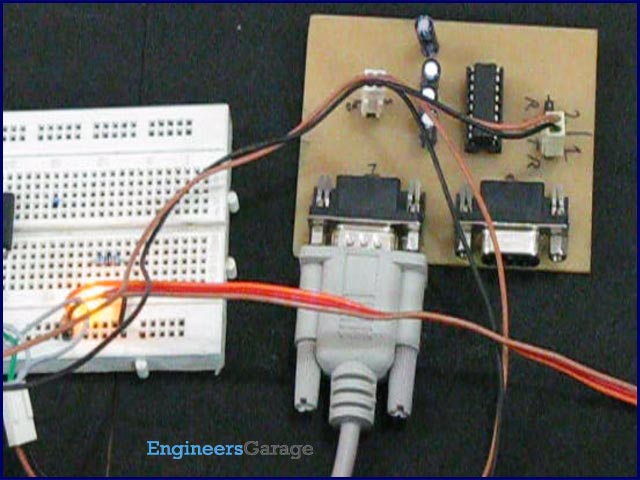
The registers of USART system are already explained in previous article. Before transmitting the data, it must be stored in UDR register. The HyperTerminal software is used to show received data. The following steps can be followed to transmit the data to COM port of computer.
i. Monitor the status of UDRE (USART Data register Empty) flag.
ii. A high on the UDRE indicates that the UDR register is empty and ready to accept new data to be sent.

void usart_putch(unsigned char send)
{
while ((UCSRA & (1 << UDRE)) == 0); // Do nothing until UDR is ready..
// for more data to be written to it
UDR = send; // Send the byte
}
Project Source Code
###
// Program to receive data from USART and displaying that..
// data on LCD and sending the same data on HyperTerminal.
/*
get data from serial port and displaying it on LCD and send back to the HyperTerminal
LCD DATA port—-PORT A
ctrl port——PORT B
rs——-PB0
rw——-PB1
en——-PB2
@ external clock frequency 12MHz
*/
#define F_CPU 12000000UL
#define USART_BAUDRATE 9600
#define BAUD_PRESCALE (((F_CPU / (USART_BAUDRATE * 16UL))) – 1)
#include<avr/io.h>
#include<util/delay.h>
#define LCD_DATA PORTA // LCD data port
#define ctrl PORTB
#define en PB2 // enable signal
#define rw PB1 // read/write signal
#define rs PB0 // register select signal
void LCD_cmd(unsigned char cmd);
void init_LCD(void);
void LCD_write(unsigned char data);
void LCD_clear();
void usart_init();
void usart_putch(unsigned char send);
unsigned int usart_getch();
int main()
{
unsigned char value;
DDRA=0xff;
DDRB=0x07;
init_LCD(); //initialization of LCD
_delay_ms(50); // delay of 50 mili seconds
usart_init(); // initialization of USART
while(1)
{
value=usart_getch(); // get data from serial port
LCD_cmd(0xC0);
LCD_write(value); // write data to LCD
usart_putch(value); // send data back to the PC (HyperTerminal)
}
return 0;
}
void init_LCD(void)
{
LCD_cmd(0x38); //initialization of 16X2 LCD in 8bit mode
_delay_ms(1);
LCD_cmd(0x01); // clear LCD
_delay_ms(1);
LCD_cmd(0x0E); // cursor ON
_delay_ms(1);
LCD_cmd(0x80); // —8 go to first line and –0 is for 0th position
_delay_ms(1);
return;
}
void LCD_cmd(unsigned char cmd)
{
LCD_DATA=cmd;
ctrl =(0<<rs)|(0<<rw)|(1<<en);
_delay_ms(1);
ctrl =(0<<rs)|(0<<rw)|(0<<en);
_delay_ms(50);
return;
}
void LCD_write(unsigned char data)
{
LCD_DATA= data;
ctrl = (1<<rs)|(0<<rw)|(1<<en);
_delay_ms(1);
ctrl = (1<<rs)|(0<<rw)|(0<<en);
_delay_ms(50);
return ;
}
void usart_init()
{
UCSRB |= (1 << RXEN) | (1 << TXEN);
// Turn on the transmission and reception circuitry
UCSRC |= (1 << URSEL) | (1<<USBS) | (1 << UCSZ0) | (1 << UCSZ1);
// Use 8-bit character sizes
UBRRL = BAUD_PRESCALE; // Load lower 8-bits of the baud rate value..
// into the low byte of the UBRR register
UBRRH = (BAUD_PRESCALE >> 8); // Load upper 8-bits of the baud rate value..
// into the high byte of the UBRR register
}
void usart_putch(unsigned char send)
{
while ((UCSRA & (1 << UDRE)) == 0); // Do nothing until UDR is ready..
// for more data to be written to it
UDR = send; // Send the byte
}
unsigned int usart_getch()
{
while ((UCSRA & (1 << RXC)) == 0);
// Do nothing until data have been received and is ready to be read from UDR
return(UDR); // return the byte
}
###
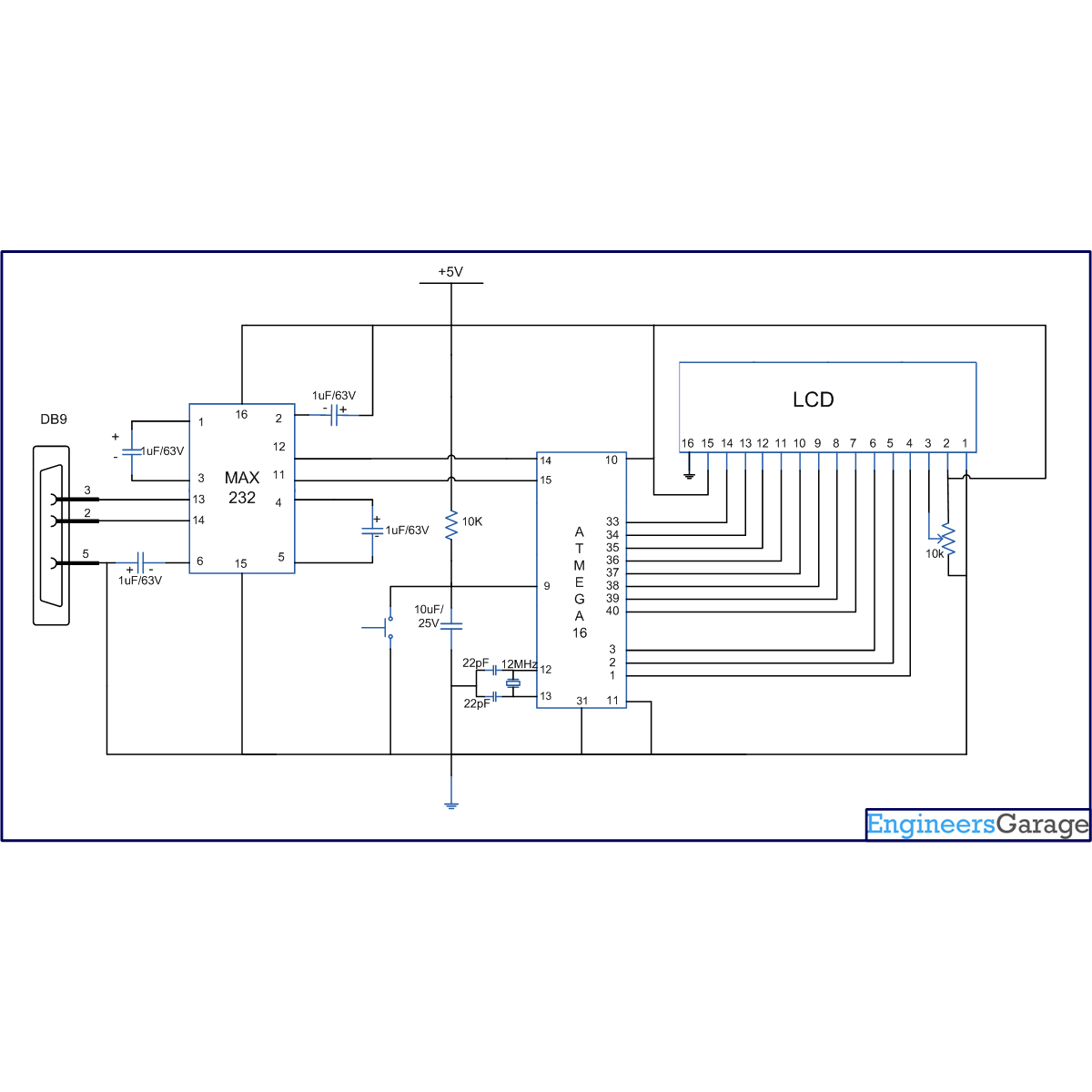
Circuit Diagrams
| Circuit-Diagram-of-How-to-interface-AVR-microcontroller-with-PC-using-USART-RS232-protocol |
- What software is used to show received data?
The HyperTerminal software is used to display the received data. - How do you know the UDR register is ready to accept new data?
A high signal on the UDRE flag indicates that the UDR register is empty and ready. - What is the external clock frequency specified for this project?
The external clock frequency is set to 12MHz. - Which ports are assigned for LCD data and control signals?
LCD data port is PORT A, while the control port is PORT B. - How is the baud rate calculated in the source code?
The baud rate prescale is calculated using the formula ((F_CPU / (USART_BAUDRATE * 16UL))) - 1. - What function is used to send a byte back to the PC?
The usart_putch function sends the byte back to the PC. - Does the system support 8-bit character sizes?
Yes, the configuration sets the UCSZ0 and UCSZ1 bits to use 8-bit character sizes. - What protocol is mentioned for interfacing with the PC?
The RS232 protocol is used for interfacing the AVR microcontroller with the PC.
