
Summary of ZofzPCB: FREE 3D Gerber Viewer
This article introduces ZofzPCB, a free 3D Gerber viewer designed to help PCB electronics designers thoroughly inspect their designs before manufacturing. It overcomes CAD limitations by allowing users to visualize boards as they appear post-production, navigate in 3D, and look between layers to detect hidden errors using features like layer peeling and material density controls.
Parts used in the ZofzPCB Project:
- Gerber files
- Mouse controls
- Keyboard controls
- Color scheme selection tool
- Layer ON/OFF function
- PEEL function
- Material density control
- Hollowing control
- Layer spread control
- Measurement function
If you’re a PCB electronics designer, you know how important it is to review your designs thoroughly before sending them to manufacturing. It’s costly – and embarrassing – to find design errors in a production board.
You also know how difficult it is to really check everything in CAD. You’re dealing with multiple layers, so you can’t see everything at once. Plus, your CAD program generates some structures automatically – you don’t see them while you’re in CAD. So it’s hard to visualize your finished board.

Of course, with experience and as you gain confidence in your CAD package, un-caught errors become less likely. But still…
Wouldn’t it be great if you could:
You also know how difficult it is to really check everything in CAD. You’re dealing with multiple layers, so you can’t see everything at once. Plus, your CAD program generates some structures automatically – you don’t see them while you’re in CAD. So it’s hard to visualize your finished board.
Of course, with experience and as you gain confidence in your CAD package, un-caught errors become less likely. But still…
Wouldn’t it be great if you could:
- Look at your PCB design through a different set of eyes?
- Get a completely different perspective than you get from CAD or a 2D Gerber viewer?
- See your board just as it will look when it comes back from production?
- Inspect it from any angle… just like holding the finished board in your hand?
- Be able to “look between the layers” for hidden errors?
A 3D Gerber Viewer that Gets “Between the Layers”
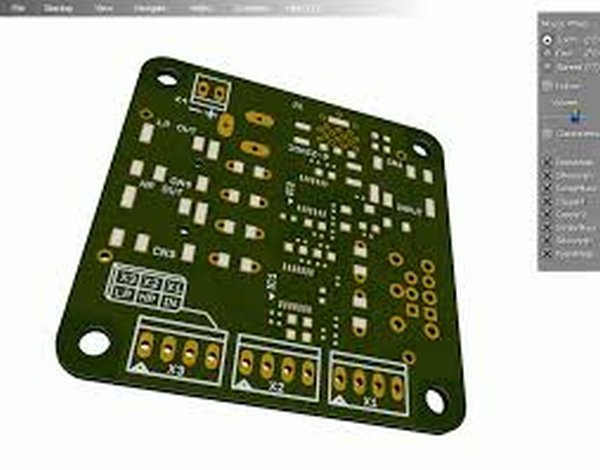
ZofzPCB is a FREE 3D Gerber viewer that shows you more than just how your board is going to look. ZofzPCB lets you see inside your board – between the layers – so you can give it a truly thorough inspection. It makes pre-production verification of your PCB designs fast, easy, intuitive and fun.
With ZofzPCB you get:
- Realistic 3D rendering from your Gerber files that shows you just how your finished board will look and unveils errors that are difficult to detect in a 2D view,
- Full 3D navigation via intuitive mouse and keyboard controls, so you can quickly and easily view any point on the board from any angle you choose,
- Color scheme selection that lets you assign colors to structures in different ways,
- Layer ON/OFF and PEEL functions, which let you remove any design layers that are in your way,
- Material density, hollowing and layer spread controls that let you “look between the layers” and verify connections between them,
- A measurement function that shows you the X,Y,Z and XY distances between any two points (pad, edge or hole),
For more detail: ZofzPCB: FREE 3D Gerber Viewer
- What is ZofzPCB?
ZofzPCB is a FREE 3D Gerber viewer that allows users to see inside their board between layers for thorough inspection. - How can I view my board from any angle?
You can use intuitive mouse and keyboard controls for full 3D navigation to quickly view any point on the board. - Can I look between the layers in ZofzPCB?
Yes, you can use material density, hollowing, and layer spread controls to look between layers and verify connections. - Does ZofzPCB show how the finished board will look?
Yes, it provides realistic 3D rendering from your Gerber files showing exactly how the finished board will appear. - What functions allow me to remove design layers?
The Layer ON/OFF and PEEL functions let you remove any design layers that are in your way. - How do I measure distances between points on the board?
The measurement function shows X,Y,Z and XY distances between any two points such as pads, edges, or holes. - Can I assign colors to structures differently?
Yes, the color scheme selection feature lets you assign colors to structures in different ways. - Why should I use this tool instead of just CAD?
It offers a completely different perspective than CAD or 2D Gerber viewers to reveal errors difficult to detect in 2D views.
