
Summary of Arduboy Solar Charge Controller, Inverter, PowerBank, Lamp
This article details a DIY all-in-one solar power solution integrating a PWM charge controller, 60W square wave inverter, USB power bank, and emergency LED lamp. The project uses an Arduino-based system to manage charging from up to a 100W solar panel and discharging to various loads via a 12V lead-acid battery and onboard Li-ion cell. It features a Nokia 5110 display for status monitoring and menu control, offering a compact off-grid energy management system suitable for camping or emergency use.
Parts used in the All-in-One Solar Power Solution:
- Solar panels (up to 100 Watt)
- 12 Volt lead acid battery
- Transformers
- MOSFETs shield
- Nokia 5110 display
- PWM Solar Charge Controller circuitry
- Square wave mini 60 Watt Inverter
- Buck regulator module
- Li-ion battery (for on-board components)
- Emergency LED lamp with brightness control
- AVR Atmega8A microcontroller
- Two button/switch controls
About this Project
I have a few solar panels, 12 Volt batteries, transformers and few more stuff laying around for a while crying out aloud to make some good use of them. Thus the birth of this device – complete small PV solution on a single board. Lets review first which does what, shall we?
- A charge controller is a device which regulates the charging of DC storage/battery from a photovoltaic solar panel and discharging of the battery by the load to prolong battery life.
- An inverter is a device that converts DC form of electricity to AC form for operating AC Loads.
- Power Bank provides 5V DC supply through USB port to gadgets/mobile devices for portable charging or off-grid charging.
- Emergency lamp is a super bright LED light source which can be used during power outage, camping, outdoor activities after dusk.
This device I made has all these features, the last two features are supported independently by the on-board Li-ion battery. With a solar panel (up to 100 Watt), a 12 Volt lead acid battery and a transformer- all the options can be utilized.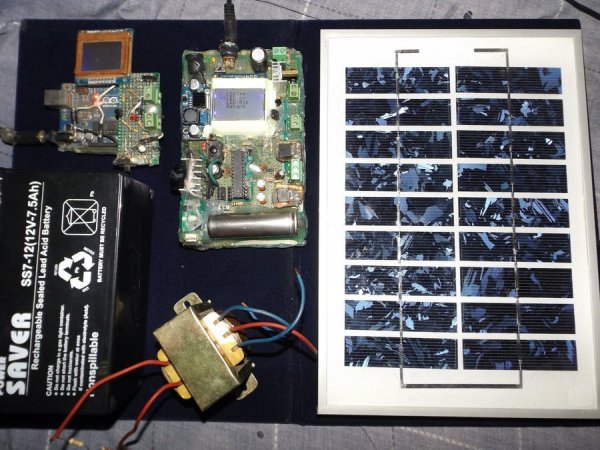
Proto Version on Uno
The first version was developed on Uno Board with minimum hardware and minimum options. The Nokia display was directly mounted and a MOSFETs shield was developed to support charging/discharging of the battery. There is no menu control, no inverter, no PWM charging and cool features! Just on/off charging and showing battery and panel voltage levels. Does the job but got no charm!
Full Fledged Version on Protoboard
Then I developed this new one with following features:
- PWM Solar Charge Controller up to 100 Watt Panel
- Square wave mini 60 Watt Inverter
- Up to three 12 Volts DC load control
- Primary DC load supports auto on/off features
- An independent USB Power Bank
- Buck regulator module
- Emergency on board LED Lamp with Blink and Brightness control
2 button/switch controlled scroll and select based menu for user control, displaying options and status information on the Nokia 5110 display. Very Cool! Back side is Hot-Glue Insulated for short circuit protection against metallic objects!
There are few more convenient features like on/off switch for display backlight, separating the buck for independent operation by switching off from the internal battery.
Let’s learn some technical stuff!
Charge controller can be On/Off, PWM or MPPT types. On/Off is the simplest form (my version 1 – picture above) of controller which does not throttle the charging current as the battery voltage approaches it full charge voltage.
Where as PWM gradually decreases the charging current as the battery gets full. PWM controller has following benefits:
- Helps recovering lost battery capacity and de-sulfate a battery
- Increases battery’s ability to accept more charge
- Maintain high average battery capacities up to 95%
- Equalize drifting battery cells, so internal cells can achieve same potential
- Reduce battery heating and gassing thus preventing electrolyte loss
- Slows down aging and prolong system life
But PWM can’t get most of the electrical power out of PV solar panels, because it drags the panel to operate near battery voltage. MPPT is the solution to this problem which basically is a DC to DC adjustable buck-boost converter, it can convert most of the solar power compared to PWM controller.
Inverters can be square wave, modified sine wave and pure sine wave types. Square wave inverter is very simple in design and good enough small DC loads like AC lamps, CFL lamps, table fans, soldering irons but not recommended for inductive motors, delicate equipments/power supplies because of harmonic distortion.
Modified sine wave is kind of retarded sine wave created form square waves, better than plain square wave inverters. Sine wave inverter are best for all types of load but complex to design hardware, difficult software algorithm to operate and expensive to make.
A buck regulator is a step down DC-DC converter, here I have used a buck module to charge the 4.2 V Li-ion battery that powers the controller (Arduino + display), independent USB power bank, on-board LED lamp.
Now USB power bank basically is a DC-DC boost that can convert a range of voltages below 5 (like 3.3 to 4.2 volts range) from a Li-ion or LiPo battery to 5 volts which is the USB bus voltage that can charge mobile devices.
It also has a buck converter to charge that battery. In my project the buck module takes some juice from panel to charge the internal (on board) battery.
Workings of the Hardware
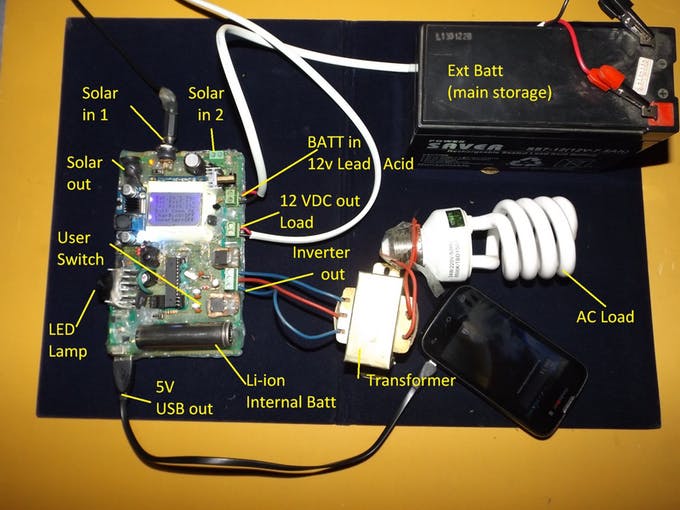
Before we go into details, check this image of everything connected around the device:
- What is the primary function of the charge controller in this device?
The charge controller regulates the charging of the DC storage battery from the solar panel and manages discharging to prolong battery life. - How does a PWM controller benefit the battery compared to On/Off types?
PWM helps recover lost capacity, de-sulfate the battery, maintains high average capacities up to 95%, equalizes drifting cells, reduces heating, and slows down aging. - Can this device operate AC loads like table fans or CFL lamps?
Yes, the square wave mini 60 Watt inverter is designed to operate small AC loads such as AC lamps, CFL lamps, and table fans. - What type of microcontroller serves as the brain of this project?
The system uses an AVR Atmega8A microcontroller programmed in Arduino, though an Atmega328P can be used with minor changes. - How is the internal Li-ion battery charged within this setup?
A buck regulator module takes power from the solar panel to charge the 4.2 V Li-ion battery that powers the controller, USB port, and LED lamp. - Is it possible to use the USB power bank independently from the main battery?
Yes, the design allows separating the buck converter to operate independently by switching off from the internal battery. - Why is MPPT considered better than PWM for extracting power from PV panels?
MPPT acts as a DC to DC adjustable buck-boost converter that can convert most of the solar power, whereas PWM drags the panel to operate near battery voltage. - What safety feature is applied to the back side of the protoboard version?
The back side is insulated with hot-glue to provide short circuit protection against metallic objects.
