
Summary of BASICS OF THE SPI COMMUNICATION PROTOCOL
This article introduces communication protocols for connecting microcontrollers to peripherals, focusing on the basics of serial vs. parallel data transmission. It outlines three common low-speed protocols—SPI, I2C, and UART—explaining that they are simpler and more resource-efficient than high-speed options like USB or WiFi. The text details how binary bits (0s and 1s) are sent via voltage changes and sets the stage for a deeper dive into SPI in subsequent articles.
Parts used in Communication Protocols Project:
- Microcontroller
- Sensor
- Display
- Module
- Wires
- Serial Peripheral Interface (SPI)
- Inter-Integrated Circuit (I2C)
- Universal Asynchronous Receiver/Transmitter (UART)
When you connect a microcontroller to a sensor, display, or other module, do you ever think about how the two devices talk to each other? What exactly are they saying? How are they able to understand each other?
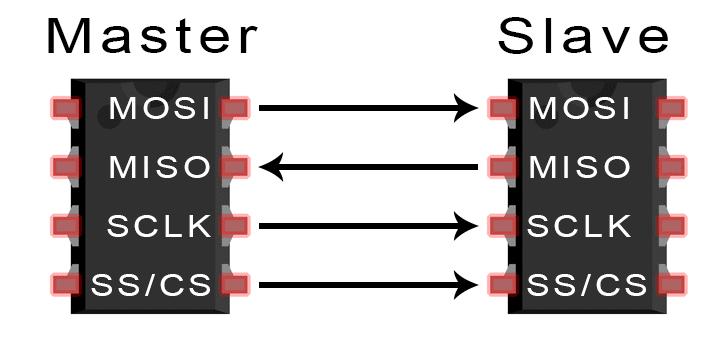
Communication between electronic devices is like communication between humans. Both sides need to speak the same language. In electronics, these languages are called communication protocols. Luckily for us, there are only a few communication protocols we need to know when building most DIY electronics projects. In this series of articles, we will discuss the basics of the three most common protocols: Serial Peripheral Interface (SPI), Inter-Integrated Circuit (I2C), and Universal Asynchronous Receiver/Transmitter (UART) driven communication.
First, we’ll begin with some basic concepts about electronic communication, then explain in detail how SPI works. In the next article, we’ll discuss UART driven communication, and in the third article, we’ll dive into I2C.
SPI, I2C, and UART are quite a bit slower than protocols like USB, ethernet, Bluetooth, and WiFi, but they’re a lot more simple and use less hardware and system resources. SPI, I2C, and UART are ideal for communication between microcontrollers and between microcontrollers and sensors where large amounts of high speed data don’t need to be transferred.
SERIAL VS. PARALLEL COMMUNICATION
Electronic devices talk to each other by sending bits of data through wires physically connected between devices. A bit is like a letter in a word, except instead of the 26 letters (in the English alphabet), a bit is binary and can only be a 1 or 0. Bits are transferred from one device to another by quick changes in voltage. In a system operating at 5 V, a 0 bit is communicated as a short pulse of 0 V, and a 1 bit is communicated by a short pulse of 5 V.
The bits of data can be transmitted either in parallel or serial form. In parallel communication, the bits of data are sent all at the same time, each through a separate wire. The following diagram shows the parallel transmission of the letter “C” in binary (01000011):

Read more: BASICS OF THE SPI COMMUNICATION PROTOCOL
- What are communication protocols in electronics?
They are the languages electronic devices use to talk to each other, similar to human communication. - Which three protocols are most common for DIY projects?
The three most common protocols discussed are SPI, I2C, and UART. - How do electronic devices transmit bits of data?
Bits are transferred through physically connected wires by quick changes in voltage. - What voltage represents a 0 bit in a 5 V system?
A 0 bit is communicated as a short pulse of 0 V. - What voltage represents a 1 bit in a 5 V system?
A 1 bit is communicated by a short pulse of 5 V. - What is the difference between serial and parallel communication?
In parallel communication, bits are sent all at once through separate wires, whereas serial sends them sequentially. - Are SPI, I2C, and UART faster than USB or Bluetooth?
No, these protocols are slower than USB, ethernet, Bluetooth, and WiFi. - Why might one choose SPI, I2C, or UART over high-speed protocols?
They are ideal because they are simpler and use less hardware and system resources. - When should large amounts of high-speed data be avoided with these protocols?
These protocols are not suitable when large amounts of high-speed data need to be transferred.
