
Summary of Keypad Interface With 8051 and Displaying Keypad Numbers in 7 Segment
This tutorial shows how to interface a keypad to an 8051 microcontroller and display pressed keys on a 7-segment display using Proteus simulation and Keil (C51). It lists required software, hardware components, provides circuit guidance, a demo video, and links to source code and additional resources.
Parts used in the Keypad Interface With 8051 and Displaying Keypad Numbers in 7 Segment:
- 8051 Development Board
- Seven Segment Display (Common Anode)
- 4x3 Keypad Matrix (4x4 also supported with code changes)
- USB to UART converter (9 Pin D type male connector for RS232)
- Jumper Wires
- Proteus Software (for simulation)
- Keil uVision with C51 compiler
- Flash Magic (for uploading to Philips-based 8051 hardware)
In this tutorial I’m going to tell you about how we can interface keypad with 8051 and displaying keypad numbers in 7 segment display
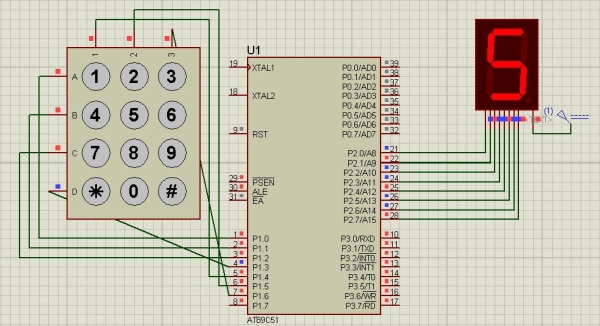
Step 1: Software Used
As we are showing proteus simulation so FOR CODING AND SIMULATION YOU REQUIRED:
1 Keil uvision: Their are lots of product from keil. so you will be required c51 compiler. You can download that software from here
2 Proteus Software for simulation: This is the software to show simulation. You will get lot of information to download this software.
If you are doing it in hardware then you would require one software that is flash magic to upload the code in your hardware. Remember flash magic is developed by nxp. So you can not upload all 8051 family microcontroler through this software. So Philips based controller only you can upload.
Step 2: Components Used:
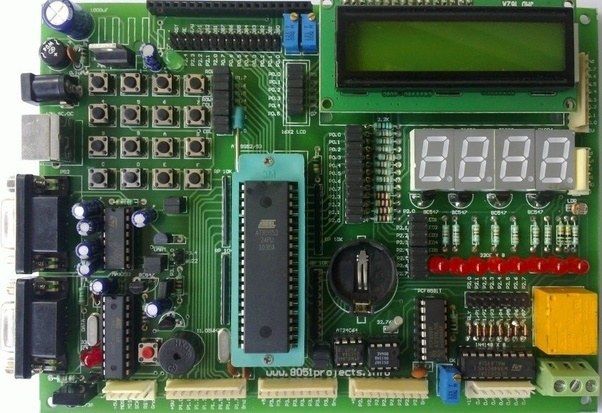
Here in our demo video we are using proteus simulation but definetly if you are doing it in your hardware you will be required these components for this project:
8051 Development board: So if you have this board it will be better so that you can easily upload the code by yourself.
Seven Segment Display: In this project we are using one Common Anode Display.
4*3 Keypad Matrix: Herewe are using 4*3 keypad matrix. So you can use 4*3 matrix or any other matrix like 4*4, no issue. For that a little more step we need to add in our code
USB to UART converter: This is 9 Pin D type male Connector For RS232 O/p Jumper Wires
Some Jumper Wires
Step 3: Circuit Diagram:
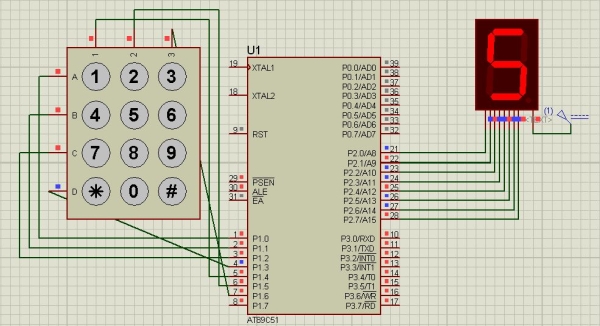
Step 4: Code and Video
The whole Project Description is given in above video
You can get the source code from our GitHub Link
If you have any doubt regarding this project feel free to comment us below. And if you want to learn more about embedded system you can visit our youtube channel
Please visit and like our Facebook Page for frequent updates.
Thanks & Regards,
Embedotronics Technologies
Source: Keypad Interface With 8051 and Displaying Keypad Numbers in 7 Segment
- What software is required for simulation?
Proteus Software is required for simulation as stated in the tutorial. - Which compiler is needed for coding?
Keil uVision with the C51 compiler is required for coding. - Can I upload code to hardware and what tool is used?
Yes, Flash Magic is used to upload code to Philips-based 8051 hardware. - What type of seven segment display is used?
The project uses a common anode seven segment display. - Which keypad matrix is used in the demo?
The demo uses a 4x3 keypad matrix; a 4x4 can also be used with code adjustments. - Where can I find the source code?
The source code is available from the provided GitHub link referenced in the tutorial. - Is there a video demonstration of the project?
Yes, a demo video is available at the provided YouTube link. - Do I need additional hardware for interfacing RS232?
The tutorial lists a USB to UART converter with a 9 pin D type male connector for RS232 output.
