
Summary of ATmega32 Basic Tutorial Led Blinking using AVR Studio 5
This basic tutorial guides beginners to build an LED blink (Hello World) project with an ATmega32 microcontroller, covering required components, a schematic, C source code for toggling PORTB LEDs with 200 ms delays, and step-by-step instructions to assemble the circuit, compile in AVR Studio 5, generate a HEX file, program the MCU, and power the circuit to observe blinking LEDs.
Parts used in the ATmega32 LED Blink Project:
- ATmega32 microcontroller
- Wiro Board or custom PCB
- 10k resistor (1)
- 330 ohm resistors (8)
- LEDs (8)
- 18 pF capacitors (2) for crystal oscillator
- XTAL crystal oscillator (recommendation around 4 MHz)
- 5 V DC power source
- AVR programmer or USB AVR programmer
- AVR Studio 5 IDE and compiler (software)
This is a very basic tutorial for atmega32 microcontroller beginners to get started. You can call this little program as Hello World for atmega programmers.
LED Tutorial Requirements:
- IDE and Compiler Recommended AVR Studio 5
- Wiro Board or Skills to design PCB according to the under given schematic
- ATmega32 microcontroller
- (1)10k resistor
- (8) 330 ohm resistors
- (8) Leds
- (2) 18 pf capacitor (for xtal crystal oscilator drive)
- (1) XTAL crystal Oscilator of any frquency within the limits recommended 4MHz
- 5 Volts DC Power Source to drive the circuit
Schematic Diagram for ATmega32 Led Blink Circuit:
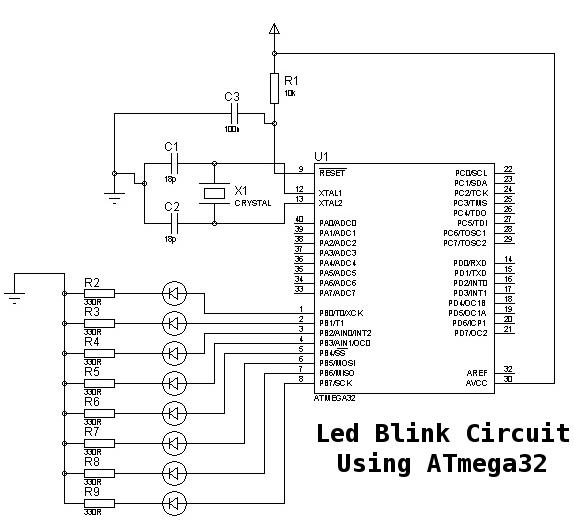
LED Blinking Code:
code is written in C language.
/*
* ledb_blinking_using_Atmega.c
* Author: Bailal Ayoub
*/
#include <avr/io.h>
#include <util/delay.h>
int main(void)
{
DDRB=0xFF; //Setting all pins of PORTB as output
PORTB=0×00; //Initializing PORTB as Zero (or Sending LED OFF Instruction)
while(1)
{
//Project Code Starts from Here
PORTB=0xFF; //Enabling LED
_delay_ms(200); //giving 200 milisec delay
PORTB=0×00; //Disabling LED
_delay_ms(200); //giving 200 milisec delay
} //while 1 loop ends
} //main ends
Step 1:
Create above circuit using components mentioned in project requirements on Wiroboard or create using PCB.
Step 2:
You need to have ATMEL AVR Studio 5 IDE and compiler. Which will help you to write and edit the C language Code easily. Insert the above source code given C Language code in the avr studio.
Step 3:
Compile the code and create the HEX file
Step 4:
Burn the Hex file to atmega32 Chip using any avr programmer or you can create your own avr usb programmer
Step 5:
Power the circuit and you will have led blinking with the delay of 200 millisecond.
- What is the recommended IDE and compiler for this project?
AVR Studio 5 is the recommended IDE and compiler according to the article. - Can I use a custom PCB instead of a Wiro Board?
Yes, you can design a PCB according to the provided schematic or use a Wiro Board. - What microcontroller is used in the tutorial?
The tutorial uses the ATmega32 microcontroller. - How many LEDs and resistors are required?
The project uses eight LEDs and eight 330 ohm resistors. - What oscillator components are needed?
One XTAL crystal oscillator and two 18 pF capacitors are required for the crystal oscillator drive. - What voltage power source is required?
A 5 volt DC power source is required to drive the circuit. - How do I program the ATmega32 with the compiled code?
Compile the code in AVR Studio 5 to create a HEX file, then burn the HEX file to the ATmega32 using any AVR programmer or a custom USB AVR programmer. - What does the provided C code do to the LEDs?
The code sets PORTB as output, then repeatedly enables PORTB (LEDs on) for 200 ms and disables PORTB (LEDs off) for 200 ms, causing blinking. - What are the step-by-step actions to get the blinking LEDs?
Build the circuit, insert the provided C source into AVR Studio 5, compile to create a HEX file, burn the HEX to ATmega32 with an AVR programmer, then power the circuit to see LEDs blink.
