
Summary of AVR Dragon Manual – User Guide in PDF
The AVR Dragon is a low-cost development tool by Atmel supporting all programming modes and full emulation for devices with 32kB or less Flash. It features flexible firmware upgrades via AVR Studio, supports multiple protocols like ISP, JTAG, and debugWIRE, and includes an onboard prototype area. Powered by USB, it can supply up to 300mA to target boards and handles level conversion for externally powered targets.
Parts used in the AVR Dragon:
- AVR Dragon Device
- USB Cable
- Onboard Prototype Area
- VCC Connector
- External Target Board (optional)
Introduction to AVR Dragon:
With the AVR Dragon, Atmel has set a new standard for low cost development tools. AVR Dragon supports all programming modes for the Atmel AVR device family. It also include
full emulation support for devices with 32kB or less Flash memory. At a fraction of the price traditionally associated with this kind of featured tool, the AVR
Dragon will fulfill all your programming and emulation needs. The flexible and secure firmware upgrade feature allows AVR Studio to easily upgrade the AVR Dragon to support
new devices.
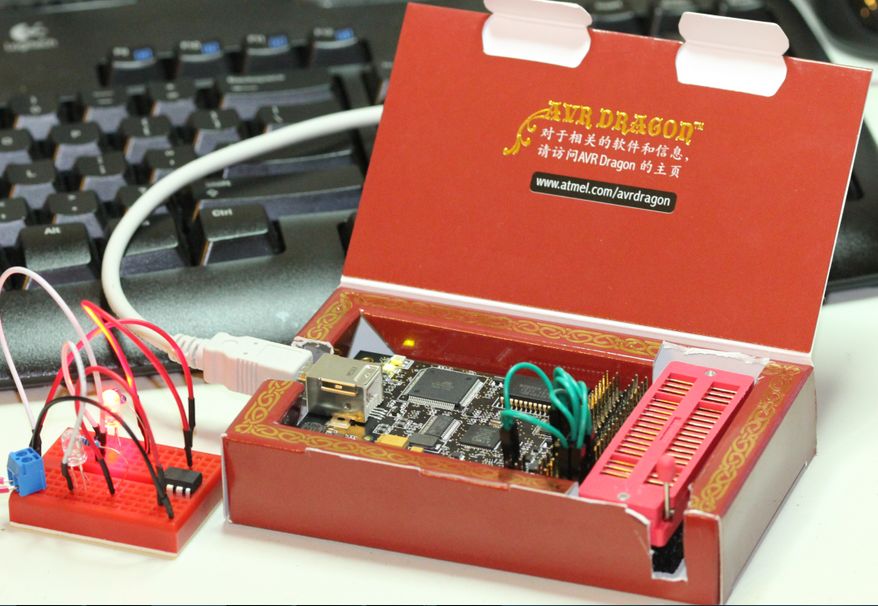
To see which devices are currently supported please read the Device Support page. (New devices will be added through AVR Studio updates or Service Packs on a regular
basis)
Supported Protocols Currently the following protocols are supported:
Programming Interfaces:
- In System Programming ( ISP )
- High Voltage Serial Programming ( HVSP )
- Parallel Programming ( PP )
- JTAG Programming ( JTAG Prog)
Emulation Interfaces: (Only available for devices with 32kB Flash or less)
- JTAG ( JTAG )
- debugWIRE ( dW )
AVR Dragon can be used with an external target board. However, the onboard prototype area, allow simple programming and debugging without any additional hardware. Please see the Using the AVR Prototype Area section for a description on how to use this. AVR Dragon is powered by the USB cable, and can also source an external target with up to 300mA (from the VCC connector) when programming or debugging. For more information on technical details, please read the AVR Dragon Requirements section. If the target is already powered by an external power source, the AVR Dragon will adapt and level convert all signals between the target and the AVR Dragon. Note: It the target board is powered by external power source, no connection should be made betwwen the VCC connector and the external board. AVR Dragon if fully supported by AVR Studio. This allows the AVR Dragon firmware to be easily updated to support new devices and protocols. When connecting the AVR Dragon, AVR Studio will automatically check the firmware and prompt the user if an updated firmware is available.
Download AVR Dragon Manual User Guide in PDF
- What programming modes does the AVR Dragon support?
It supports In System Programming, High Voltage Serial Programming, Parallel Programming, and JTAG Programming. - Does the AVR Dragon offer emulation support?
Yes, it includes full emulation support for devices with 32kB or less Flash memory. - How is the AVR Dragon powered?
The device is powered by the USB cable. - Can the AVR Dragon power an external target board?
Yes, it can source up to 300mA from the VCC connector when programming or debugging. - How can I update the firmware on the AVR Dragon?
Firmware updates are performed easily through AVR Studio which checks for updates automatically upon connection. - What happens if the target board has its own power source?
The AVR Dragon adapts and level converts signals between the target and itself without connecting the VCC connector. - Is an external target board required to use the AVR Dragon?
No, the onboard prototype area allows simple programming and debugging without additional hardware. - Which protocols are supported for emulation?
JTAG and debugWIRE are the supported emulation interfaces for eligible devices.
