
Summary of Universal Serial Bus (USB) Connectors Pinout
This article explains Universal Serial Bus (USB) connectors, highlighting their ease of use for attaching peripherals like mice and printers compared to older interfaces. It details the standard 4-pin USB cable configuration: VCC (+5V), Data -, Data +, and Ground. The text notes that a single USB connection can support up to 127 devices and describes the internal wiring colors for power and data transmission.
Parts used in the PC Cable USB Pinout Diagram:
- VCC Supply Voltage
- D- Data -ive Signal
- D+ Data +ive Signal
- GND Ground / Neutral
- +5 volts red wire
- Ground brown wire
- Yellow twisted pair wire
- Blue twisted pair wire
- Shielded cable
All Types of USB Pinout Diagrames
Universal Serial Bus connectors. These USB connectors let you attach mice, printers and other accessories to your computer quickly and easily. The operating system supports USB as well, so the installation of the device drivers is quick and easy, too. Compared to other ways of connecting devices to your computer (including parallel ports, serial ports and special cards that you install inside the computer’s case), USB devices are incredibly simple.
PC Cable USB Pinout Diagram
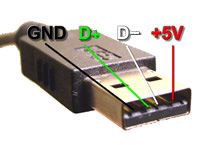
Other USB Connector Pin out
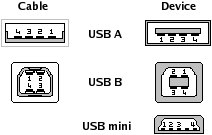
| Pin No. | Signal/Symbol | Notes | Description |
|---|---|---|---|
| 1 | VCC | Supply Voltage | +5V |
| 2 | D- | Data -ive Signal | Data – |
| 3 | D+ | Data +ive Signal | Data + |
| 4 | GND | Ground / Neutral | Ground |
Inside a USB cable:
There are two wires for power — +5 volts (red) and ground (brown) — and a twisted pair (yellow and blue) of wires to carry the data. The cable is also shielded. The goal of USB is to end all of these headaches. The Universal Serial Bus gives you a single, standardized, easy-to-use way to connect up to 127 devices to a computer.
- How many devices can a single USB connection support?
A single standardized USB connection allows you to connect up to 127 devices. - What voltage is supplied by the VCC pin?
The VCC pin provides a supply voltage of +5V. - Which wires carry the data signals inside a USB cable?
A twisted pair consisting of yellow and blue wires carries the data. - What are the colors of the power wires in a USB cable?
The power wires are red for +5 volts and brown for ground. - Why are USB devices considered simpler than parallel or serial ports?
USB devices are incredibly simple because they do not require special cards installed inside the computer case. - Does the operating system support USB drivers automatically?
Yes, the operating system supports USB, making device driver installation quick and easy. - What is the function of the D- signal?
The D- signal represents the negative data signal. - Is the USB cable shielded?
Yes, the USB cable is shielded.
