
Summary of ATMEGA8 USB EMAIL NOTIFIER CIRCUIT
This article describes a DIY "USB Mail Notifier" project using an ATmega8 microcontroller. It replaces manual email checks with a physical USB device that flashes LEDs to signal new messages and includes a touch button to launch email clients or silence alerts. The device connects to a mail server via custom C++ code in RAD Studio and functions as a plug-and-play HID USB device without drivers, housed in a repurposed CD sleeve envelope.
Parts used in the USB Mail Notifier:
- ATmega8 microcontroller
- C++ RAD Studio source code
- Email account
- Mail server
- LEDs
- Touch button
- Pressure sensor
- CD sleeve box
- HID USB device interface
Market “USB Mail Notifier” ready devices are sold, but in practice, ileginç project also ATmega8 microcontroller and the email account that connects the program’s source code (C + + RAD studiox) or not different… Electronics Projects, ATmega8 USB Email Notifier Circuit “atmega8 projects, avr project, microcontroller projects, “
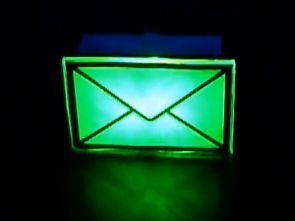
USB Mail Notifier
Market “USB Mail Notifier” ready devices are sold, but in practice, ileginç project also ATmega8microcontroller and the email account that connects the program’s source code (C + + RAD studiox) or not different projects, mail server and microcontroller communication and so on. would be useful in developing for quite disabled to get the highest yield requirement to prepare an elegant box as in the picture 🙂 author box from the CD sleeve prepared to take the output from laser printers have used the mail icon
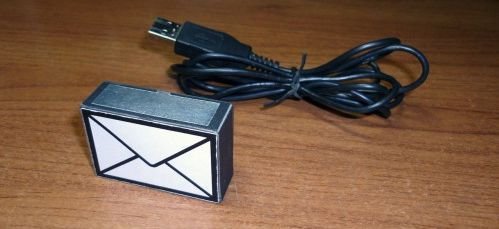
USB Mail Notifier Author: Bonio Often need to quickly respond to the email message came. Can be several times a day to check mail manually, in which case your interlocutor risk wait a whole day before you answer. You can use the special software which will check mail at a given interval of time and if there are new messages to report on it from the tray. But here it may be that you miss a message, for example, watching movies, or if you are at this moment not at the computer. To always know if there is new mail was invented USB Mail Notifier. The device is a USB plug on the box in an envelope, with a touch button on top. The front side of the “envelope” starts flashing continuously set the color, if you have new messages. Color is set from the control program. You can set any of the possible two, and mix them together. Touch button, you can run any program, such as email-client, or disable it altogether. USB Mail Notifier is a HID USB device, so drivers are not necessary.

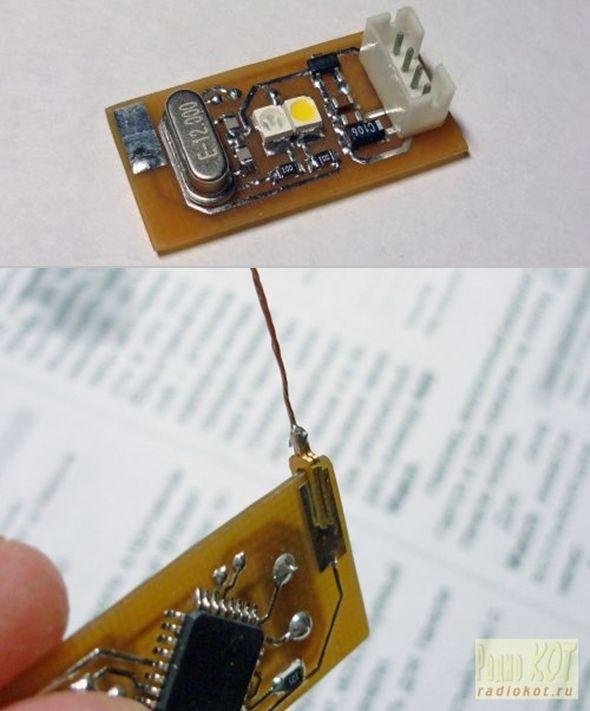
Use of computer software in addition to the email you are entering information when it comes to email blazing brightness of the LEDs can be adjusted as additional pressure sensor located on the circuit you want you can make a program work
Read More Information….
-
How does the USB Mail Notifier alert the user?
The front side of the envelope starts flashing continuously in a set color if there are new messages. -
Can I change the LED colors on the device?
Yes, you can set any of two possible colors or mix them together using the control program. -
What happens when the touch button is pressed?
You can run any program such as an email client or disable the notification altogether. -
Does this device require special drivers?
No, it is a HID USB device so drivers are not necessary. -
What programming language is used for the project?
The project uses C++ RAD Studio source code to connect the microcontroller to the email account. -
Can the brightness of the LEDs be adjusted?
Yes, additional software allows adjusting LED brightness based on input from an extra pressure sensor. -
What material was used to build the enclosure?
The author prepared the box from a CD sleeve to take the output from laser printers.
