
Summary of Charging your Smartphone from USB without fear
The article explains why smartphones and tablets often fail to charge from standard USB ports due to missing "native" charger voltage signatures. It details a DIY solution for Samsung Galaxy devices using a resistor divider (R1/R2) to output 1.2V on data pins, tricking the device into recognizing the power source. However, it warns that fully discharged batteries may exceed the USB 2.0 current limit of 500mA.
Parts used in the Samsung Galaxy Tab Charging Fix:
- R1 Resistor
- R2 Resistor
- USB Connector
- USB Car Charger
- Samsung Galaxy Tab 10.1
- Motorola Droid 3 Phone
From time to time many of us are facing the same problem when trying to charge your smartphone or tablet from the USB port – it just not charging. Recently I have bought USB car charger to power my Samsung Galaxy Tab 10.1 on the road just to discover it doesn’t work. Even though the Galaxy actually sees the charger connected is just marking it as unrecognized power source. I was trying to power up my Motorola Droid 3 phone – it won’t work either. The reason is simple – the Galaxy Tab doesn’t recognize the charging device as “native charger”.
What is “native” charger?
The native charger for smartphone or tablet often have a special voltage signature on USB data pins to let the device recognize the charger and figure out the maximum charging current it can consume from the power source. The intent is twofold. First, it is stopping the device from consuming too much current from the charger. Second, it is preventing the charging from unrecognized power sources. The “unrecognized” is the keyword here, as profiting from selling additional device accessories (chargers) is definitely a business strategy.
Samsung devices
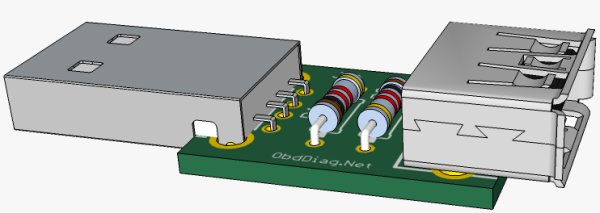
I have figured the simple solution that will make the Samsung Galaxy pad device charge from USB port, see the schematic below. The R1/R2 voltage divider is providing the 1.2V voltage on the D+ and D- pins of the USB connector to be recognized as Samsung native charger. That’s it. The only issue is that completely discharged Galaxy tab battery might draw even more then 500 mA from the USB port, when the USB 2.0 specification limiting the maximum current load to 500 mA. Just be aware.
For more detail: Charging your Smartphone from USB without fear
- Why does my tablet show an unrecognized power source?
The device requires a special voltage signature on USB data pins to recognize the charger as native. - How can I make a Samsung Galaxy pad charge from a USB port?
Use an R1/R2 voltage divider to provide 1.2V on the D+ and D- pins of the USB connector. - What is the purpose of the native charger voltage signature?
It prevents devices from consuming too much current and stops charging from unrecognized power sources. - Does the USB 2.0 specification allow more than 500 mA?
No, the USB 2.0 specification limits the maximum current load to 500 mA. - Can a completely discharged Galaxy tab battery cause issues?
Yes, it might draw more than 500 mA, which exceeds the USB 2.0 limit. - What happens if the charger is not recognized as native?
The device will mark the power source as unrecognized and refuse to charge effectively. - Is this fix applicable to Motorola phones?
The text notes the Motorola Droid 3 also failed but only provides a specific schematic solution for Samsung devices.
