
Summary of Converting from Eagle to KiCad
This article details a set of User Language Programs (ULPs) designed to convert Eagle schematic and PCB files, along with library files, into compatible KiCad formats. The tools support multi-sheet schematics, net labels, gate conversion, and project directory management. They also address specific challenges like unconnected vias and track documentation on specific layers to ensure flood fill functionality works correctly in KiCad. Installation is available via ZIP download or Git clone.
Parts used in the Eagle to KiCad Conversion Project:
- Eagle ULP scripts (5 files)
- Eagle include file
- Eagle sch/pcb version 6.xx files
- Eagle lib(lbr) files
- KiCad sch/pcb files
- KiCad lib/mod files
- Converted examples director
Converting from Eagle to KiCad.
- Quick Introduction Video
Recommended video player Firefox 46+ with VLC video player plugin - The following 5 ulp (eagle user script file) and one ulp include file, work together or stand alone to convert Eagle sch/pcb version 6.xx(7.xx maybe?) file(s) and any version of Eagle lib(lbr) to KiCad sch/pcb and lib/mod files.

- The Programs will do
- Eagle mulit sheet sch to KiCad mulit sheets.
- Global and local net labels for mulit sheets.(This is a real nasty bit of hacking!)
- Mulit part gate’s.
- Build KiCad PCB modules and SCH libs from Eagle SCH.
- Make project director to store all the converted files.
- And basic error checking.
- Eagle 6.xx PCB files can be directly import to KiCad.
- Eagle LBR’s(any version of Eagel libs or size ) can be converted to KiCad lib/mod using eagle-lbr2kicad-1.0.ulp see
- Eagle Lib conversion for more details.
- Converts Via’s to Pads, which helps with KiCad’s flood fill, when Via’s have no connections.
- Documents fill’s over SMD pad’s on Eagle Layer 155,156
- Documents on layer’s 150,152,153,154 of (Eagle) the unconnected Via’s and tracks.
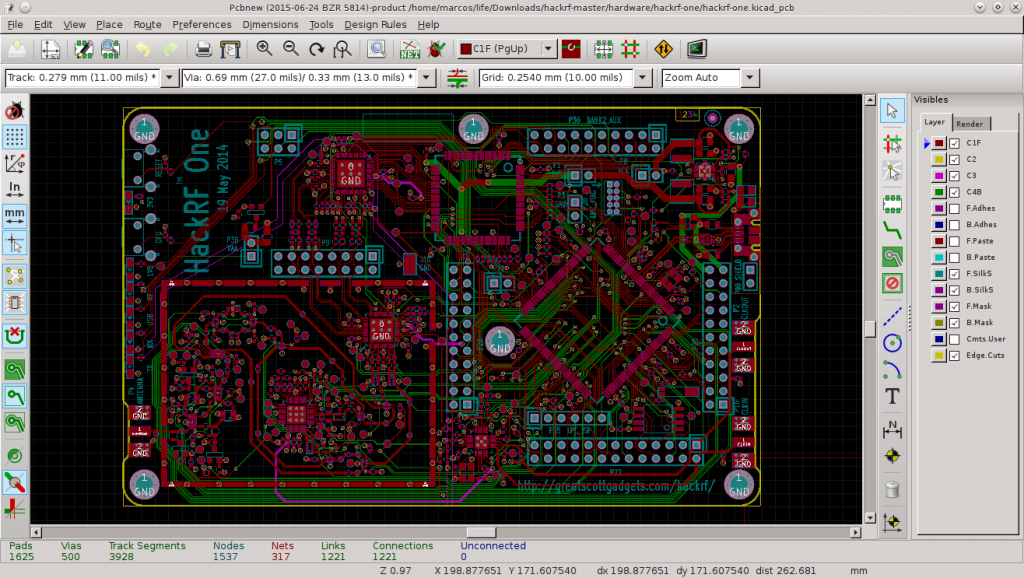
- The examples director contains a number of converted sch’s/board’s.
- By using the following ulp’s a consistent link from the SCH to PCB is maintained so forward and backward net-list annotations work under KiCad!
WARNING KiCad via’s and tracks don’t retain NET information from Eagle when they are not connect to a PAD!,** So KiCad flood fill will not connect to them !!! There is an option to convert and document on layer’s 150,152,153,154 of (Eagle) the unconnected Via’s and tracks which will make finding and fixing the problem much easier.**
Installing.
- Download the zip file, (click on the button on the bottom right of this page. Download ZIP) And unzip using your favorite zip program to your target directory OR if your prefer git:
git clone https://github.com/lachlanA/eagle-to-kicad.gitFor more detail: Converting from Eagle to KiCad
- How do I install the conversion tools?
You can download the zip file from the page button or use git clone https://github.com/lachlanA/eagle-to-kicad.git. - Can these tools handle multi-sheet schematics?
Yes, the programs convert Eagle multi-sheet schematics to KiCad multi-sheets including global and local net labels. - What happens to unconnected vias during conversion?
Vias are converted to pads to help with KiCad's flood fill, and unconnected vias and tracks can be documented on specific layers for easier fixing. - Does the tool maintain the link between schematic and PCB?
Yes, using these ULPs maintains a consistent link so forward and backward net-list annotations work under KiCad. - Which Eagle versions are supported for direct import?
Eagle 6.xx PCB files can be directly imported to KiCad. - How are Eagle libraries converted to KiCad?
Eagle LBR files can be converted to KiCad lib/mod files using the eagle-lbr2kicad-1.0.ulp script. - Why might KiCad flood fill fail to connect to tracks?
KiCad vias and tracks do not retain NET information from Eagle when not connected to a pad, which prevents flood fill connection. - On which layers does the tool document unconnected items?
The tool documents unconnected vias and tracks on Eagle layers 150, 152, 153, and 154. - What additional documentation features are included?
The system documents fills over SMD pads on Eagle Layer 155 and 156. - Is there an example directory provided?
Yes, the examples director contains a number of converted schematics and boards.
