
Summary of DipCortex – ARM Cortex in a Dip Package with USB
This article introduces the DipCortex, an ARM Cortex M3/M0 microcontroller in a 40-pin DIP package with a USB socket. Available in NXP LPC1347 (M3) and LPC11U24 (M0) versions, it mimics 8-bit microcontroller pinouts for easy breadboard prototyping. Both variants feature built-in USB peripherals and ROM-based stacks. Firmware updates are simplified via drag-and-drop onto a mass storage device after holding buttons and resetting.
Parts used in the DipCortex:
- DipCortex module
- NXP LPC1347 M3 microcontroller
- LPC11U24 M0 microcontroller
- 40 pin dip package
- USB socket
- Bread board
- Computer
- Reset button
- Buttons
This week we have been playing with another new product, the DipCortex. It’s an ARM Cortex M3/M0 in a 40 pin dip package and USB socket. It has two versions a NXP LPC1347 M3 and a LPC11U24 M0, the pin out roughly follows a certain range of 40pin 8bit micros.
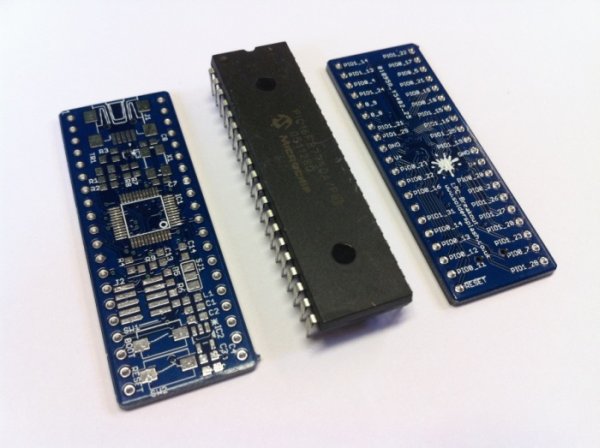
It’s perfect for quickly prototyping a product on a bread board. Both have USB peripherals and a USB stack in ROM saving flash space. Updating the code can be performed by plugging it into the computer, holding both buttons and then releasing the reset button. A mass storage device then appears and firmware can be drag and dropped on to this drive. Press reset and the new code is executed. Have a look at the product page for more info.
For more detail: DipCortex – ARM Cortex in a Dip Package with USB
- What is the DipCortex?
It is an ARM Cortex M3/M0 microcontroller packaged in a 40 pin dip format with a USB socket. - Which versions of the DipCortex are available?
There are two versions: one with an NXP LPC1347 M3 chip and another with an LPC11U24 M0 chip. - Can I use the DipCortex on a bread board?
Yes, it is designed to be perfect for quickly prototyping a product on a bread board. - How do I update the firmware on the DipCortex?
You plug it into a computer, hold both buttons, release the reset button to create a mass storage drive, and then drag and drop the firmware. - Does the DipCortex save flash space?
Yes, both versions have USB peripherals and a USB stack located in ROM which saves flash space. - What happens after I drag and drop the new code?
You must press the reset button for the new code to execute. - Do the pins follow a standard layout?
The pin out roughly follows a certain range of 40pin 8bit micros.
