
Summary of DIY Temperature & Humidity & Smoke Detector
This article guides users in building a DIY temperature, humidity, and smoke alarm system using an ICStation Mega 2560 board. The device monitors environmental conditions via sensors, displays real-time data on a 1602 LCD, and triggers sound and light alarms when thresholds are exceeded. Users can set dangerous limits for temperature and humidity using tactile switches.
Parts used in the Temperature Humidity Smoke Alarm System:
- ICStation ATMEGA2560 Mega2560 R3 Board Compatible Arduino
- DHT11 Digital Humidity Temperature Sensor
- MQ-2 Gas Sensor Module Smoke Methane Butane Detection for Arduino
- 1602A HD44780 Character LCD Display Module LCM Blue Backlight
- Active Buzzer Module for Arduino
- 830 Point Solderless PCB Bread Board MB-102 Test DIY
- 100K ohm 3296W Trim Pot Trimmer Potentiomete
- 1K ohm 1/4W 1% Accuracy Metal Film Resistor
- Jumper wires
- 3P DuPont Line
- Tact Switches 4 Legs
- Green LED 5mm DIP Hole Though
- Red LED 5mm DIP Hole Though
- 5 Voltage power supply
ICStation team introduce you how to DIY this temperature & humidity & smoke alarm system based on ICStation Mega 2560 compatible with Arduino.The working voltage of this system is DC5V.It can measure the current temperature, humidity and smoke. It can display real-time data by the 1602 LCD and can realize the sound and light alarm when in the dangerous temperature and humidity. It is a simply and easily to operate monitoring alarm system about temperature humidity and smoke.
Functions
1.When connect to the power supply, after the initialization of hardware, the1602 LCDwill display the current temperature,humidity and smoke volume
2.When we press the NO.1 key, the1602 LCD will turn the page and enter the dangerous temperature setting page.At this time, press NO.2 key once, the dangerous temperature will add one. If the actual temperature is higher than the setting value, the gree LED will light, at the same time the buzzer will alarm. When the actual temperature is lower than the dangerous temperature, the LED will go out and the buzzer will stop alarm.
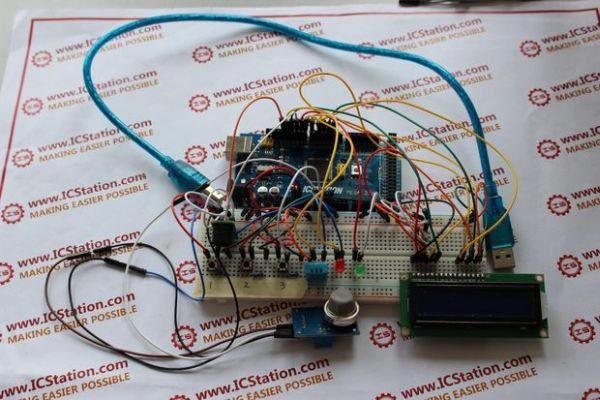
3.When the 1602LCD display stays on the second page , we press the NO.1 key, you will see the 1602LCD will turn page to the third page and enter the dangerous humidity setting page.At this time, press the NO.3 key, the dangerous humidity will add one.If the actual humidity is higher than the setting value, the red LED will light,at the same time the buzzer alarms. When the actual humidity is lower than the dangerous humidity, the LED will go out and buzzer stop alarming.
Step 1: Components List
1.ICStation ATMEGA2560 Mega2560 R3 Board Compatible Arduino
2.DHT11 Digital Humidity Temperature Sensor
3.MQ-2 Gas Sensor Module Smoke Methane Butane Detection for Arduino
4.1602A HD44780 Character LCD Display Module LCM Blue Backlight
5.Active Buzzer Module for Arduino
6.830 Point Solderless PCB Bread Board MB-102 Test DIY
7.100K ohm 3296W Trim Pot Trimmer Potentiomete
8.1K ohm 1/4W 1% Accuracy Metal Film Resistor
9.Jumper wires
10.3P DuPont Line
11.Tact Switches 4 Legs
12.Green LED 5mm DIP Hole Though
13.Red LED 5mm DIP Hole Though
14. 5 Voltage power supply
For more detail: DIY Temperature & Humidity & Smoke Detector
- What is the working voltage of this system?
The working voltage of this system is DC5V. - How does the system display real-time data?
It uses a 1602 LCD to display the current temperature, humidity, and smoke volume. - Which key sets the dangerous temperature limit?
Pressing the NO.1 key enters the dangerous temperature setting page. - How do you increase the dangerous temperature setting value?
Press the NO.2 key once to add one to the dangerous temperature value. - What happens when the actual temperature exceeds the setting?
The green LED lights up and the buzzer alarms simultaneously. - How do you access the dangerous humidity setting page?
While on the second page, press the NO.1 key to turn to the third page. - Which key adjusts the dangerous humidity level?
Press the NO.3 key to add one to the dangerous humidity setting. - What indicates that the humidity has exceeded the limit?
The red LED lights up and the buzzer alarms when humidity is higher than the setting.
