
Summary of DIY USB 5V Solar Power Bank
This article describes a DIY solar power bank that harvests energy via a solar panel to charge a LiPo battery, providing a stable 5V output for USB devices. It features dual charging capabilities using sunlight or an external 5V source, ensuring the device remains powered without manual intervention during the day. The circuit design utilizes SoloCapture and consists of two stages: a battery charger stage and a step-up converter stage.
Parts used in the Solar Power Bank:
- Solar panel
- LiPo battery
- MCP73831 (battery charger)
- LT1302-5 (step up converter)
- USB gadgets
- SoloPCB tools (SoloCapture)
Solar energy is renewable, free, widely available and clean form of energy. It is considered as a serious source of energy for many years because of the vast amounts of energy that is made freely available, if harnessed by modern technology. Many people are familiar with so-called photovoltaic cells, or solar panels, found on things like spacecraft, rooftops, and handheld calculators. The cells are made of semiconductor materials like those found in computer chips. When sunlight hits the cells, it knocks electrons loose from their atoms. As the electrons flow through the cell, they generate electricity.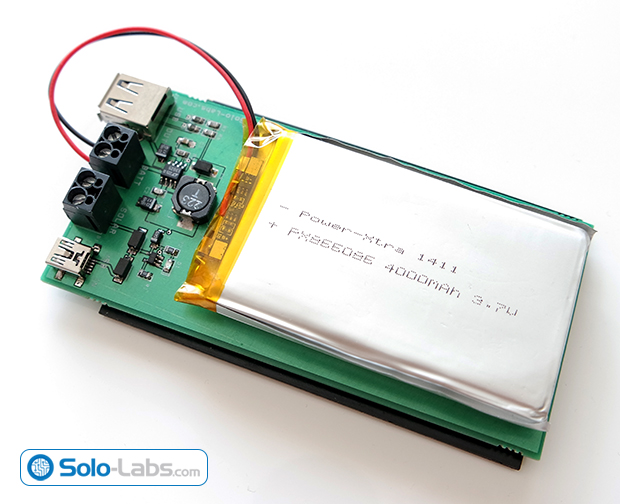
In this project, we are building a power bank which harvests energy by using a solar panel. The energy gained by the solar panel is stored in a LiPo battery. Then the battery is used to supply a stable 5V which is used by USB gadgets. The power bank can also be charged by an external 5V source. The best thing for this power bank during day that you don’t need to remember to charge it. It charges itself by using the sunlight and you don’t come up with an empty bank.
Circuit Design
The schematic of the project is drawn in SoloCapture, the schematic editor of SoloPCB tools. SoloCapture makes the schematic drawing process very easy and fast. You can download SoloPCB tools at Solo-Labs.com for FREE.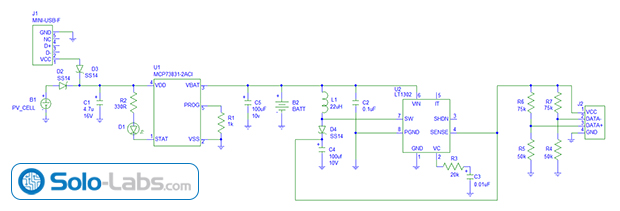
The circuit consists of two stages. The first stage is the battery charger state based on MCP73831 and the second stage is the step up converter based on LT1302-5 which converts the battery voltage to 5V.
For more detail: DIY USB 5V Solar Power Bank
- How does the solar panel generate electricity?
When sunlight hits the semiconductor cells, it knocks electrons loose from their atoms, generating electricity as they flow through the cell. - Can the power bank be charged by an external source?
Yes, the power bank can be charged by an external 5V source in addition to the solar panel. - What voltage is supplied to USB gadgets?
The battery supplies a stable 5V which is used by USB gadgets. - Which tool was used to draw the circuit schematic?
The schematic was drawn in SoloCapture, the schematic editor of SoloPCB tools. - What are the two main stages of the circuit design?
The first stage is the battery charger based on MCP73831, and the second stage is the step up converter based on LT1302-5. - Why is this project beneficial during the day?
You do not need to remember to charge it because it charges itself using sunlight. - What material are photovoltaic cells made of?
The cells are made of semiconductor materials like those found in computer chips. - Where can you download the SoloPCB tools?
You can download SoloPCB tools at Solo-Labs.com for FREE.
