
Summary of Introducing the BMP180 barometric sensor
This article guides users on interfacing the BMP180 barometric sensor with an Arduino to measure air pressure, altitude, and temperature via the I2C interface. It covers purchasing details, pin wiring connections for the Arduino Uno, library installation steps using the SFE_BMP180 Library, and how to access example code within the IDE.
Parts used in the BMP180 Barometric Sensor Project:
- BMP180 barometric sensor (model GY-68)
- Arduino Uno
- SFE_BMP180 Library
This post is about how to use the BMP180 barometric sensor with the Arduino. It is also applicable for other similar barometric sensors.
Introducing the BMP180 barometric sensor
The BMP180 barometric sensor (model GY-68) is the one in the following figure (front and back view). It is a very small module with 1mm x 1.1mm (0.039in x 0.043in).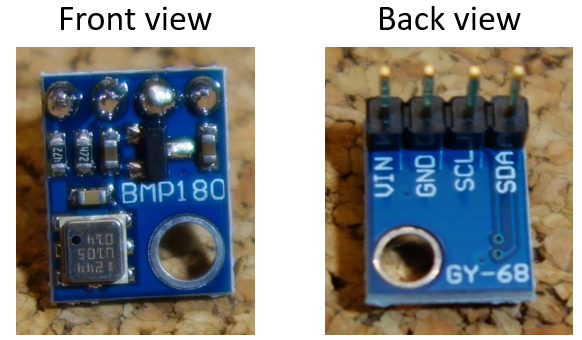
It measures the absolute pressure of the air around it. It has a measuring range from 300 to 1100hPa with an accuracy down to 0.02 hPa. It can also measure altitude and temperature.
The BMP180 barometric sensor communicates via I2C interface. This means that it communicates with the Arduino using just 2 pins.
Where to buy?
This sensor is very cheap. You can buy one for approximately $3 on eBay (view on eBay).
Pin wiring
Wiring the sensor to the Arduino is pretty straightforward:
| Pin | Wiring to Arduino Uno |
| Vin | 5V |
| GND | GND |
| SCL | A5 |
| SDA | A4 |
Schematics
Wire your sensor to the Arduino as shown in the schematics below.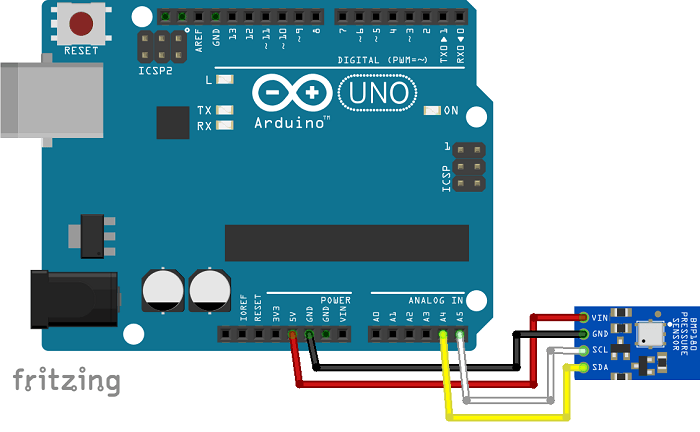
Code
To control the BMP180 barometric sensor, you need to install the SFE_BMP180 Library.
Installing the SFE_BMP180 Library
- Click here to download the SFE_BMP180 library. You should have a .zip folder in your Downloads folder
- Unzip the .zip folder and you should get BMP180_Breakout_Arduino_Library-master folder
- Rename your folder from
BMP180_Breakout_Arduino_Library-masterto BMP180_Breakout_Arduino_Library - Move the BMP180_Breakout_Arduino_Library folder to your Arduino IDE installation libraries folder
- Finally, re-open your Arduino IDE
Go to File > Examples >SparkfunBMP180 > SFE_BMP180_example.
For more detail: Introducing the BMP180 barometric sensor
- What does the BMP180 sensor measure?
The sensor measures absolute air pressure, altitude, and temperature. - How does the BMP180 communicate with the Arduino?
It communicates via the I2C interface using just two pins. - Which Arduino pins connect to the BMP180 SCL and SDA?
SCL connects to A5 and SDA connects to A4 on the Arduino Uno. - Can the BMP180 be used with other similar sensors?
Yes, the guide states it is also applicable for other similar barometric sensors. - What is the approximate cost of the BMP180 sensor?
You can buy one for approximately $3 on eBay. - How do you install the required library for this project?
Download the .zip file, rename the folder to BMP180_Breakout_Arduino_Library, move it to the Arduino IDE libraries folder, and restart the IDE. - Where can you find the example code after installing the library?
Go to File > Examples > SparkfunBMP180 > SFE_BMP180_example. - What is the measuring range of the BMP180 sensor?
The measuring range is from 300 to 1100hPa.
