
Summary of LCD Message Display Using AT Mega8 microcontroller
This project builds a large-character LCD message display using a 20x4 LCD and an ATmega8 microcontroller, showing five oversized characters at once (each composed from 12 LCD cells). Character and message data are stored in an external 24C32 serial EEPROM. Optional time and temperature display uses DS1621 or TCN75 sensors. The system is controlled by BASCOM code and can receive text via a PC RS232 interface.
Parts used in the LCD Message Display:
- 20x4 LCD module
- ATmega8 microcontroller
- 24C32 serial EEPROM (4096 bytes)
- LCD adapter board (optional)
- DS1621 LCD Thermometer (optional)
- TCN75 LCD Thermometer (optional)
- STK500 or AT2313 project board (for connection examples, optional)
- RS232 PC connection (for text input, under construction)
Description
This LCD message display can show text with large characters on an 20*4 LCD module. The display can show five characters at a time. Each characters is build from twelve characters of the display module. The text on the display can be read from up to ten meters distance.
The data to build each character is stored in an external 24C32 serial EEPROM which has 4096 bytes of memory. The characters that can be shown on the display are: A to Z and 0 to 9. There are in total 35 characters so we need 35*12 bytes = 420 bytes. The text is also stored in the EEPROM.
It is also possible to show the time and temperature on the display.
To show the temperature you need to connect the LCD Thermometer DS1621 or the LCD Thermometer TCN75 to the microcontroller.
Hardware
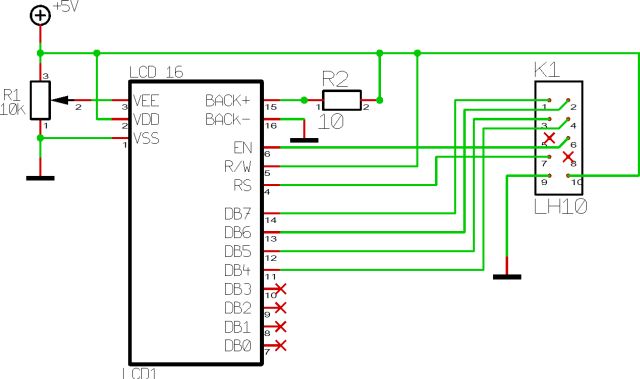
The LCD module has to be connected to PORTB of a AT Mega8 microcontroller.On the LCD@AVR you can see how tho connect an LCD module to a AVR microcontroller, or you can use the LCD adapter board that i have made for this project, you can see the schematic and the board on top of this page. In this way you can easily connect the LCD module for example to the STK500 or the AT2313 project board.
Software
The code for the project is written in the BASCOM program language.
The text on the LCD message display can be changed via the PC’s RS232 port.(under construction)
For more details, click: LCD Message Display Using AT Mega8 microcontroller
- What microcontroller is used in the project?
The project uses the ATmega8 microcontroller. - Which LCD module is required?
A 20x4 LCD module is required. - How are large characters formed on the display?
Each large character is built from twelve characters (cells) of the 20x4 LCD module. - How many large characters can be shown at once?
The display shows five large characters at a time. - Where is the character and text data stored?
Character and text data are stored in an external 24C32 serial EEPROM. - How many bytes are needed to store the characters?
35 characters use 35 times 12 bytes, totaling 420 bytes. - Can the display show temperature and time?
Yes, it is possible to show time and temperature. - Which temperature sensors are supported?
The project supports the DS1621 and the TCN75 LCD Thermometer sensors. - What programming language is the project code written in?
The code is written in the BASCOM programming language. - Can the text be changed from a PC?
Text can be changed via the PC RS232 port, though that feature is noted as under construction.
